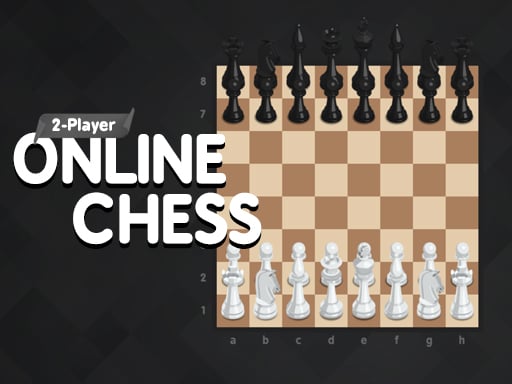
Looking for a multiplayer game that starts instantly? 2 Player Online Chess runs in your browser and is completely free to play. 2 Player Online Chess is better with company. Whether you share a keyboard or meet other players online, the game is built around what people do to — and with — each other. A few things the tags reveal: it teaches or practises a skill — often maths, reading or logic — while you play; planning and resource decisions matter more than reflexes.
About 2 Player Online Chess
Immerse yourself in the classic world of strategy with 2 Player Online Chess! This game invites players of all levels to enjoy a game of chess against either a challenging AI or a friend. Whether you're a novice looking to learn the ropes or a seasoned player aiming to refine your tactics, the simplicity and ease of use make it
Judged as a multiplayer game, 2 Player Online Chess hits the notes you would hope for: moments of comeback and reversal, bragging rights and head-to-head or cooperative play. Playing it works your communication and composure, which is a large part of why the "one more round" feeling is so strong.
How to play 2 Player Online Chess
- Start by clicking the big play button. 2 Player Online Chess loads inside the frame; give it a moment, especially on a slow connection.
- Follow the on-screen prompts. The developer describes the controls like this: Use your mouse or swipe with your finger to control the action
- Try a round against the computer or alone first so the controls are familiar before you bring in another player.
- Use the full-screen button under the frame for the best view, and keep an eye on the score, timer or health display so you know what the game is asking of you.
Controls
You will not need a manual for 2 Player Online Chess, but knowing the inputs before you start saves the first minute of fumbling:
| Input | What it does |
|---|---|
| Mouse | Use your mouse or swipe with your finger to control the action. |
| Swipe | Use your mouse or swipe with your finger to control the action. |
The controls are tap and drag based, which makes it comfortable on touch screens as well as with a mouse.
Tips and tricks
- Do not tilt. After a bad round, the next one is a fresh start; the player who resets emotionally usually wins the set.
- In shared-keyboard games, agree on who uses which keys before you start — hand collisions cause more losses than skill does.
- Cooperative modes reward splitting roles: one player handles offence while the other covers, rather than both rushing.
- Use the first round to test. Try something unusual and see how the opponent reacts; the information is worth more than the round.
Who will enjoy it
We would recommend 2 Player Online Chess to friends on one screen, online competitors and anyone who finds bots boring. A typical session is matches of two to ten minutes, best played in a series. The learning curve is entirely dependent on who you are playing against. The controls are tap and drag based, which makes it comfortable on touch screens as well as with a mouse.
Game details
| Category | Multiplayer Games |
|---|---|
| Tags | Html5 Games For Your Site, Hypercasual, Funny, Bmx Games, Brain, Educational, 2 Player Games, Strategy, Classic, Skateboard, Train |
| Platform | Browser (desktop, tablet and mobile) |
| Controls | Touch and mouse |
| Technology | HTML5 — no download or plugin required |
| Frame | Landscape (1280×768) |
| Added | 1 January 2025 |
| Plays | 1 |
| Price | Free to play |
Frequently asked questions
Is 2 Player Online Chess free to play?
It is free. Open the page, press play and the game loads in the browser. You do not need to install anything or register.
Can I play 2 Player Online Chess on my phone?
2 Player Online Chess works on mobile devices. Open this page on your phone or tablet and use the touch controls; rotating the device to landscape usually gives the best view.
What are the controls for 2 Player Online Chess?
In short: Mouse — Use your mouse or swipe with your finger to control the action; Swipe — Use your mouse or swipe with your finger to control the action. The full list is in the controls section above.
Does 2 Player Online Chess save my progress?
Progress in 2 Player Online Chess is kept by the game itself inside your browser storage. It will normally be there when you come back on the same device and browser.
How do I play 2 Player Online Chess in full screen?
Use the full-screen button just below the game frame. Press Esc on your keyboard to leave full-screen mode again.
Is 2 Player Online Chess suitable for children?
It is tagged Educational, which usually indicates content aimed at younger players. As with any online game, we suggest a parent takes a quick look first.
Games similar to 2 Player Online Chess
You will find more games like 2 Player Online Chess further down this page, chosen by matching tags and category.