Play Advanced Bus Driving 3d simulator for free — a racing game that runs directly in your browser on desktop, tablet or phone. Advanced Bus Driving 3d simulator is about speed, lines and nerve. You are behind the wheel, the track is in front of you, and the only question is how much throttle you dare to hold. A few things the tags reveal: it is filed in the collection that traditionally appeals to girls, though the gameplay is for everyone.
About Advanced Bus Driving 3d simulator
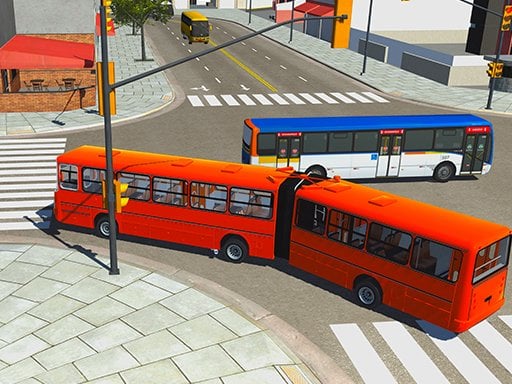
Get ready for the ultimate driving experience with the Advanced Bus Driving 3D Simulator! This immersive coach simulator invites you to navigate through realistic environments while taking passengers from one city to another. You'll explore breathtaking landscapes and iconic landmarks as you handle one of many meticulously designed coach buses, offering an unparalleled gaming experience. The game features an expansive open-world
The genre lives on upgrades or unlocks between races, tracks or roads that reward memorisation and a sense of speed. Advanced Bus Driving 3d simulator understands that, and it shows in the first minute of play. Playing it works your spatial awareness and timing, which is a large part of why the "one more round" feeling is so strong.
How to play Advanced Bus Driving 3d simulator
- Start by clicking the big play button. Advanced Bus Driving 3d simulator loads inside the frame; give it a moment, especially on a slow connection.
- Follow the on-screen prompts. The developer describes the controls like this: Keyboard Controls
- Do a warm-up lap without worrying about position. Feel how the vehicle brakes and turns, then race for real.
- Switch to full screen if precision matters, and remember that the game keeps its own progress — finish a level before you close the tab.
Controls
The controls in Advanced Bus Driving 3d simulator are straightforward once you have seen them written down:
| Input | What it does |
|---|---|
| Arrow keys / WASD | Move your character or vehicle. |
| Space | Jump, fire or confirm, depending on the level. |
It is designed for desktop play with a keyboard and mouse.
Tips and tricks
- Learn one track completely before moving on. Knowing where every bend is worth several seconds a lap and the skill carries over.
- Nitro or boost is best used on straights where you are already stable, not to rescue a bad corner.
- If the game has upgrades, put the first ones into handling or brakes rather than top speed — control wins more races than raw power at the beginning.
- Look where you want to go, not at the wall you want to avoid. Your steering follows your attention.
Who will enjoy it
Who is Advanced Bus Driving 3d simulator for? In a word, anyone who enjoys speed, vehicles and shaving seconds off a personal best. In terms of time, think of a single race of one to three minutes, or a longer career if unlocks are involved. How hard is it? Forgiving on early tracks, demanding on later ones. It is designed for desktop play with a keyboard and mouse.
Game details
| Category | Racing Games |
|---|---|
| Tags | 3d Games, Girls, 1 Player, Fall Boys, Trial Car, Unity3d, Best Games, Simulation, Supercars, Driving, .io Games, Monstertruck, Simulator, Drifting, Business |
| Platform | Browser (desktop) |
| Controls | Keyboard |
| Technology | HTML5 — no download or plugin required |
| Frame | Landscape (800×600) |
| Added | 26 September 2024 |
| Plays | 4 |
| Price | Free to play |
Frequently asked questions
Is Advanced Bus Driving 3d simulator free to play?
Yes. Advanced Bus Driving 3d simulator is completely free to play on Diemakora. There is no download, no account and no payment — the game runs in your browser.
Can I play Advanced Bus Driving 3d simulator on my phone?
This one is a desktop game. It expects a keyboard and mouse, so we recommend playing Advanced Bus Driving 3d simulator on a computer for the intended experience.
What are the controls for Advanced Bus Driving 3d simulator?
The developer did not publish detailed controls, but the game follows genre conventions: Arrow keys / WASD — Move your character or vehicle; Space — Jump, fire or confirm, depending on the level. The full list is in the controls section above.
Does Advanced Bus Driving 3d simulator save my progress?
Most browser games, including Advanced Bus Driving 3d simulator, store progress locally in your browser. If you clear your cookies or switch devices, that progress may be lost, so finish sessions before clearing browser data.
How do I play Advanced Bus Driving 3d simulator in full screen?
Click the expand icon under the game to switch Advanced Bus Driving 3d simulator to full screen. Esc returns you to the normal view.
Is Advanced Bus Driving 3d simulator suitable for children?
It is tagged Girls, which usually indicates content aimed at younger players. As with any online game, we suggest a parent takes a quick look first.
Games similar to Advanced Bus Driving 3d simulator
You will find more games like Advanced Bus Driving 3d simulator further down this page, chosen by matching tags and category.