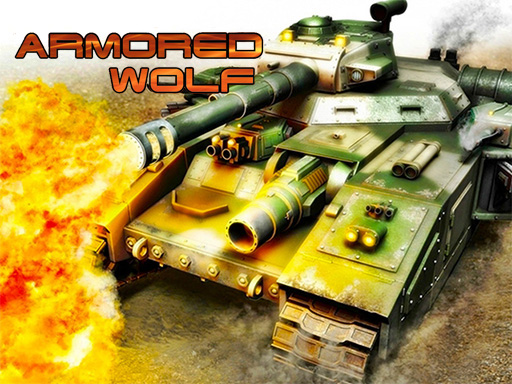
Armored Wolf is one of the shooting games in the Diemakora collection. It loads in seconds and needs nothing installed. Shooting games are really about attention: Armored Wolf rewards the player who tracks several moving things at once and picks the right one to deal with first. Its tags tell you what to expect: you control an armoured vehicle with slow turning and heavy fire.
About Armored Wolf
Armored Wolf is an exciting 2D tank shooter that captivates players with its addictive gameplay inspired by the golden age of classic 16-bit gaming. In this action-packed adventure, you ll take on the role of a lone tank commander, facing waves of enemy forces determined to thwart your progress. With its retro-style graphics and immersive sound effects, Armored Wolf delivers
What makes a good shooting game? Usually ammunition or cooldown management, satisfying hit feedback and enemies with distinct behaviours — and Armored Wolf has each of them in some measure. The skills it leans on are target prioritisation and aim; both improve noticeably after a few sessions.
How to play Armored Wolf
- Press the play button above and wait for Armored Wolf to finish loading. On first load this can take a few seconds while the game files are fetched.
- Follow the on-screen prompts. The developer describes the controls like this: W A S D or ARROW KEYS to move around Mouse to aim Left mouse click to fire Right mouse click to fire 2 click E to get out of the tank
- Take a few practice shots at the first targets to learn the aim speed, then move on to prioritising the dangerous enemies.
- When you are comfortable, set a target: a score to beat, a level to clear or a time to shave. Small goals are what make Armored Wolf stick.
Controls
The controls in Armored Wolf are straightforward once you have seen them written down:
| Input | What it does |
|---|---|
| Arrow keys | W A S D or ARROW KEYS to move around Mouse to aim Left mouse click to fire Right mouse click to fire 2 click E to get out of the tank. |
| Mouse | W A S D or ARROW KEYS to move around Mouse to aim Left mouse click to fire Right mouse click to fire 2 click E to get out of the tank. |
| W key | W A S D or ARROW KEYS to move around Mouse to aim Left mouse click to fire Right mouse click to fire 2 click E to get out of the tank. |
It is designed for desktop play with a keyboard and mouse.
Tips and tricks
- Keep your cursor or crosshair roughly where enemies appear, not on the spot where the last one died.
- Move between shots. Many shooters make you an easy target only when you stand in one place.
- Prioritise the threat that will hurt you soonest, not the one that is closest or biggest. Fast enemies before slow ones, shooters before melee.
- Learn the spawn points. Most levels reuse the same few entry points, and knowing them turns panic into routine.
Who will enjoy it
Armored Wolf is a good fit for players who like precision, quick targeting and progressively tougher waves. A typical session is levels of a few minutes each, with longer runs in survival modes. How hard is it? Approachable at first, with a steep climb in the later waves. It is designed for desktop play with a keyboard and mouse.
Game details
| Category | Shooting Games |
|---|---|
| Tags | First Person Shooter, Shooting, Warrior, Shoot Em Up, Tanks |
| Platform | Browser (desktop) |
| Controls | Keyboard and mouse |
| Technology | HTML5 — no download or plugin required |
| Frame | Landscape (854×480) |
| Added | 26 September 2024 |
| Plays | 1 |
| Price | Free to play |
Frequently asked questions
Is Armored Wolf free to play?
It is free. Open the page, press play and the game loads in the browser. You do not need to install anything or register.
Can I play Armored Wolf on my phone?
This one is a desktop game. It expects a keyboard and mouse, so we recommend playing Armored Wolf on a computer for the intended experience.
What are the controls for Armored Wolf?
In short: Arrow keys — W A S D or ARROW KEYS to move around Mouse to aim Left mouse click to fire Right mouse click to fire 2 click E to get out of the tank; Mouse — W A S D or ARROW KEYS to move around Mouse to aim Left mouse click to fire Right mouse click to fire 2 click E to get out of the tank; W key — W A S D or ARROW KEYS to move around Mouse to aim Left mouse click to fire Right mouse click to fire 2 click E to get out of the tank. The full list is in the controls section above.
Does Armored Wolf save my progress?
Progress in Armored Wolf is kept by the game itself inside your browser storage. It will normally be there when you come back on the same device and browser.
What if Armored Wolf does not load?
A blank frame usually means the game is still loading or a browser extension blocked it. Wait a few seconds, then reload; if that fails, try another browser.
What kind of game is Armored Wolf?
It is a shooting game with the tags First Person Shooter, Shooting, Warrior, Shoot Em Up. Approachable at first, with a steep climb in the later waves, and levels of a few minutes each, with longer runs in survival modes.
Games similar to Armored Wolf
Finished a session? The games listed below were picked because they share tags or a category with Armored Wolf.