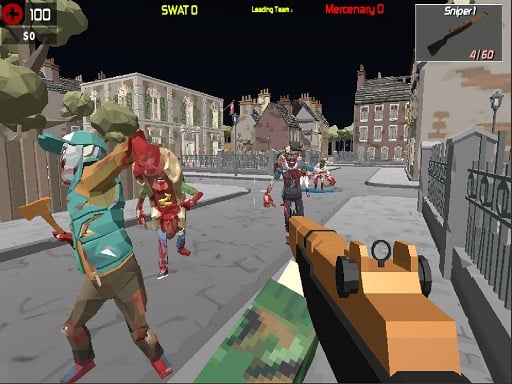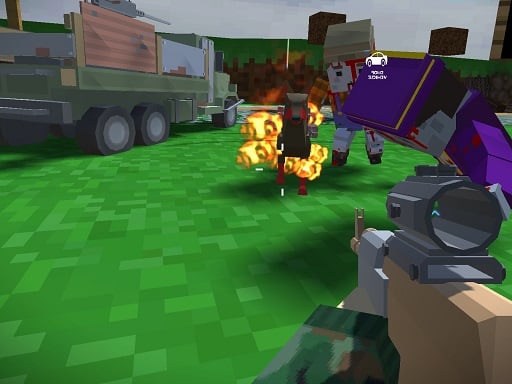
Blocky Zombie And Vehicle Shooting is a free online multiplayer game you can play right here in your browser, with no download and no sign-up. Blocky Zombie And Vehicle Shooting works because it is social. Winning feels better and losing is funnier when there is a real person on the other side. A few things the tags reveal: the enemies are zombies, which usually means slow but relentless crowds; it has retro pixel-art visuals.
About Blocky Zombie And Vehicle Shooting
Prepare yourself for an exhilarating adventure in Blocky Zombie And Vehicle Shooting, where you'll engage in intense combat against hordes of zombies while maximizing your skills behind the wheel. This action-packed game allows you to experience the thrill of driving various vehicles as you take on not just zombies but also other players worldwide. Are you ready to prove your
What makes a good multiplayer game? Usually simple rules everyone can grasp fast, bragging rights and moments of comeback and reversal — and Blocky Zombie And Vehicle Shooting has each of them in some measure. Under the surface it is a test of communication and reading opponents, dressed up in fun presentation.
How to play Blocky Zombie And Vehicle Shooting
- Press the play button above and wait for Blocky Zombie And Vehicle Shooting to finish loading. On first load this can take a few seconds while the game files are fetched.
- Follow the on-screen prompts. The developer describes the controls like this: wasd- drive vehicle or walk use mouse to look around shoot or change gun e - enter in car and exit q - cahnge camo to gun T - change attachaments
- Try a round against the computer or alone first so the controls are familiar before you bring in another player.
- Use the full-screen button under the frame for the best view, and keep an eye on the score, timer or health display so you know what the game is asking of you.
Controls
Here is how Blocky Zombie And Vehicle Shooting is controlled, based on the developer's instructions and our own testing:
| Input | What it does |
|---|---|
| WASD keys | Wasd- drive vehicle or walk use mouse to look around shoot or change gun e - enter in car and exit q - cahnge camo to gun T - change attachaments. |
| Mouse | Wasd- drive vehicle or walk use mouse to look around shoot or change gun e - enter in car and exit q - cahnge camo to gun T - change attachaments. |
| Enter | Wasd- drive vehicle or walk use mouse to look around shoot or change gun e - enter in car and exit q - cahnge camo to gun T - change attachaments. |
It is designed for desktop play with a keyboard and mouse.
Tips and tricks
- In shared-keyboard games, agree on who uses which keys before you start — hand collisions cause more losses than skill does.
- Short, frequent matches build skill faster than marathon sessions.
- Be a good winner. Rematches are how multiplayer games stay fun, and nobody replays a gloater.
- Cooperative modes reward splitting roles: one player handles offence while the other covers, rather than both rushing.
Who will enjoy it
Who is Blocky Zombie And Vehicle Shooting for? In a word, friends on one screen, online competitors and anyone who finds bots boring. A typical session is matches of two to ten minutes, best played in a series. How hard is it? Entirely dependent on who you are playing against. It is designed for desktop play with a keyboard and mouse.
Game details
| Category | Multiplayer Games |
|---|---|
| Tags | Trial Car, Webgl, Unity3d, First Person Shooter, Pixel, Zombie, Multiplayer |
| Platform | Browser (desktop) |
| Controls | Keyboard and mouse |
| Technology | HTML5 — no download or plugin required |
| Frame | Landscape (850×600) |
| Added | 25 October 2024 |
| Plays | 1 |
| Price | Free to play |
Frequently asked questions
Is Blocky Zombie And Vehicle Shooting free to play?
Yes. Blocky Zombie And Vehicle Shooting is completely free to play on Diemakora. There is no download, no account and no payment — the game runs in your browser.
Can I play Blocky Zombie And Vehicle Shooting on my phone?
This one is a desktop game. It expects a keyboard and mouse, so we recommend playing Blocky Zombie And Vehicle Shooting on a computer for the intended experience.
What are the controls for Blocky Zombie And Vehicle Shooting?
In short: WASD keys — Wasd- drive vehicle or walk use mouse to look around shoot or change gun e - enter in car and exit q - cahnge camo to gun T - change attachaments; Mouse — Wasd- drive vehicle or walk use mouse to look around shoot or change gun e - enter in car and exit q - cahnge camo to gun T - change attachaments; Enter — Wasd- drive vehicle or walk use mouse to look around shoot or change gun e - enter in car and exit q - cahnge camo to gun T - change attachaments. The full list is in the controls section above.
Does Blocky Zombie And Vehicle Shooting save my progress?
Progress in Blocky Zombie And Vehicle Shooting is kept by the game itself inside your browser storage. It will normally be there when you come back on the same device and browser.
How do I play Blocky Zombie And Vehicle Shooting in full screen?
Click the expand icon under the game to switch Blocky Zombie And Vehicle Shooting to full screen. Esc returns you to the normal view.
What kind of game is Blocky Zombie And Vehicle Shooting?
It is a multiplayer game with the tags Trial Car, Webgl, Unity3d, First Person Shooter. Entirely dependent on who you are playing against, and matches of two to ten minutes, best played in a series.
Games similar to Blocky Zombie And Vehicle Shooting
Finished a session? The games listed below were picked because they share tags or a category with Blocky Zombie And Vehicle Shooting.