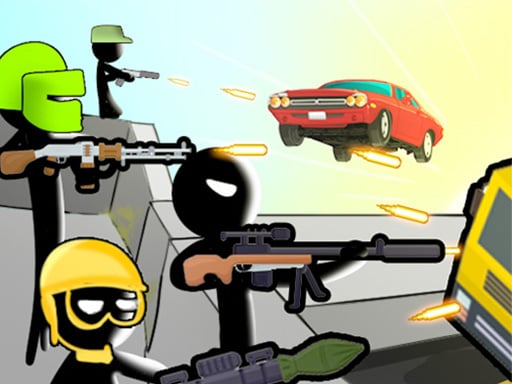
Looking for a browser game that starts instantly? Bridge Wars runs in your browser and is completely free to play. Sometimes the best game is the one that respects your time. Bridge Wars loads fast, starts fast and lets you stop whenever you like without losing anything. Its tags tell you what to expect: combat between many participants is the theme; it follows the hyper-casual formula: one mechanic, instant play and very short rounds.
About Bridge Wars
Prepare for an exhilarating experience with Bridge Wars, a mobile gaming sensation that masterfully combines creativity and strategy. Dive into a vibrant world where your tactical skills are challenged while you express your artistic side. In this engaging game, you'll draw intricate patterns to summon stickman defenders in mere seconds, standing strong against waves of relentless enemy vehicles. Your journey requires
The genre lives on quick loading, a clear goal and a friendly difficulty curve. Bridge Wars understands that, and it shows in the first minute of play. Playing it works your a little patience and focus, which is a large part of why the "one more round" feeling is so strong.
How to play Bridge Wars
- Press the play button above and wait for Bridge Wars to finish loading. On first load this can take a few seconds while the game files are fetched.
- Follow the on-screen prompts. The developer describes the controls like this: HOW TO PLAY Bridge Wars 1 Draw a pattern to spawn your soldiers within 3 seconds 2 The soldiers spawned will attack the enemy vehicles who will try to cross the bridge full of barricades 3 Visit the shop to upgrade…
- Explore. Click everything once, try each button, and let the game teach you its loop.
- Use the full-screen button under the frame for the best view, and keep an eye on the score, timer or health display so you know what the game is asking of you.
Controls
Controls for Bridge Wars at a glance:
| Input | What it does |
|---|---|
| Mouse / Tap | Click or tap to interact with the game. |
| Drag | Hold and move to aim, steer or drag objects where the game asks for it. |
The controls are tap and drag based, which makes it comfortable on touch screens as well as with a mouse.
Tips and tricks
- Do not compare your first hour to someone's hundredth. Casual games are built to be learned in public, one small improvement at a time.
- Set a small goal per session — one level, one upgrade, one new best — and stop when you hit it. It keeps the game fun.
- Full-screen mode makes a real difference to precision. Use the button beneath the game.
- Spend your first attempt learning, not winning. Poke at everything on screen; browser games hide small mechanics in plain sight.
- Because this is a Hypercasual game, find the rhythm of the single mechanic — that is the entire skill.
- Because this is a Battle game, position before you engage.
Who will enjoy it
Who is Bridge Wars for? In a word, casual players of all ages looking for a quick, free game in the browser. Expect anything from two minutes to an afternoon. The learning curve is friendly at first and steadily more demanding. The controls are tap and drag based, which makes it comfortable on touch screens as well as with a mouse.
Game details
| Category | Games |
|---|---|
| Tags | Hypercasual, Battle |
| Platform | Browser (desktop, tablet and mobile) |
| Controls | Touch and mouse |
| Technology | HTML5 — no download or plugin required |
| Frame | Landscape (800×600) |
| Added | 23 August 2024 |
| Plays | 1 |
| Price | Free to play |
Frequently asked questions
Is Bridge Wars free to play?
It is free. Open the page, press play and the game loads in the browser. You do not need to install anything or register.
Can I play Bridge Wars on my phone?
Bridge Wars works on mobile devices. Open this page on your phone or tablet and use the touch controls; rotating the device to landscape usually gives the best view.
What are the controls for Bridge Wars?
The developer did not publish detailed controls, but the game follows genre conventions: Mouse / Tap — Click or tap to interact with the game; Drag — Hold and move to aim, steer or drag objects where the game asks for it. The full list is in the controls section above.
Does Bridge Wars save my progress?
Most browser games, including Bridge Wars, store progress locally in your browser. If you clear your cookies or switch devices, that progress may be lost, so finish sessions before clearing browser data.
How do I play Bridge Wars in full screen?
Click the expand icon under the game to switch Bridge Wars to full screen. Esc returns you to the normal view.
What kind of game is Bridge Wars?
It is a browser game with the tags Hypercasual, Battle. Friendly at first and steadily more demanding, and anything from two minutes to an afternoon.
Games similar to Bridge Wars
If you enjoy Bridge Wars, the related games below share its category or tags and are a natural next step.