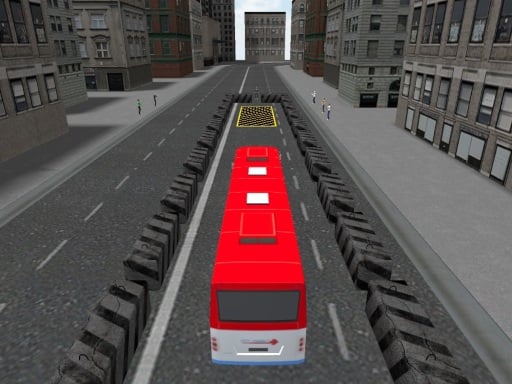
Looking for a arcade game that starts instantly? Bus Parking runs in your browser and is completely free to play. Bus Parking follows the oldest recipe in gaming: one clear rule, one clear score, and the urge to try just one more time. Its tags tell you what to expect: it uses hardware-accelerated graphics in the browser.
About Bus Parking
Step into the world of Bus Parking and challenge your skills as a master driver! This exciting game puts your parking abilities to the test as you maneuver a massive bus through a maze of obstacles. The goal is simple: navigate your way to the designated parking spot without crashing into any surrounding barriers or other vehicles. Do you have
The genre lives on a single, easy-to-read score, the "one more go" effect and bright, readable visuals. Bus Parking understands that, and it shows in the first minute of play. Under the surface it is a test of focus and rhythm, dressed up in playful presentation.
How to play Bus Parking
- Start by clicking the big play button. Bus Parking loads inside the frame; give it a moment, especially on a slow connection.
- Follow the on-screen prompts. The developer describes the controls like this: WASD to control bus C to change camera
- Play the first run purely to learn. Notice the rhythm of the obstacles, then start a fresh run and aim for a clean start.
- When you are comfortable, set a target: a score to beat, a level to clear or a time to shave. Small goals are what make Bus Parking stick.
Controls
Controls for Bus Parking at a glance:
| Input | What it does |
|---|---|
| WASD keys | WASD to control bus C to change camera. |
It is designed for desktop play with a keyboard and mouse.
Tips and tricks
- Combo systems reward patience: keep the chain alive with safe moves rather than reaching for risky bonuses.
- Learn the first thirty seconds perfectly. The opening is the same every time, so it should never be where you lose.
- Take a short break after three or four failed runs. Arcade games punish tired eyes more than any other genre.
- Find the rhythm. Most arcade games have an underlying beat — taps, jumps or moves that fall on a regular interval — and once you feel it, your accuracy jumps.
Who will enjoy it
We would recommend Bus Parking to anyone with a few minutes to spare and a competitive streak. A typical session is runs of thirty seconds to a few minutes, endlessly repeatable. Difficulty-wise it is simple rules, high skill ceiling. It is designed for desktop play with a keyboard and mouse.
Game details
| Category | Arcade Games |
|---|---|
| Tags | 3d Games, Webgl, Unity3d, Carparking, Business |
| Platform | Browser (desktop) |
| Controls | Keyboard |
| Technology | HTML5 — no download or plugin required |
| Frame | Landscape (960×600) |
| Added | 25 October 2024 |
| Plays | 2 |
| Price | Free to play |
Frequently asked questions
Is Bus Parking free to play?
It is free. Open the page, press play and the game loads in the browser. You do not need to install anything or register.
Can I play Bus Parking on my phone?
Bus Parking is best played on a desktop or laptop. It relies on keyboard and mouse input, and while it may load on a phone, the controls will not be comfortable.
What are the controls for Bus Parking?
In short: WASD keys — WASD to control bus C to change camera. The full list is in the controls section above.
Does Bus Parking save my progress?
Most browser games, including Bus Parking, store progress locally in your browser. If you clear your cookies or switch devices, that progress may be lost, so finish sessions before clearing browser data.
What if Bus Parking does not load?
A blank frame usually means the game is still loading or a browser extension blocked it. Wait a few seconds, then reload; if that fails, try another browser.
What kind of game is Bus Parking?
It is a arcade game with the tags 3d Games, Webgl, Unity3d, Carparking. Simple rules, high skill ceiling, and runs of thirty seconds to a few minutes, endlessly repeatable.
Games similar to Bus Parking
If you enjoy Bus Parking, the related games below share its category or tags and are a natural next step.