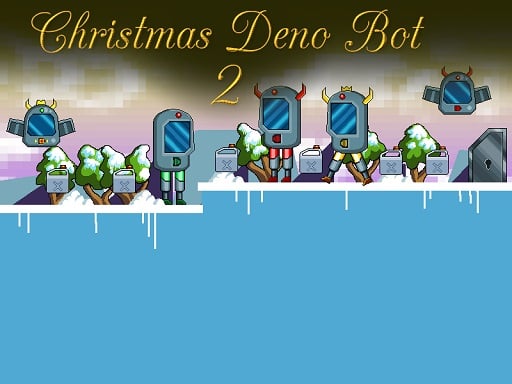
Looking for a arcade game that starts instantly? Christmas Deno Bot 2 runs in your browser and is completely free to play. Arcade games are designed around the loop, and Christmas Deno Bot 2 has a good one — short attempts, instant restarts and a score that begs to be beaten. From the tags you can already tell that gathering items or collectibles is the goal; you run and jump across platforms, and precise movement is the core skill; it has retro pixel-art visuals.
About Christmas Deno Bot 2
Christmas Deno Bot 2 is an exciting 2D Sci-fi themed platformer that invites players to step back into the exhilarating world of Deno Bot. In this thrilling sequel, players take control of Deno Bot, embarking on a quest to collect valuable fuel containers while skillfully dodging adversaries. You will encounter a variety of foes, including malicious ground bots and threatening
The genre lives on the "one more go" effect, a single, easy-to-read score and instant restarts. Christmas Deno Bot 2 understands that, and it shows in the first minute of play. Playing it works your focus and consistency, which is a large part of why the "one more round" feeling is so strong.
How to play Christmas Deno Bot 2
- Start by clicking the big play button. Christmas Deno Bot 2 loads inside the frame; give it a moment, especially on a slow connection.
- Follow the on-screen prompts. The developer describes the controls like this: Use WASD or Arrow keys for the player s movement Use W or Arrow key twice for double jump
- Play the first run purely to learn. Notice the rhythm of the obstacles, then start a fresh run and aim for a clean start.
- When you are comfortable, set a target: a score to beat, a level to clear or a time to shave. Small goals are what make Christmas Deno Bot 2 stick.
Controls
Here is how Christmas Deno Bot 2 is controlled, based on the developer's instructions and our own testing:
| Input | What it does |
|---|---|
| WASD keys | Use WASD or Arrow keys for the player s movement Use W or Arrow key twice for double jump. |
| Arrow keys | Use WASD or Arrow keys for the player s movement Use W or Arrow key twice for double jump. |
It is designed for desktop play with a keyboard and mouse.
Tips and tricks
- Take a short break after three or four failed runs. Arcade games punish tired eyes more than any other genre.
- Restart early. If a run starts badly, do not grind it out; a fresh attempt costs nothing and saves your focus.
- Play in a quiet tab with nothing else running. Small frame drops cause missed timing that feels like bad luck but is not.
- Look one step ahead of your character. Reacting to what is under you is too late; reacting to what is coming is exactly on time.
- Because this is a Retro game, old-school games rarely explain themselves; experiment.
Who will enjoy it
Christmas Deno Bot 2 is a good fit for anyone with a few minutes to spare and a competitive streak. A typical session is runs of thirty seconds to a few minutes, endlessly repeatable. The learning curve is simple rules, high skill ceiling. It is designed for desktop play with a keyboard and mouse.
Game details
| Category | Arcade Games |
|---|---|
| Tags | Arcade, 1 Player, Adventure, 2d, Jumping, Cartoon Network, Cute, Platform, Collecting, Pixel, Retro, Robot, Science |
| Platform | Browser (desktop) |
| Controls | Keyboard |
| Technology | HTML5 — no download or plugin required |
| Frame | Landscape (800×640) |
| Added | 26 September 2024 |
| Plays | 1 |
| Price | Free to play |
Frequently asked questions
Is Christmas Deno Bot 2 free to play?
Yes. Christmas Deno Bot 2 is completely free to play on Diemakora. There is no download, no account and no payment — the game runs in your browser.
Can I play Christmas Deno Bot 2 on my phone?
Christmas Deno Bot 2 is best played on a desktop or laptop. It relies on keyboard and mouse input, and while it may load on a phone, the controls will not be comfortable.
What are the controls for Christmas Deno Bot 2?
In short: WASD keys — Use WASD or Arrow keys for the player s movement Use W or Arrow key twice for double jump; Arrow keys — Use WASD or Arrow keys for the player s movement Use W or Arrow key twice for double jump. The full list is in the controls section above.
Does Christmas Deno Bot 2 save my progress?
Progress in Christmas Deno Bot 2 is kept by the game itself inside your browser storage. It will normally be there when you come back on the same device and browser.
How do I play Christmas Deno Bot 2 in full screen?
Use the full-screen button just below the game frame. Press Esc on your keyboard to leave full-screen mode again.
What kind of game is Christmas Deno Bot 2?
It is a arcade game with the tags Arcade, 1 Player, Adventure, 2d. Simple rules, high skill ceiling, and runs of thirty seconds to a few minutes, endlessly repeatable.
Games similar to Christmas Deno Bot 2
You will find more games like Christmas Deno Bot 2 further down this page, chosen by matching tags and category.