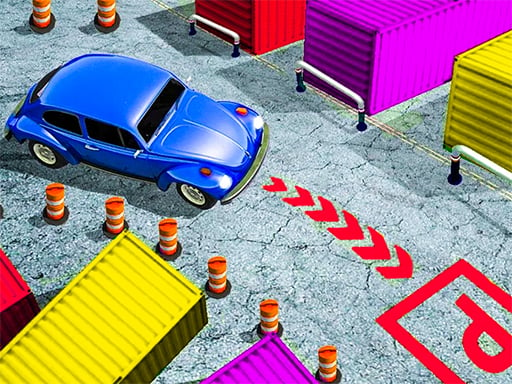
Classic Car Parking 3D is one of the arcade games in the Diemakora collection. It loads in seconds and needs nothing installed. Arcade games are designed around the loop, and Classic Car Parking 3D has a good one — short attempts, instant restarts and a score that begs to be beaten. A few things the tags reveal: it is a driving game where handling and road awareness matter more than raw speed.
About Classic Car Parking 3D
Experience the thrill of the ultimate parking challenge in Classic Car Parking 3D, a dynamic game that combines fun with skill development. Unlike traditional racing games, this unique offering focuses on honing your car parking abilities using an array of stunning vintage vehicles. Every level presents a fresh set of challenges designed to test your precision and patience, making it
Judged as a arcade game, Classic Car Parking 3D hits the notes you would hope for: bright, readable visuals, difficulty that ramps steadily and a single, easy-to-read score. The skills it leans on are rhythm and focus; both improve noticeably after a few sessions.
How to play Classic Car Parking 3D
- Start by clicking the big play button. Classic Car Parking 3D loads inside the frame; give it a moment, especially on a slow connection.
- Follow the on-screen prompts. The developer describes the controls like this: Use WASD or Arrows to drive Space - handbrake use pressed left mouse button to rotate camera
- Play the first run purely to learn. Notice the rhythm of the obstacles, then start a fresh run and aim for a clean start.
- When you are comfortable, set a target: a score to beat, a level to clear or a time to shave. Small goals are what make Classic Car Parking 3D stick.
Controls
Controls for Classic Car Parking 3D at a glance:
| Input | What it does |
|---|---|
| WASD keys | Use WASD or Arrows to drive Space - handbrake use pressed left mouse button to rotate camera. |
| Arrow keys | Use WASD or Arrows to drive Space - handbrake use pressed left mouse button to rotate camera. |
| Space bar | Use WASD or Arrows to drive Space - handbrake use pressed left mouse button to rotate camera. |
| Mouse | Use WASD or Arrows to drive Space - handbrake use pressed left mouse button to rotate camera. |
It is designed for desktop play with a keyboard and mouse.
Tips and tricks
- Play in a quiet tab with nothing else running. Small frame drops cause missed timing that feels like bad luck but is not.
- Aim for consistency before you aim for records. A steady run that avoids mistakes usually scores higher than a flashy one that ends early.
- Combo systems reward patience: keep the chain alive with safe moves rather than reaching for risky bonuses.
- Look one step ahead of your character. Reacting to what is under you is too late; reacting to what is coming is exactly on time.
- Because this is a Racing game, learn one track thoroughly — the skills transfer to every other track.
Who will enjoy it
We would recommend Classic Car Parking 3D to anyone with a few minutes to spare and a competitive streak. A typical session is runs of thirty seconds to a few minutes, endlessly repeatable. How hard is it? Simple rules, high skill ceiling. It is designed for desktop play with a keyboard and mouse.
Game details
| Category | Arcade Games |
|---|---|
| Tags | 3d Games, Trial Car, Supercars, Racing, Driving, Carparking |
| Platform | Browser (desktop) |
| Controls | Keyboard and mouse |
| Technology | HTML5 — no download or plugin required |
| Frame | Landscape (900×600) |
| Added | 25 October 2024 |
| Plays | 1 |
| Price | Free to play |
Frequently asked questions
Is Classic Car Parking 3D free to play?
Yes. Classic Car Parking 3D is completely free to play on Diemakora. There is no download, no account and no payment — the game runs in your browser.
Can I play Classic Car Parking 3D on my phone?
This one is a desktop game. It expects a keyboard and mouse, so we recommend playing Classic Car Parking 3D on a computer for the intended experience.
What are the controls for Classic Car Parking 3D?
In short: WASD keys — Use WASD or Arrows to drive Space - handbrake use pressed left mouse button to rotate camera; Arrow keys — Use WASD or Arrows to drive Space - handbrake use pressed left mouse button to rotate camera; Space bar — Use WASD or Arrows to drive Space - handbrake use pressed left mouse button to rotate camera. The full list is in the controls section above.
Does Classic Car Parking 3D save my progress?
Most browser games, including Classic Car Parking 3D, store progress locally in your browser. If you clear your cookies or switch devices, that progress may be lost, so finish sessions before clearing browser data.
What if Classic Car Parking 3D does not load?
A blank frame usually means the game is still loading or a browser extension blocked it. Wait a few seconds, then reload; if that fails, try another browser.
What kind of game is Classic Car Parking 3D?
It is a arcade game with the tags 3d Games, Trial Car, Supercars, Racing. Simple rules, high skill ceiling, and runs of thirty seconds to a few minutes, endlessly repeatable.
Games similar to Classic Car Parking 3D
If you enjoy Classic Car Parking 3D, the related games below share its category or tags and are a natural next step.