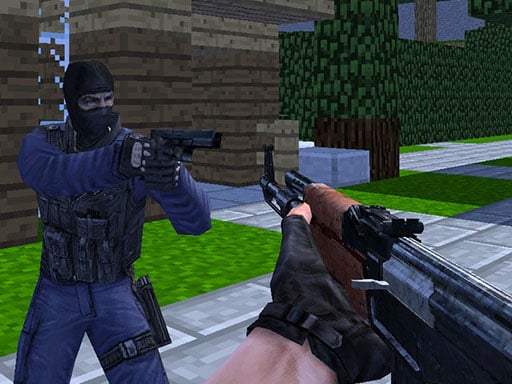
Looking for a multiplayer game that starts instantly? Counter Craft runs in your browser and is completely free to play. Solo games are predictable; other people are not. Counter Craft uses that unpredictability as its engine, and every match ends up telling a slightly different story. From the tags you can already tell that aiming and firing at targets is the primary action; other players are involved, either online or on the same device.
About Counter Craft
Counter Craft immerses players in an exhilarating multiplayer battlefield set within uniquely designed Minecraft-themed maps. Engage in thrilling combat, where strategy and sharpshooting skills are put to the test. With a wide array of weapons available for purchase, each match presents a new opportunity to upgrade your arsenal and optimize your style of play. Players must navigate diverse environments, utilizing
The genre lives on moments of comeback and reversal, bragging rights and simple rules everyone can grasp fast. Counter Craft understands that, and it shows in the first minute of play. The skills it leans on are communication and adaptability; both improve noticeably after a few sessions.
How to play Counter Craft
- Press the play button above and wait for Counter Craft to finish loading. On first load this can take a few seconds while the game files are fetched.
- Follow the on-screen prompts. The developer describes the controls like this: WASD - Move Space - Jump C - Crouch LMB - Shoot RMB - Aim R - Reload TAB - Pause menu 1 2 3 - Select weapon
- Try a round against the computer or alone first so the controls are familiar before you bring in another player.
- Switch to full screen if precision matters, and remember that the game keeps its own progress — finish a level before you close the tab.
Controls
The controls in Counter Craft are straightforward once you have seen them written down:
| Input | What it does |
|---|---|
| WASD keys | WASD - Move Space - Jump C - Crouch LMB - Shoot RMB - Aim R - Reload TAB - Pause menu 1 2 3 - Select weapon. |
| Space bar | WASD - Move Space - Jump C - Crouch LMB - Shoot RMB - Aim R - Reload TAB - Pause menu 1 2 3 - Select weapon. |
| Tab | WASD - Move Space - Jump C - Crouch LMB - Shoot RMB - Aim R - Reload TAB - Pause menu 1 2 3 - Select weapon. |
It is designed for desktop play with a keyboard and mouse.
Tips and tricks
- Short, frequent matches build skill faster than marathon sessions.
- Cooperative modes reward splitting roles: one player handles offence while the other covers, rather than both rushing.
- Use the first round to test. Try something unusual and see how the opponent reacts; the information is worth more than the round.
- Do not tilt. After a bad round, the next one is a fresh start; the player who resets emotionally usually wins the set.
Who will enjoy it
Who is Counter Craft for? In a word, friends on one screen, online competitors and anyone who finds bots boring. A typical session is matches of two to ten minutes, best played in a series. The learning curve is entirely dependent on who you are playing against. It is designed for desktop play with a keyboard and mouse.
Game details
| Category | Multiplayer Games |
|---|---|
| Tags | 3d Games, Action, Webgl, Unity3d, First Person Shooter, Shooting, Multiplayer, Gun, Warrior, Shoot Em Up, Killing, Crafting, Csgo |
| Platform | Browser (desktop) |
| Controls | Keyboard |
| Technology | HTML5 — no download or plugin required |
| Frame | Landscape (960×600) |
| Added | 25 October 2024 |
| Plays | 2 |
| Price | Free to play |
Frequently asked questions
Is Counter Craft free to play?
It is free. Open the page, press play and the game loads in the browser. You do not need to install anything or register.
Can I play Counter Craft on my phone?
Counter Craft is best played on a desktop or laptop. It relies on keyboard and mouse input, and while it may load on a phone, the controls will not be comfortable.
What are the controls for Counter Craft?
In short: WASD keys — WASD - Move Space - Jump C - Crouch LMB - Shoot RMB - Aim R - Reload TAB - Pause menu 1 2 3 - Select weapon; Space bar — WASD - Move Space - Jump C - Crouch LMB - Shoot RMB - Aim R - Reload TAB - Pause menu 1 2 3 - Select weapon; Tab — WASD - Move Space - Jump C - Crouch LMB - Shoot RMB - Aim R - Reload TAB - Pause menu 1 2 3 - Select weapon. The full list is in the controls section above.
Does Counter Craft save my progress?
Progress in Counter Craft is kept by the game itself inside your browser storage. It will normally be there when you come back on the same device and browser.
What if Counter Craft does not load?
If Counter Craft does not load, refresh the page, make sure your browser is up to date and check that hardware acceleration is enabled. Ad blockers occasionally interfere with the game frame as well.
What kind of game is Counter Craft?
It is a multiplayer game with the tags 3d Games, Action, Webgl, Unity3d. Entirely dependent on who you are playing against, and matches of two to ten minutes, best played in a series.
Games similar to Counter Craft
You will find more games like Counter Craft further down this page, chosen by matching tags and category.