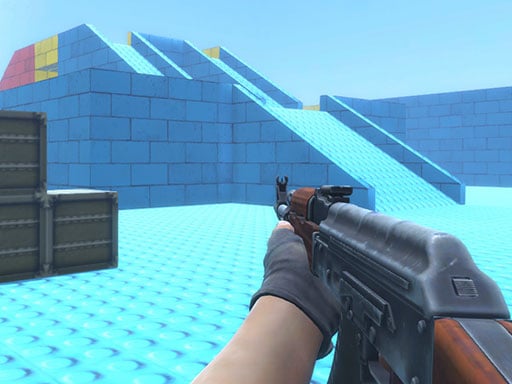
Looking for a multiplayer game that starts instantly? Counter Craft Lego Clash runs in your browser and is completely free to play. Solo games are predictable; other people are not. Counter Craft Lego Clash uses that unpredictability as its engine, and every match ends up telling a slightly different story. A few things the tags reveal: other players are involved, either online or on the same device; it features firearms and shooting mechanics.
About Counter Craft Lego Clash
Counter Craft Lego Clash immerses players in a thrilling multiplayer combat experience set in vibrant, Lego-themed environments. Navigate through intricately designed maps, where every corner presents an opportunity for strategic maneuvers and engaging encounters. Armed with a variety of unique weapons, players must utilize their skills to outsmart and eliminate rival players, aiming to dominate each round. The game s mechanics
Judged as a multiplayer game, Counter Craft Lego Clash hits the notes you would hope for: quick matchmaking or shared-screen setup, bragging rights and moments of comeback and reversal. The skills it leans on are composure and adaptability; both improve noticeably after a few sessions.
How to play Counter Craft Lego Clash
- Press the play button above and wait for Counter Craft Lego Clash to finish loading. On first load this can take a few seconds while the game files are fetched.
- Follow the on-screen prompts. The developer describes the controls like this: WASD - Move Space - Jump C - Crouch LMB - Shoot RMB - Aim R - Reload P - Pause menu 1 2 3 - Select weapon
- Try a round against the computer or alone first so the controls are familiar before you bring in another player.
- Use the full-screen button under the frame for the best view, and keep an eye on the score, timer or health display so you know what the game is asking of you.
Controls
Here is how Counter Craft Lego Clash is controlled, based on the developer's instructions and our own testing:
| Input | What it does |
|---|---|
| WASD keys | WASD - Move Space - Jump C - Crouch LMB - Shoot RMB - Aim R - Reload P - Pause menu 1 2 3 - Select weapon. |
| Space bar | WASD - Move Space - Jump C - Crouch LMB - Shoot RMB - Aim R - Reload P - Pause menu 1 2 3 - Select weapon. |
It is designed for desktop play with a keyboard and mouse.
Tips and tricks
- Be a good winner. Rematches are how multiplayer games stay fun, and nobody replays a gloater.
- Do not tilt. After a bad round, the next one is a fresh start; the player who resets emotionally usually wins the set.
- Use the first round to test. Try something unusual and see how the opponent reacts; the information is worth more than the round.
- Play the opponent, not the game. Notice what your rival keeps doing and punish that habit.
Who will enjoy it
We would recommend Counter Craft Lego Clash to friends on one screen, online competitors and anyone who finds bots boring. Expect matches of two to ten minutes, best played in a series. Difficulty-wise it is entirely dependent on who you are playing against. It is designed for desktop play with a keyboard and mouse.
Game details
| Category | Multiplayer Games |
|---|---|
| Tags | 3d Games, Action, Webgl, Unity3d, First Person Shooter, Shooting, Multiplayer, Gun, Warrior, Shoot Em Up, Killing, Crafting, Clash, Csgo, Lego |
| Platform | Browser (desktop) |
| Controls | Keyboard |
| Technology | HTML5 — no download or plugin required |
| Frame | Landscape (960×600) |
| Added | 25 October 2024 |
| Plays | 1 |
| Price | Free to play |
Frequently asked questions
Is Counter Craft Lego Clash free to play?
It is free. Open the page, press play and the game loads in the browser. You do not need to install anything or register.
Can I play Counter Craft Lego Clash on my phone?
This one is a desktop game. It expects a keyboard and mouse, so we recommend playing Counter Craft Lego Clash on a computer for the intended experience.
What are the controls for Counter Craft Lego Clash?
In short: WASD keys — WASD - Move Space - Jump C - Crouch LMB - Shoot RMB - Aim R - Reload P - Pause menu 1 2 3 - Select weapon; Space bar — WASD - Move Space - Jump C - Crouch LMB - Shoot RMB - Aim R - Reload P - Pause menu 1 2 3 - Select weapon. The full list is in the controls section above.
Does Counter Craft Lego Clash save my progress?
Most browser games, including Counter Craft Lego Clash, store progress locally in your browser. If you clear your cookies or switch devices, that progress may be lost, so finish sessions before clearing browser data.
How do I play Counter Craft Lego Clash in full screen?
Click the expand icon under the game to switch Counter Craft Lego Clash to full screen. Esc returns you to the normal view.
What kind of game is Counter Craft Lego Clash?
It is a multiplayer game with the tags 3d Games, Action, Webgl, Unity3d. Entirely dependent on who you are playing against, and matches of two to ten minutes, best played in a series.
Games similar to Counter Craft Lego Clash
Finished a session? The games listed below were picked because they share tags or a category with Counter Craft Lego Clash.