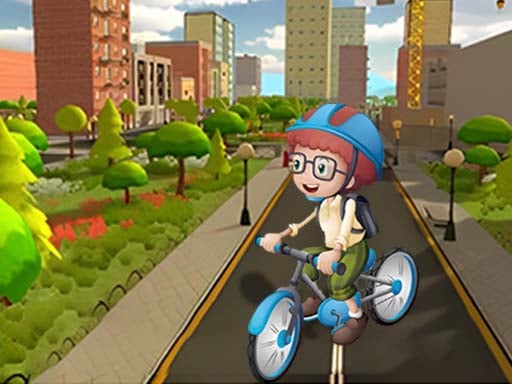
Welcome to Crazy bike fun, a browser-based action game. Click play, wait a moment for it to load, and you are in. If you like games that reward quick decisions over slow deliberation, Crazy bike fun was built for you. Every few seconds something changes and you have to answer it. A few things the tags reveal: it has touch controls and layouts made for phones and tablets; the content and difficulty are tuned for younger players.
About Crazy bike fun
Experience exhilarating racing action with "Crazy Bike Fun," an electrifying mobile game that puts your driving skills to the ultimate test. Choose from a variety of customizable bicycles, allowing players to assemble, transform, and upgrade their rides according to personal preferences. With each bike modification, you will enhance your performance and prepare for thrilling races against rivals! In this intense real-time
What makes a good action game? Usually clear feedback on every hit or miss, tight controls and escalating difficulty — and Crazy bike fun has each of them in some measure. Under the surface it is a test of staying calm under pressure and staying calm under pressure, dressed up in tense presentation.
How to play Crazy bike fun
- Start by clicking the big play button. Crazy bike fun loads inside the frame; give it a moment, especially on a slow connection.
- Follow the on-screen prompts. The developer describes the controls like this: 1 The bicycle you own can be upgraded to improve its maximum speed and acceleration 2 In the competition the opponents close to you can use weapons to knock them down and of course you will also be attacked by others 3…
- Start slowly. Learn the movement and the first enemy pattern before you push for score; speed comes naturally once the inputs are automatic.
- Switch to full screen if precision matters, and remember that the game keeps its own progress — finish a level before you close the tab.
Controls
You will not need a manual for Crazy bike fun, but knowing the inputs before you start saves the first minute of fumbling:
| Input | What it does |
|---|---|
| Mouse / Tap | Click or tap to interact with the game. |
| Drag | Hold and move to aim, steer or drag objects where the game asks for it. |
The controls are tap and drag based, which makes it comfortable on touch screens as well as with a mouse.
Tips and tricks
- Sound is a cue. Many action games telegraph attacks with an audio effect a moment before the visual one — play with sound on when you are learning.
- Do not chase every bonus. Collectibles placed near danger are a trade-off the designer set for you; take them only when your position is safe.
- Learn the enemy or obstacle patterns before you try to go fast — most action games repeat a handful of behaviours, and once you recognise them the game slows down in your head.
- If there is a dash, jump or dodge move, treat it as a resource: use it to escape, not to attack, until you know the level.
- Because this is a Girls game, take your time with creative choices; there is rarely a wrong answer in this kind of game.
Who will enjoy it
We would recommend Crazy bike fun to players who enjoy adrenaline, arcade-style progression and beating their own high score. In terms of time, think of rounds of two to five minutes, which makes it ideal for a quick break. How hard is it? Easy to pick up but genuinely demanding to master. The controls are tap and drag based, which makes it comfortable on touch screens as well as with a mouse.
Game details
| Category | Action Games |
|---|---|
| Tags | Html5 Games For Your Site, Kids, Hypercasual, Funny, 3d Games, Mobile, Girls, Action, Fall Boys, Bmx Games, Driving, H5, Violence, Golf |
| Platform | Browser (desktop, tablet and mobile) |
| Controls | Touch and mouse |
| Technology | HTML5 — no download or plugin required |
| Frame | Portrait (750×1334) |
| Added | 26 September 2024 |
| Plays | 1 |
| Price | Free to play |
Frequently asked questions
Is Crazy bike fun free to play?
It is free. Open the page, press play and the game loads in the browser. You do not need to install anything or register.
Can I play Crazy bike fun on my phone?
Yes — the game supports touch input and adapts to smaller screens, so you can play Crazy bike fun on a phone or tablet as well as on a computer.
What are the controls for Crazy bike fun?
The developer did not publish detailed controls, but the game follows genre conventions: Mouse / Tap — Click or tap to interact with the game; Drag — Hold and move to aim, steer or drag objects where the game asks for it. The full list is in the controls section above.
Does Crazy bike fun save my progress?
Most browser games, including Crazy bike fun, store progress locally in your browser. If you clear your cookies or switch devices, that progress may be lost, so finish sessions before clearing browser data.
How do I play Crazy bike fun in full screen?
Use the full-screen button just below the game frame. Press Esc on your keyboard to leave full-screen mode again.
Is Crazy bike fun suitable for children?
It is tagged Kids, Girls, which usually indicates content aimed at younger players. As with any online game, we suggest a parent takes a quick look first.
Games similar to Crazy bike fun
When you are done, scroll down for more action games and titles that share tags with Crazy bike fun.