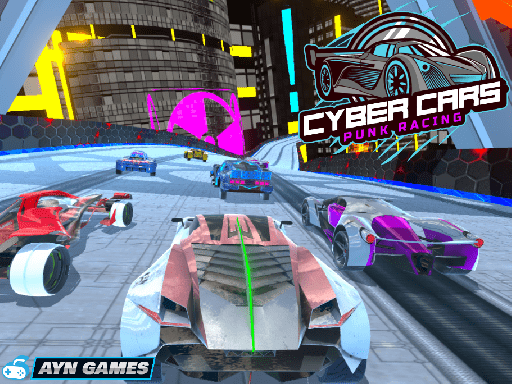
Looking for a racing game that starts instantly? Cyber Cars Punk Racing runs in your browser and is completely free to play. In Cyber Cars Punk Racing every corner is a small decision — brake early and lose time, brake late and risk the wall. That tension is what keeps people replaying the same track. From the tags you can already tell that jumps, flips and stunts are what score.
About Cyber Cars Punk Racing
Cyber Cars Punk Racing immerses you in a vibrant 3D car driving experience set in a futuristic world. With an array of supercars, neon-lit cities, and a variety of thrilling game modes, this game promises endless excitement. You'll have the chance to choose from 16 spectacular supercars and navigate 60 diverse racetracks. You can challenge yourself in various exciting environments,
Judged as a racing game, Cyber Cars Punk Racing hits the notes you would hope for: a scoring system based on time, position or distance, responsive steering and a sense of speed. The skills it leans on are anticipation and risk management; both improve noticeably after a few sessions.
How to play Cyber Cars Punk Racing
- Start by clicking the big play button. Cyber Cars Punk Racing loads inside the frame; give it a moment, especially on a slow connection.
- Follow the on-screen prompts. The developer describes the controls like this: Player 1 Controls Drive ARROW KEYS or WASD Nitro N Camera View C Player 2 Controls Move WASD Nitro T
- Do a warm-up lap without worrying about position. Feel how the vehicle brakes and turns, then race for real.
- When you are comfortable, set a target: a score to beat, a level to clear or a time to shave. Small goals are what make Cyber Cars Punk Racing stick.
Controls
The controls in Cyber Cars Punk Racing are straightforward once you have seen them written down:
| Input | What it does |
|---|---|
| WASD keys | Player 1 Controls Drive ARROW KEYS or WASD Nitro N Camera View C Player 2 Controls Move WASD Nitro T. |
| Arrow keys | Player 1 Controls Drive ARROW KEYS or WASD Nitro N Camera View C Player 2 Controls Move WASD Nitro T. |
It is designed for desktop play with a keyboard and mouse.
Tips and tricks
- Learn one track completely before moving on. Knowing where every bend is worth several seconds a lap and the skill carries over.
- On mobile, tilt controls feel exciting but touch buttons are usually more precise. Try both before you settle.
- Nitro or boost is best used on straights where you are already stable, not to rescue a bad corner.
- Use the whole width of the road. Cutting across from the outside to the inside of a bend and back out again shortens the distance and keeps your speed up.
- Because this is a Racing game, learn one track thoroughly — the skills transfer to every other track.
- Because this is a Crazy game, embrace the chaos — precision matters less than persistence.
Who will enjoy it
Who is Cyber Cars Punk Racing for? In a word, anyone who enjoys speed, vehicles and shaving seconds off a personal best. Expect a single race of one to three minutes, or a longer career if unlocks are involved. The learning curve is forgiving on early tracks, demanding on later ones. It is designed for desktop play with a keyboard and mouse.
Game details
| Category | Racing Games |
|---|---|
| Tags | Arcade, 3d Games, Action, Trial Car, Supercars, Racing, Driving, 2 Player Games, Avoid, Battleship, Drifting, Crazy, Stunts, Fly, Collection, Fairy, Police |
| Platform | Browser (desktop) |
| Controls | Keyboard |
| Technology | HTML5 — no download or plugin required |
| Frame | Landscape (800×450) |
| Added | 25 October 2024 |
| Plays | 2 |
| Price | Free to play |
Frequently asked questions
Is Cyber Cars Punk Racing free to play?
Yes. Cyber Cars Punk Racing is completely free to play on Diemakora. There is no download, no account and no payment — the game runs in your browser.
Can I play Cyber Cars Punk Racing on my phone?
Cyber Cars Punk Racing is best played on a desktop or laptop. It relies on keyboard and mouse input, and while it may load on a phone, the controls will not be comfortable.
What are the controls for Cyber Cars Punk Racing?
In short: WASD keys — Player 1 Controls Drive ARROW KEYS or WASD Nitro N Camera View C Player 2 Controls Move WASD Nitro T; Arrow keys — Player 1 Controls Drive ARROW KEYS or WASD Nitro N Camera View C Player 2 Controls Move WASD Nitro T. The full list is in the controls section above.
Does Cyber Cars Punk Racing save my progress?
Most browser games, including Cyber Cars Punk Racing, store progress locally in your browser. If you clear your cookies or switch devices, that progress may be lost, so finish sessions before clearing browser data.
How do I play Cyber Cars Punk Racing in full screen?
Use the full-screen button just below the game frame. Press Esc on your keyboard to leave full-screen mode again.
What kind of game is Cyber Cars Punk Racing?
It is a racing game with the tags Arcade, 3d Games, Action, Trial Car. Forgiving on early tracks, demanding on later ones, and a single race of one to three minutes, or a longer career if unlocks are involved.
Games similar to Cyber Cars Punk Racing
Finished a session? The games listed below were picked because they share tags or a category with Cyber Cars Punk Racing.