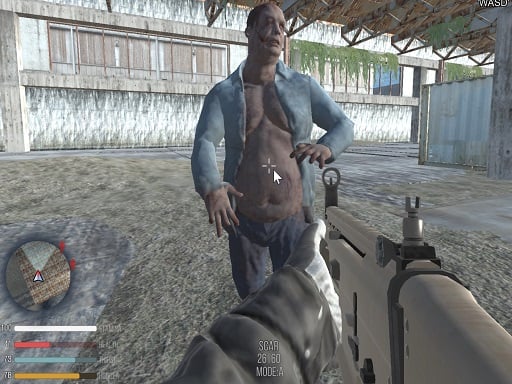
Welcome to Dark Forest Zombie Survival FPS, a browser-based action game. Click play, wait a moment for it to load, and you are in. Dark Forest Zombie Survival FPS belongs to the action family, which means the fun comes from momentum — moving, dodging, striking and recovering before the next wave arrives.
About Dark Forest Zombie Survival FPS
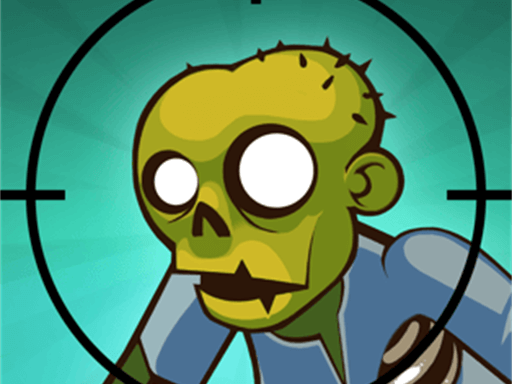
Enter the chilling realm of Dark Forest Zombie Survival FPS, where the night conceals a plethora of menacing zombies lurking in the shadows. As you navigate this eerie environment, you'll face a variety of terrifying foes, from ferocious biting zombies to the grotesque tentacled variants that defy expectations by continuing to advance even after decapitation. Beware of Lickers, Roadblockers, Chargers,
Judged as a action game, Dark Forest Zombie Survival FPS hits the notes you would hope for: short, intense rounds, a satisfying rhythm once you learn the patterns and escalating difficulty. Under the surface it is a test of hand-eye coordination and staying calm under pressure, dressed up in fast-paced presentation.
How to play Dark Forest Zombie Survival FPS
- Start by clicking the big play button. Dark Forest Zombie Survival FPS loads inside the frame; give it a moment, especially on a slow connection.
- Follow the on-screen prompts. The developer describes the controls like this: WASD - walk MOUSE- look around aim shoot F - get weapon from ground 1- WEAPON echip TAB- menu
- Start slowly. Learn the movement and the first enemy pattern before you push for score; speed comes naturally once the inputs are automatic.
- Switch to full screen if precision matters, and remember that the game keeps its own progress — finish a level before you close the tab.
Controls
You will not need a manual for Dark Forest Zombie Survival FPS, but knowing the inputs before you start saves the first minute of fumbling:
| Input | What it does |
|---|---|
| WASD keys | WASD - walk MOUSE- look around aim shoot F - get weapon from ground 1- WEAPON echip TAB- menu. |
| Mouse | WASD - walk MOUSE- look around aim shoot F - get weapon from ground 1- WEAPON echip TAB- menu. |
| Tab | WASD - walk MOUSE- look around aim shoot F - get weapon from ground 1- WEAPON echip TAB- menu. |
It is designed for desktop play with a keyboard and mouse.
Tips and tricks
- When you die, note exactly what killed you. The answer is usually one specific pattern, and fixing that one thing is worth more than "trying harder".
- Keep moving. Standing still is the most common way to lose an action round, because the game is designed to punish hesitation.
- Do not chase every bonus. Collectibles placed near danger are a trade-off the designer set for you; take them only when your position is safe.
- Sound is a cue. Many action games telegraph attacks with an audio effect a moment before the visual one — play with sound on when you are learning.
- Because this is a Crazy game, embrace the chaos — precision matters less than persistence.
Who will enjoy it
Who is Dark Forest Zombie Survival FPS for? In a word, players who enjoy adrenaline, arcade-style progression and beating their own high score. Expect rounds of two to five minutes, which makes it ideal for a quick break. Difficulty-wise it is easy to pick up but genuinely demanding to master. It is designed for desktop play with a keyboard and mouse.
Game details
| Category | Action Games |
|---|---|
| Tags | 3d Games, 1 Player, Action, Bmx Games, Webgl, Unity3d, Best Games, First Person Shooter, Shooting, Zombie, Crazy |
| Platform | Browser (desktop) |
| Controls | Keyboard and mouse |
| Technology | HTML5 — no download or plugin required |
| Frame | Landscape (800×600) |
| Added | 25 October 2024 |
| Plays | 1 |
| Price | Free to play |
Frequently asked questions
Is Dark Forest Zombie Survival FPS free to play?
Yes. Dark Forest Zombie Survival FPS is completely free to play on Diemakora. There is no download, no account and no payment — the game runs in your browser.
Can I play Dark Forest Zombie Survival FPS on my phone?
This one is a desktop game. It expects a keyboard and mouse, so we recommend playing Dark Forest Zombie Survival FPS on a computer for the intended experience.
What are the controls for Dark Forest Zombie Survival FPS?
In short: WASD keys — WASD - walk MOUSE- look around aim shoot F - get weapon from ground 1- WEAPON echip TAB- menu; Mouse — WASD - walk MOUSE- look around aim shoot F - get weapon from ground 1- WEAPON echip TAB- menu; Tab — WASD - walk MOUSE- look around aim shoot F - get weapon from ground 1- WEAPON echip TAB- menu. The full list is in the controls section above.
Does Dark Forest Zombie Survival FPS save my progress?
Most browser games, including Dark Forest Zombie Survival FPS, store progress locally in your browser. If you clear your cookies or switch devices, that progress may be lost, so finish sessions before clearing browser data.
What if Dark Forest Zombie Survival FPS does not load?
A blank frame usually means the game is still loading or a browser extension blocked it. Wait a few seconds, then reload; if that fails, try another browser.
What kind of game is Dark Forest Zombie Survival FPS?
It is a action game with the tags 3d Games, 1 Player, Action, Bmx Games. Easy to pick up but genuinely demanding to master, and rounds of two to five minutes, which makes it ideal for a quick break.
Games similar to Dark Forest Zombie Survival FPS
When you are done, scroll down for more action games and titles that share tags with Dark Forest Zombie Survival FPS.