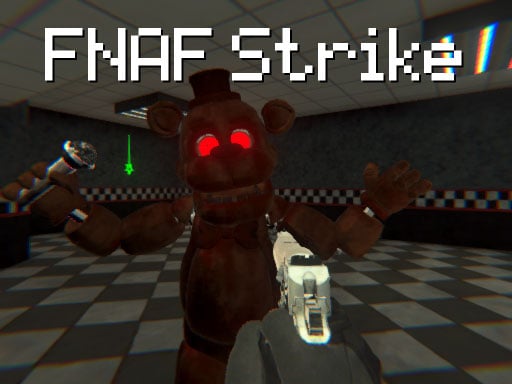
FNAF Strike is a free online shooting game you can play right here in your browser, with no download and no sign-up. The appeal of FNAF Strike is simple and old: line up the shot, take it, and watch the result. What makes it stick is the escalation that follows. From the tags you can already tell that aiming and firing at targets is the primary action; it uses hardware-accelerated graphics in the browser.
About FNAF Strike
FNAF Strike is an electrifying shooting game that immerses players in a tense world dominated by menacing animatronics. Tasked with the ultimate mission of survival, players must engage in fast-paced combat, taking down waves of these fearsome creatures as they navigate through an elaborate network of endless corridors. The game combines elements of horror and action, creating a uniquely thrilling
The genre lives on precise aiming, enemies with distinct behaviours and ammunition or cooldown management. FNAF Strike understands that, and it shows in the first minute of play. Playing it works your resource management and resource management, which is a large part of why the "one more round" feeling is so strong.
How to play FNAF Strike
- Press the play button above and wait for FNAF Strike to finish loading. On first load this can take a few seconds while the game files are fetched.
- Follow the on-screen prompts. The developer describes the controls like this: WASD - Move LMB - Shoot RMB - Aim Flashlight Space - Jump R - Reload G - Grenade F - Use C - Crouch
- Take a few practice shots at the first targets to learn the aim speed, then move on to prioritising the dangerous enemies.
- Use the full-screen button under the frame for the best view, and keep an eye on the score, timer or health display so you know what the game is asking of you.
Controls
You will not need a manual for FNAF Strike, but knowing the inputs before you start saves the first minute of fumbling:
| Input | What it does |
|---|---|
| WASD keys | WASD - Move LMB - Shoot RMB - Aim Flashlight Space - Jump R - Reload G - Grenade F - Use C - Crouch. |
| Space bar | WASD - Move LMB - Shoot RMB - Aim Flashlight Space - Jump R - Reload G - Grenade F - Use C - Crouch. |
It is designed for desktop play with a keyboard and mouse.
Tips and tricks
- Keep your cursor or crosshair roughly where enemies appear, not on the spot where the last one died.
- Move between shots. Many shooters make you an easy target only when you stand in one place.
- Learn the spawn points. Most levels reuse the same few entry points, and knowing them turns panic into routine.
- If there is a reload, reload during quiet moments — never in the middle of a wave.
- Because this is a Shooting game, aim before you fire, and fire in short bursts.
- Because this is a Gun game, reload in quiet moments, never mid-wave.
Who will enjoy it
FNAF Strike is a good fit for players who like precision, quick targeting and progressively tougher waves. In terms of time, think of levels of a few minutes each, with longer runs in survival modes. The learning curve is approachable at first, with a steep climb in the later waves. It is designed for desktop play with a keyboard and mouse.
Game details
| Category | Shooting Games |
|---|---|
| Tags | 3d Games, Action, Webgl, Unity3d, First Person Shooter, Shooting, Gun, Shoot Em Up, Horror, Csgo |
| Platform | Browser (desktop) |
| Controls | Keyboard |
| Technology | HTML5 — no download or plugin required |
| Frame | Landscape (960×600) |
| Added | 4 January 2025 |
| Plays | 2 |
| Price | Free to play |
Frequently asked questions
Is FNAF Strike free to play?
Yes. FNAF Strike is completely free to play on Diemakora. There is no download, no account and no payment — the game runs in your browser.
Can I play FNAF Strike on my phone?
This one is a desktop game. It expects a keyboard and mouse, so we recommend playing FNAF Strike on a computer for the intended experience.
What are the controls for FNAF Strike?
In short: WASD keys — WASD - Move LMB - Shoot RMB - Aim Flashlight Space - Jump R - Reload G - Grenade F - Use C - Crouch; Space bar — WASD - Move LMB - Shoot RMB - Aim Flashlight Space - Jump R - Reload G - Grenade F - Use C - Crouch. The full list is in the controls section above.
Does FNAF Strike save my progress?
Progress in FNAF Strike is kept by the game itself inside your browser storage. It will normally be there when you come back on the same device and browser.
How do I play FNAF Strike in full screen?
Use the full-screen button just below the game frame. Press Esc on your keyboard to leave full-screen mode again.
What kind of game is FNAF Strike?
It is a shooting game with the tags 3d Games, Action, Webgl, Unity3d. Approachable at first, with a steep climb in the later waves, and levels of a few minutes each, with longer runs in survival modes.
Games similar to FNAF Strike
Finished a session? The games listed below were picked because they share tags or a category with FNAF Strike.