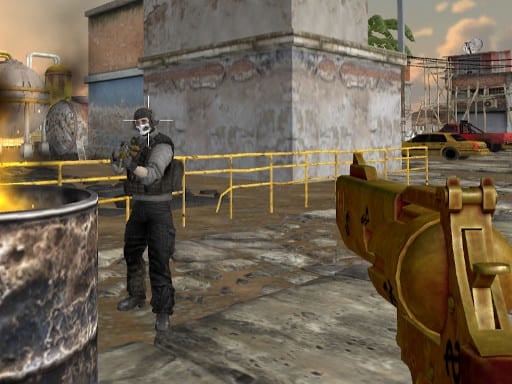
ForceZ.io is a free online multiplayer game you can play right here in your browser, with no download and no sign-up. Solo games are predictable; other people are not. ForceZ.io uses that unpredictability as its engine, and every match ends up telling a slightly different story. A few things the tags reveal: fast reactions and constant movement are the point.
About ForceZ.io
Immerse yourself in the thrilling world of ForceZ.io, an exhilarating online game that invites players to explore five diverse arenas brimming with challenges and opportunities. Whether you prefer to undertake your adventures solo or engage in multiplayer confrontations, this game has got you covered. The dynamic gameplay keeps each session fresh and exciting, allowing you to test your skills against
Judged as a multiplayer game, ForceZ.io hits the notes you would hope for: simple rules everyone can grasp fast, quick matchmaking or shared-screen setup and moments of comeback and reversal. The skills it leans on are adaptability and communication; both improve noticeably after a few sessions.
How to play ForceZ.io
- Press the play button above and wait for ForceZ.io to finish loading. On first load this can take a few seconds while the game files are fetched.
- Follow the on-screen prompts. The developer describes the controls like this: WASD or arrow keys to move Left click to shoot Right click to aim R to reload 1 2 3 9 or Mouse wheel to cycle through weapons Space to jump Tab to toggle pause menu
- Try a round against the computer or alone first so the controls are familiar before you bring in another player.
- Use the full-screen button under the frame for the best view, and keep an eye on the score, timer or health display so you know what the game is asking of you.
Controls
You will not need a manual for ForceZ.io, but knowing the inputs before you start saves the first minute of fumbling:
| Input | What it does |
|---|---|
| WASD keys | WASD or arrow keys to move Left click to shoot Right click to aim R to reload 1 2 3 9 or Mouse wheel to cycle through weapons Space to jump Tab to toggle pause menu. |
| Arrow keys | WASD or arrow keys to move Left click to shoot Right click to aim R to reload 1 2 3 9 or Mouse wheel to cycle through weapons Space to jump Tab to toggle pause menu. |
| Space bar | WASD or arrow keys to move Left click to shoot Right click to aim R to reload 1 2 3 9 or Mouse wheel to cycle through weapons Space to jump Tab to toggle pause menu. |
| Left mouse click | WASD or arrow keys to move Left click to shoot Right click to aim R to reload 1 2 3 9 or Mouse wheel to cycle through weapons Space to jump Tab to toggle pause menu. |
| Right mouse click | WASD or arrow keys to move Left click to shoot Right click to aim R to reload 1 2 3 9 or Mouse wheel to cycle through weapons Space to jump Tab to toggle pause menu. |
| Mouse | WASD or arrow keys to move Left click to shoot Right click to aim R to reload 1 2 3 9 or Mouse wheel to cycle through weapons Space to jump Tab to toggle pause menu. |
| Tab | WASD or arrow keys to move Left click to shoot Right click to aim R to reload 1 2 3 9 or Mouse wheel to cycle through weapons Space to jump Tab to toggle pause menu. |
It is designed for desktop play with a keyboard and mouse.
Tips and tricks
- Short, frequent matches build skill faster than marathon sessions.
- Do not tilt. After a bad round, the next one is a fresh start; the player who resets emotionally usually wins the set.
- Play the opponent, not the game. Notice what your rival keeps doing and punish that habit.
- Cooperative modes reward splitting roles: one player handles offence while the other covers, rather than both rushing.
Who will enjoy it
Who is ForceZ.io for? In a word, friends on one screen, online competitors and anyone who finds bots boring. In terms of time, think of matches of two to ten minutes, best played in a series. The learning curve is entirely dependent on who you are playing against. It is designed for desktop play with a keyboard and mouse.
Game details
| Category | Multiplayer Games |
|---|---|
| Tags | 3d Games, Action, Webgl, Unity3d, First Person Shooter, .io Games, Violence, Multiplayer |
| Platform | Browser (desktop) |
| Controls | Keyboard and mouse |
| Technology | HTML5 — no download or plugin required |
| Frame | Landscape (1060×650) |
| Added | 25 October 2024 |
| Plays | 1 |
| Price | Free to play |
Frequently asked questions
Is ForceZ.io free to play?
It is free. Open the page, press play and the game loads in the browser. You do not need to install anything or register.
Can I play ForceZ.io on my phone?
This one is a desktop game. It expects a keyboard and mouse, so we recommend playing ForceZ.io on a computer for the intended experience.
What are the controls for ForceZ.io?
In short: WASD keys — WASD or arrow keys to move Left click to shoot Right click to aim R to reload 1 2 3 9 or Mouse wheel to cycle through weapons Space to jump Tab to toggle pause menu; Arrow keys — WASD or arrow keys to move Left click to shoot Right click to aim R to reload 1 2 3 9 or Mouse wheel to cycle through weapons Space to jump Tab to toggle pause menu; Space bar — WASD or arrow keys to move Left click to shoot Right click to aim R to reload 1 2 3 9 or Mouse wheel to cycle through weapons Space to jump Tab to toggle pause menu. The full list is in the controls section above.
Does ForceZ.io save my progress?
Progress in ForceZ.io is kept by the game itself inside your browser storage. It will normally be there when you come back on the same device and browser.
How do I play ForceZ.io in full screen?
Use the full-screen button just below the game frame. Press Esc on your keyboard to leave full-screen mode again.
What kind of game is ForceZ.io?
It is a multiplayer game with the tags 3d Games, Action, Webgl, Unity3d. Entirely dependent on who you are playing against, and matches of two to ten minutes, best played in a series.
Games similar to ForceZ.io
When you are done, scroll down for more multiplayer games and titles that share tags with ForceZ.io.