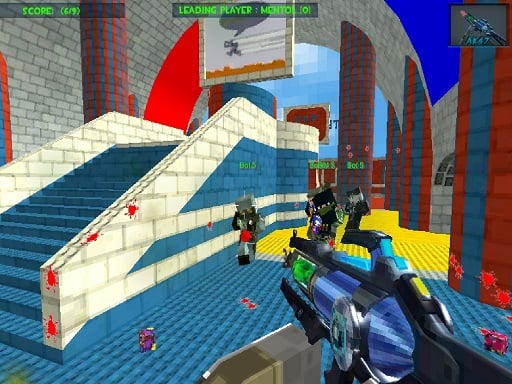
FPS Shooting Game: 3D Gun Game is one of the adventure games in the Diemakora collection. It loads in seconds and needs nothing installed. FPS Shooting Game: 3D Gun Game is a browser game in the classic sense: click play, understand the goal within a minute, and settle into a loop that is easy to enjoy and hard to put down. Its tags tell you what to expect: aiming and firing at targets is the primary action; fast reactions and constant movement are the point.
About FPS Shooting Game: 3D Gun Game
Are you ready to play the best Action shooter game ever, complete with realistic modes and weapons? Join a worldwide community of millions of players in an offline Shooting game. The goal is to survive and compete against your opponents. Enemy snipers and soldiers are ready to retaliate and counter your maneuvers. This is a survival fps shooting game in
The genre lives on a friendly difficulty curve, quick loading and a clear goal. FPS Shooting Game: 3D Gun Game understands that, and it shows in the first minute of play. The skills it leans on are a little patience and timing; both improve noticeably after a few sessions.
How to play FPS Shooting Game: 3D Gun Game
- Start by clicking the big play button. FPS Shooting Game: 3D Gun Game loads inside the frame; give it a moment, especially on a slow connection.
- Follow the on-screen prompts. The developer describes the controls like this: W Arrow Up rarr Move Front S Arrow Down rarr Move Back A Arrow Left rarr Move Left D Arrow Right rarr Move Right - To click any button use mouse
- Explore. Click everything once, try each button, and let the game teach you its loop.
- Switch to full screen if precision matters, and remember that the game keeps its own progress — finish a level before you close the tab.
Controls
Controls for FPS Shooting Game: 3D Gun Game at a glance:
| Input | What it does |
|---|---|
| Mouse | W Arrow Up rarr Move Front S Arrow Down rarr Move Back A Arrow Left rarr Move Left D Arrow Right rarr Move Right - To click any button use mouse. |
| W key | W Arrow Up rarr Move Front S Arrow Down rarr Move Back A Arrow Left rarr Move Left D Arrow Right rarr Move Right - To click any button use mouse. |
It is designed for desktop play with a keyboard and mouse.
Tips and tricks
- Do not compare your first hour to someone's hundredth. Casual games are built to be learned in public, one small improvement at a time.
- Sound effects are feedback, not decoration. Play with the volume up at least until you know the game.
- Spend your first attempt learning, not winning. Poke at everything on screen; browser games hide small mechanics in plain sight.
- Read the on-screen prompts once. Most casual games explain their entire control scheme in the first ten seconds and never again.
Who will enjoy it
We would recommend FPS Shooting Game: 3D Gun Game to casual players of all ages looking for a quick, free game in the browser. A typical session is anything from two minutes to an afternoon. How hard is it? Friendly at first and steadily more demanding. It is designed for desktop play with a keyboard and mouse.
Game details
| Category | Adventure Games |
|---|---|
| Tags | Action, First Person Shooter, Shooting, Enemies |
| Platform | Browser (desktop) |
| Controls | Keyboard and mouse |
| Technology | HTML5 — no download or plugin required |
| Frame | Landscape (800×600) |
| Added | 7 March 2026 |
| Plays | 1 |
| Price | Free to play |
Frequently asked questions
Is FPS Shooting Game: 3D Gun Game free to play?
It is free. Open the page, press play and the game loads in the browser. You do not need to install anything or register.
Can I play FPS Shooting Game: 3D Gun Game on my phone?
This one is a desktop game. It expects a keyboard and mouse, so we recommend playing FPS Shooting Game: 3D Gun Game on a computer for the intended experience.
What are the controls for FPS Shooting Game: 3D Gun Game?
In short: Mouse — W Arrow Up rarr Move Front S Arrow Down rarr Move Back A Arrow Left rarr Move Left D Arrow Right rarr Move Right - To click any button use mouse; W key — W Arrow Up rarr Move Front S Arrow Down rarr Move Back A Arrow Left rarr Move Left D Arrow Right rarr Move Right - To click any button use mouse. The full list is in the controls section above.
Does FPS Shooting Game: 3D Gun Game save my progress?
Progress in FPS Shooting Game: 3D Gun Game is kept by the game itself inside your browser storage. It will normally be there when you come back on the same device and browser.
How do I play FPS Shooting Game: 3D Gun Game in full screen?
Click the expand icon under the game to switch FPS Shooting Game: 3D Gun Game to full screen. Esc returns you to the normal view.
What kind of game is FPS Shooting Game: 3D Gun Game?
It is a adventure game with the tags Action, First Person Shooter, Shooting, Enemies. Friendly at first and steadily more demanding, and anything from two minutes to an afternoon.
Games similar to FPS Shooting Game: 3D Gun Game
Finished a session? The games listed below were picked because they share tags or a category with FPS Shooting Game: 3D Gun Game.