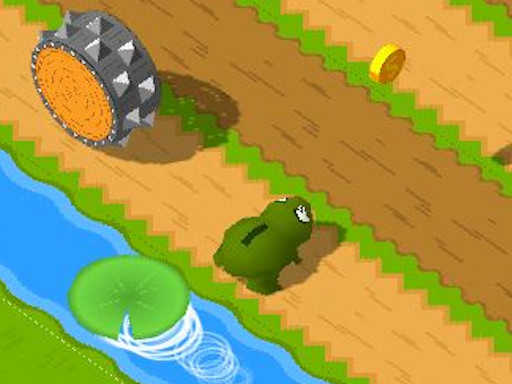
Play Frosch for free — a arcade game that runs directly in your browser on desktop, tablet or phone. You will understand Frosch in about ten seconds and still be improving at it a week later. That is the arcade formula done right. From the tags you can already tell that it features animals as characters or theme; it uses hardware-accelerated graphics in the browser.
About Frosch
Willkommen in der Welt von Frosch, einem humorvollen und spannenden Spiel, das Sie herausfordert, wahrend Sie den Tieren helfen, sicher die Stra e zu uberqueren. Ein klassisches Ratsel wartet darauf, gelost zu werden, und der beruhmte Witz uber das Huhn sorgt fur ein Augenzwinkern. Ihre Aufgabe besteht darin, den Tieren den Weg uber die Stra e zu zeigen und sie
The genre lives on instant restarts, difficulty that ramps steadily and bright, readable visuals. Frosch understands that, and it shows in the first minute of play. The skills it leans on are consistency and timing; both improve noticeably after a few sessions.
How to play Frosch
- Press the play button above and wait for Frosch to finish loading. On first load this can take a few seconds while the game files are fetched.
- Follow the on-screen prompts. The developer describes the controls like this: WASD- oder Pfeiltasten zum Bewegen Tab oder Esc um die Pause umzuschalten
- Play the first run purely to learn. Notice the rhythm of the obstacles, then start a fresh run and aim for a clean start.
- Switch to full screen if precision matters, and remember that the game keeps its own progress — finish a level before you close the tab.
Controls
You will not need a manual for Frosch, but knowing the inputs before you start saves the first minute of fumbling:
| Input | What it does |
|---|---|
| WASD keys | WASD- oder Pfeiltasten zum Bewegen Tab oder Esc um die Pause umzuschalten. |
| Esc | WASD- oder Pfeiltasten zum Bewegen Tab oder Esc um die Pause umzuschalten. |
| Tab | WASD- oder Pfeiltasten zum Bewegen Tab oder Esc um die Pause umzuschalten. |
It is designed for desktop play with a keyboard and mouse.
Tips and tricks
- Find the rhythm. Most arcade games have an underlying beat — taps, jumps or moves that fall on a regular interval — and once you feel it, your accuracy jumps.
- Take a short break after three or four failed runs. Arcade games punish tired eyes more than any other genre.
- Learn the first thirty seconds perfectly. The opening is the same every time, so it should never be where you lose.
- Aim for consistency before you aim for records. A steady run that avoids mistakes usually scores higher than a flashy one that ends early.
- Because this is a Webgl game, enable hardware acceleration in your browser settings if it stutters.
- Because this is a Animal game, each animal usually has a unique ability — test them all.
Who will enjoy it
We would recommend Frosch to anyone with a few minutes to spare and a competitive streak. A typical session is runs of thirty seconds to a few minutes, endlessly repeatable. How hard is it? Simple rules, high skill ceiling. It is designed for desktop play with a keyboard and mouse.
Game details
| Category | Arcade Games |
|---|---|
| Tags | Webgl, Animal |
| Platform | Browser (desktop) |
| Controls | Keyboard |
| Technology | HTML5 — no download or plugin required |
| Frame | Landscape (960×600) |
| Added | 25 October 2024 |
| Plays | 2 |
| Price | Free to play |
Frequently asked questions
Is Frosch free to play?
Yes. Frosch is completely free to play on Diemakora. There is no download, no account and no payment — the game runs in your browser.
Can I play Frosch on my phone?
Frosch is best played on a desktop or laptop. It relies on keyboard and mouse input, and while it may load on a phone, the controls will not be comfortable.
What are the controls for Frosch?
In short: WASD keys — WASD- oder Pfeiltasten zum Bewegen Tab oder Esc um die Pause umzuschalten; Esc — WASD- oder Pfeiltasten zum Bewegen Tab oder Esc um die Pause umzuschalten; Tab — WASD- oder Pfeiltasten zum Bewegen Tab oder Esc um die Pause umzuschalten. The full list is in the controls section above.
Does Frosch save my progress?
Progress in Frosch is kept by the game itself inside your browser storage. It will normally be there when you come back on the same device and browser.
What if Frosch does not load?
If Frosch does not load, refresh the page, make sure your browser is up to date and check that hardware acceleration is enabled. Ad blockers occasionally interfere with the game frame as well.
What kind of game is Frosch?
It is a arcade game with the tags Webgl, Animal. Simple rules, high skill ceiling, and runs of thirty seconds to a few minutes, endlessly repeatable.
Games similar to Frosch
You will find more games like Frosch further down this page, chosen by matching tags and category.