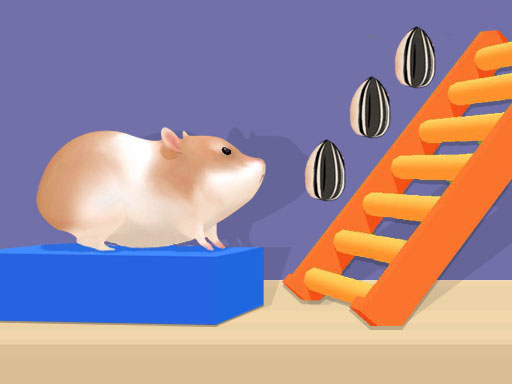
Looking for a arcade game that starts instantly? Hamster Stack Maze runs in your browser and is completely free to play. Hamster Stack Maze follows the oldest recipe in gaming: one clear rule, one clear score, and the urge to try just one more time. Its tags tell you what to expect: it features animals as characters or theme.
About Hamster Stack Maze
Hamster Stack Maze is an engaging and entertaining puzzle game designed for boys, all available for free. In this delightful game, players take control of a charming hamster navigating through intricate mazes filled with exciting challenges. With simple controls and engaging mechanics, this game provides hours of fun while stimulating your brain to think critically. As you guide your adorable hamster
What makes a good arcade game? Usually difficulty that ramps steadily, the "one more go" effect and bright, readable visuals — and Hamster Stack Maze has each of them in some measure. Under the surface it is a test of timing and focus, dressed up in upbeat presentation.
How to play Hamster Stack Maze
- Start by clicking the big play button. Hamster Stack Maze loads inside the frame; give it a moment, especially on a slow connection.
- Follow the on-screen prompts. The developer describes the controls like this: Mouse or tap to play
- Play the first run purely to learn. Notice the rhythm of the obstacles, then start a fresh run and aim for a clean start.
- Switch to full screen if precision matters, and remember that the game keeps its own progress — finish a level before you close the tab.
Controls
Here is how Hamster Stack Maze is controlled, based on the developer's instructions and our own testing:
| Input | What it does |
|---|---|
| Mouse | Mouse or tap to play. |
| Tap (touch) | Mouse or tap to play. |
The controls are tap and drag based, which makes it comfortable on touch screens as well as with a mouse.
Tips and tricks
- Restart early. If a run starts badly, do not grind it out; a fresh attempt costs nothing and saves your focus.
- Learn the first thirty seconds perfectly. The opening is the same every time, so it should never be where you lose.
- Play in a quiet tab with nothing else running. Small frame drops cause missed timing that feels like bad luck but is not.
- Combo systems reward patience: keep the chain alive with safe moves rather than reaching for risky bonuses.
- Because this is a Skills game, practise the hardest input in isolation before you attempt a full run.
Who will enjoy it
We would recommend Hamster Stack Maze to anyone with a few minutes to spare and a competitive streak. In terms of time, think of runs of thirty seconds to a few minutes, endlessly repeatable. Difficulty-wise it is simple rules, high skill ceiling. The controls are tap and drag based, which makes it comfortable on touch screens as well as with a mouse.
Game details
| Category | Arcade Games |
|---|---|
| Tags | Html5 Games For Your Site, Kids, Puzzleblock, Funny, 3d Games, Fall Boys, Skills, Android, Animal, Brain, Onlinegames Io, Maze, Stack |
| Platform | Browser (desktop, tablet and mobile) |
| Controls | Touch and mouse |
| Technology | HTML5 — no download or plugin required |
| Frame | Portrait (750×1334) |
| Added | 26 September 2024 |
| Plays | 2 |
| Price | Free to play |
Frequently asked questions
Is Hamster Stack Maze free to play?
Yes. Hamster Stack Maze is completely free to play on Diemakora. There is no download, no account and no payment — the game runs in your browser.
Can I play Hamster Stack Maze on my phone?
Yes — the game supports touch input and adapts to smaller screens, so you can play Hamster Stack Maze on a phone or tablet as well as on a computer.
What are the controls for Hamster Stack Maze?
In short: Mouse — Mouse or tap to play; Tap (touch) — Mouse or tap to play. The full list is in the controls section above.
Does Hamster Stack Maze save my progress?
Most browser games, including Hamster Stack Maze, store progress locally in your browser. If you clear your cookies or switch devices, that progress may be lost, so finish sessions before clearing browser data.
What if Hamster Stack Maze does not load?
If Hamster Stack Maze does not load, refresh the page, make sure your browser is up to date and check that hardware acceleration is enabled. Ad blockers occasionally interfere with the game frame as well.
Is Hamster Stack Maze suitable for children?
It is tagged Kids, which usually indicates content aimed at younger players. As with any online game, we suggest a parent takes a quick look first.
Games similar to Hamster Stack Maze
You will find more games like Hamster Stack Maze further down this page, chosen by matching tags and category.