Hekov Bot 2 is one of the arcade games in the Diemakora collection. It loads in seconds and needs nothing installed. You will understand Hekov Bot 2 in about ten seconds and still be improving at it a week later. That is the arcade formula done right. From the tags you can already tell that the structure is classic arcade — quick rounds, rising difficulty and a score to beat; there is a journey with a beginning and an end rather than an endless score chase.
About Hekov Bot 2
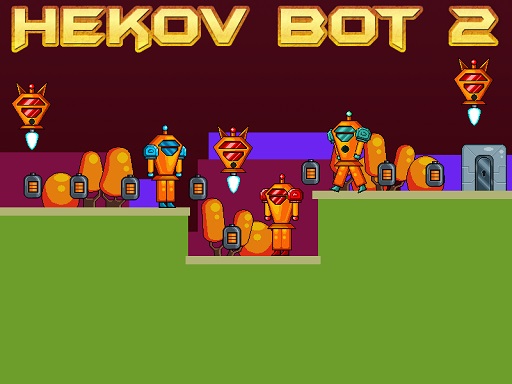
Hekov Bot 2 is an exciting 2D platformer steeped in a captivating sci-fi atmosphere, where players embark on a thrilling adventure to collect battery cells. As you navigate through the intricately designed levels, you'll need to outmaneuver a variety of enemies ranging from enemy robots to menacing flying bots while dodging numerous deadly obstacles such as bullets and spikes. Your
What makes a good arcade game? Usually the "one more go" effect, instant restarts and bright, readable visuals — and Hekov Bot 2 has each of them in some measure. Playing it works your consistency and timing, which is a large part of why the "one more round" feeling is so strong.
How to play Hekov Bot 2
- Start by clicking the big play button. Hekov Bot 2 loads inside the frame; give it a moment, especially on a slow connection.
- Follow the on-screen prompts. The developer describes the controls like this: Use WASD or Arrow keys for the player s movement Use W or Up arrow key twice for double jump
- Play the first run purely to learn. Notice the rhythm of the obstacles, then start a fresh run and aim for a clean start.
- Switch to full screen if precision matters, and remember that the game keeps its own progress — finish a level before you close the tab.
Controls
The controls in Hekov Bot 2 are straightforward once you have seen them written down:
| Input | What it does |
|---|---|
| WASD keys | Use WASD or Arrow keys for the player s movement Use W or Up arrow key twice for double jump. |
| Arrow keys | Use WASD or Arrow keys for the player s movement Use W or Up arrow key twice for double jump. |
It is designed for desktop play with a keyboard and mouse.
Tips and tricks
- Find the rhythm. Most arcade games have an underlying beat — taps, jumps or moves that fall on a regular interval — and once you feel it, your accuracy jumps.
- Aim for consistency before you aim for records. A steady run that avoids mistakes usually scores higher than a flashy one that ends early.
- Learn the first thirty seconds perfectly. The opening is the same every time, so it should never be where you lose.
- Play in a quiet tab with nothing else running. Small frame drops cause missed timing that feels like bad luck but is not.
- Because this is a Collecting game, plan a route that passes everything once.
- Because this is a Robot game, upgrades usually stack — save for the ones that multiply.
Who will enjoy it
Who is Hekov Bot 2 for? In a word, anyone with a few minutes to spare and a competitive streak. Expect runs of thirty seconds to a few minutes, endlessly repeatable. How hard is it? Simple rules, high skill ceiling. It is designed for desktop play with a keyboard and mouse.
Game details
| Category | Arcade Games |
|---|---|
| Tags | Arcade, 1 Player, Adventure, 2d, Jumping, Cartoon Network, Cute, Platform, Collecting, Pixel, Retro, Robot, Science |
| Platform | Browser (desktop) |
| Controls | Keyboard |
| Technology | HTML5 — no download or plugin required |
| Frame | Landscape (800×640) |
| Added | 26 September 2024 |
| Plays | 0 |
| Price | Free to play |
Frequently asked questions
Is Hekov Bot 2 free to play?
It is free. Open the page, press play and the game loads in the browser. You do not need to install anything or register.
Can I play Hekov Bot 2 on my phone?
Hekov Bot 2 is best played on a desktop or laptop. It relies on keyboard and mouse input, and while it may load on a phone, the controls will not be comfortable.
What are the controls for Hekov Bot 2?
In short: WASD keys — Use WASD or Arrow keys for the player s movement Use W or Up arrow key twice for double jump; Arrow keys — Use WASD or Arrow keys for the player s movement Use W or Up arrow key twice for double jump. The full list is in the controls section above.
Does Hekov Bot 2 save my progress?
Progress in Hekov Bot 2 is kept by the game itself inside your browser storage. It will normally be there when you come back on the same device and browser.
How do I play Hekov Bot 2 in full screen?
Click the expand icon under the game to switch Hekov Bot 2 to full screen. Esc returns you to the normal view.
What kind of game is Hekov Bot 2?
It is a arcade game with the tags Arcade, 1 Player, Adventure, 2d. Simple rules, high skill ceiling, and runs of thirty seconds to a few minutes, endlessly repeatable.
Games similar to Hekov Bot 2
When you are done, scroll down for more arcade games and titles that share tags with Hekov Bot 2.