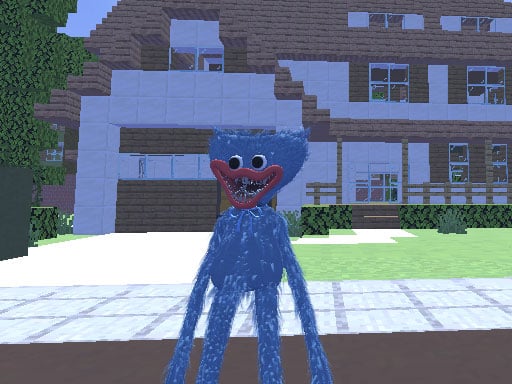
Welcome to Huggy Wuggy in Minecraft, a browser-based arcade game. Click play, wait a moment for it to load, and you are in. Huggy Wuggy in Minecraft follows the oldest recipe in gaming: one clear rule, one clear score, and the urge to try just one more time. A few things the tags reveal: it uses hardware-accelerated graphics in the browser; fast reactions and constant movement are the point.
About Huggy Wuggy in Minecraft
Step into the blocky universe of Minecraft where Huggy Wuggy takes center stage in an extraordinary adventure! This exciting game transforms the cuddly yet creepy figure into your avatar as you navigate through the pixelated realms of Minecraft. The vibrant landscapes are teeming with various mobs, each presenting a unique challenge for players eager to level up. Your primary objective in
Judged as a arcade game, Huggy Wuggy in Minecraft hits the notes you would hope for: the "one more go" effect, a single, easy-to-read score and difficulty that ramps steadily. Under the surface it is a test of consistency and focus, dressed up in playful presentation.
How to play Huggy Wuggy in Minecraft
- Press the play button above and wait for Huggy Wuggy in Minecraft to finish loading. On first load this can take a few seconds while the game files are fetched.
- Follow the on-screen prompts. The developer describes the controls like this: WASD - Move Mouse - Attack Space - Jump TAB - Pause
- Play the first run purely to learn. Notice the rhythm of the obstacles, then start a fresh run and aim for a clean start.
- Use the full-screen button under the frame for the best view, and keep an eye on the score, timer or health display so you know what the game is asking of you.
Controls
Controls for Huggy Wuggy in Minecraft at a glance:
| Input | What it does |
|---|---|
| WASD keys | WASD - Move Mouse - Attack Space - Jump TAB - Pause. |
| Space bar | WASD - Move Mouse - Attack Space - Jump TAB - Pause. |
| Mouse | WASD - Move Mouse - Attack Space - Jump TAB - Pause. |
| Tab | WASD - Move Mouse - Attack Space - Jump TAB - Pause. |
It is designed for desktop play with a keyboard and mouse.
Tips and tricks
- Take a short break after three or four failed runs. Arcade games punish tired eyes more than any other genre.
- Restart early. If a run starts badly, do not grind it out; a fresh attempt costs nothing and saves your focus.
- Combo systems reward patience: keep the chain alive with safe moves rather than reaching for risky bonuses.
- Play in a quiet tab with nothing else running. Small frame drops cause missed timing that feels like bad luck but is not.
Who will enjoy it
We would recommend Huggy Wuggy in Minecraft to anyone with a few minutes to spare and a competitive streak. In terms of time, think of runs of thirty seconds to a few minutes, endlessly repeatable. How hard is it? Simple rules, high skill ceiling. It is designed for desktop play with a keyboard and mouse.
Game details
| Category | Arcade Games |
|---|---|
| Tags | 3d Games, 1 Player, Adventure, Action, Webgl, Unity3d, Minecraft, Huggy |
| Platform | Browser (desktop) |
| Controls | Keyboard and mouse |
| Technology | HTML5 — no download or plugin required |
| Frame | Landscape (960×600) |
| Added | 26 September 2024 |
| Plays | 1 |
| Price | Free to play |
Frequently asked questions
Is Huggy Wuggy in Minecraft free to play?
Yes. Huggy Wuggy in Minecraft is completely free to play on Diemakora. There is no download, no account and no payment — the game runs in your browser.
Can I play Huggy Wuggy in Minecraft on my phone?
Huggy Wuggy in Minecraft is best played on a desktop or laptop. It relies on keyboard and mouse input, and while it may load on a phone, the controls will not be comfortable.
What are the controls for Huggy Wuggy in Minecraft?
In short: WASD keys — WASD - Move Mouse - Attack Space - Jump TAB - Pause; Space bar — WASD - Move Mouse - Attack Space - Jump TAB - Pause; Mouse — WASD - Move Mouse - Attack Space - Jump TAB - Pause. The full list is in the controls section above.
Does Huggy Wuggy in Minecraft save my progress?
Most browser games, including Huggy Wuggy in Minecraft, store progress locally in your browser. If you clear your cookies or switch devices, that progress may be lost, so finish sessions before clearing browser data.
What if Huggy Wuggy in Minecraft does not load?
A blank frame usually means the game is still loading or a browser extension blocked it. Wait a few seconds, then reload; if that fails, try another browser.
What kind of game is Huggy Wuggy in Minecraft?
It is a arcade game with the tags 3d Games, 1 Player, Adventure, Action. Simple rules, high skill ceiling, and runs of thirty seconds to a few minutes, endlessly repeatable.
Games similar to Huggy Wuggy in Minecraft
When you are done, scroll down for more arcade games and titles that share tags with Huggy Wuggy in Minecraft.