Welcome to Lion King Simulator: Wildlife Animal Hunting, a browser-based arcade game. Click play, wait a moment for it to load, and you are in. Arcade games are designed around the loop, and Lion King Simulator: Wildlife Animal Hunting has a good one — short attempts, instant restarts and a score that begs to be beaten. A few things the tags reveal: it models a real activity or system with some fidelity; it features animals as characters or theme.
About Lion King Simulator: Wildlife Animal Hunting
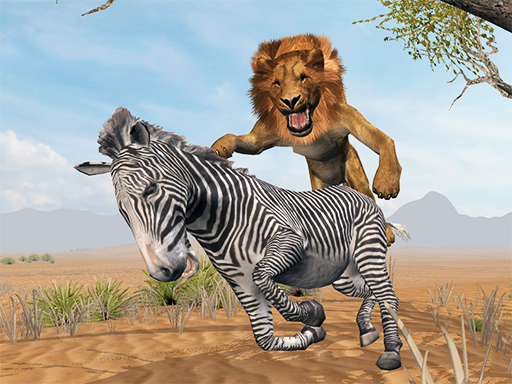
Step into the wild with Lion King Simulator: Wildlife Animal Hunting, an immersive RPG that allows you to embody the regal power of a lion. Roam through lush jungle landscapes, embracing your primal instincts as you hunt for food and establish your territory. As a fierce predator, you'll experience the thrill of the chase while perfecting your stalking and ambushing
What makes a good arcade game? Usually difficulty that ramps steadily, a single, easy-to-read score and bright, readable visuals — and Lion King Simulator: Wildlife Animal Hunting has each of them in some measure. Under the surface it is a test of consistency and consistency, dressed up in playful presentation.
How to play Lion King Simulator: Wildlife Animal Hunting
- Start by clicking the big play button. Lion King Simulator: Wildlife Animal Hunting loads inside the frame; give it a moment, especially on a slow connection.
- Follow the on-screen prompts. The developer describes the controls like this: Use WASD or Arrows to walk Left Shift to run Mouse - to hunt
- Play the first run purely to learn. Notice the rhythm of the obstacles, then start a fresh run and aim for a clean start.
- Switch to full screen if precision matters, and remember that the game keeps its own progress — finish a level before you close the tab.
Controls
Controls for Lion King Simulator: Wildlife Animal Hunting at a glance:
| Input | What it does |
|---|---|
| WASD keys | Use WASD or Arrows to walk Left Shift to run Mouse - to hunt. |
| Arrow keys | Use WASD or Arrows to walk Left Shift to run Mouse - to hunt. |
| Mouse | Use WASD or Arrows to walk Left Shift to run Mouse - to hunt. |
| Shift | Use WASD or Arrows to walk Left Shift to run Mouse - to hunt. |
It is designed for desktop play with a keyboard and mouse.
Tips and tricks
- Play in a quiet tab with nothing else running. Small frame drops cause missed timing that feels like bad luck but is not.
- Learn the first thirty seconds perfectly. The opening is the same every time, so it should never be where you lose.
- Take a short break after three or four failed runs. Arcade games punish tired eyes more than any other genre.
- Combo systems reward patience: keep the chain alive with safe moves rather than reaching for risky bonuses.
- Because this is a Simulator game, learn the systems slowly — simulations reward understanding over speed.
Who will enjoy it
We would recommend Lion King Simulator: Wildlife Animal Hunting to anyone with a few minutes to spare and a competitive streak. Expect runs of thirty seconds to a few minutes, endlessly repeatable. The learning curve is simple rules, high skill ceiling. It is designed for desktop play with a keyboard and mouse.
Game details
| Category | Arcade Games |
|---|---|
| Tags | Simulation, Animal, Simulator, Slacking |
| Platform | Browser (desktop) |
| Controls | Keyboard and mouse |
| Technology | HTML5 — no download or plugin required |
| Frame | Landscape (900×600) |
| Added | 25 October 2024 |
| Plays | 1 |
| Price | Free to play |
Frequently asked questions
Is Lion King Simulator: Wildlife Animal Hunting free to play?
Yes. Lion King Simulator: Wildlife Animal Hunting is completely free to play on Diemakora. There is no download, no account and no payment — the game runs in your browser.
Can I play Lion King Simulator: Wildlife Animal Hunting on my phone?
This one is a desktop game. It expects a keyboard and mouse, so we recommend playing Lion King Simulator: Wildlife Animal Hunting on a computer for the intended experience.
What are the controls for Lion King Simulator: Wildlife Animal Hunting?
In short: WASD keys — Use WASD or Arrows to walk Left Shift to run Mouse - to hunt; Arrow keys — Use WASD or Arrows to walk Left Shift to run Mouse - to hunt; Mouse — Use WASD or Arrows to walk Left Shift to run Mouse - to hunt. The full list is in the controls section above.
Does Lion King Simulator: Wildlife Animal Hunting save my progress?
Progress in Lion King Simulator: Wildlife Animal Hunting is kept by the game itself inside your browser storage. It will normally be there when you come back on the same device and browser.
How do I play Lion King Simulator: Wildlife Animal Hunting in full screen?
Use the full-screen button just below the game frame. Press Esc on your keyboard to leave full-screen mode again.
What kind of game is Lion King Simulator: Wildlife Animal Hunting?
It is a arcade game with the tags Simulation, Animal, Simulator, Slacking. Simple rules, high skill ceiling, and runs of thirty seconds to a few minutes, endlessly repeatable.
Games similar to Lion King Simulator: Wildlife Animal Hunting
You will find more games like Lion King Simulator: Wildlife Animal Hunting further down this page, chosen by matching tags and category.