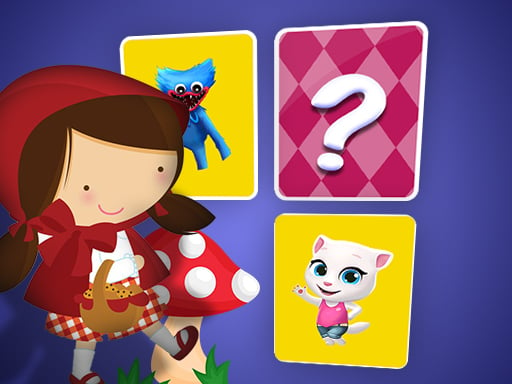
Little Red Riding Hood Memory Card Match is a free online puzzle game you can play right here in your browser, with no download and no sign-up. Little Red Riding Hood Memory Card Match asks you to think before you act. There is no clock chasing you in most levels — only a board, a set of rules, and the pleasure of the solution clicking into place. A few things the tags reveal: it exercises logic and quick thinking; it is played with cards, so probability and memory matter.
About Little Red Riding Hood Memory Card Match
Engage your mind in an enchanting challenge with the Little Red Riding Hood Memory Card Match game! This delightful memory game invites players to dive into a world filled with familiar fairy-tale imagery. Begin your adventure by choosing a difficulty level; the more challenging the level, the greater the number of cards you will encounter on the game board. The objective
What makes a good puzzle game? Usually a gentle but real difficulty curve, hints or undo options and levels that teach one idea at a time — and Little Red Riding Hood Memory Card Match has each of them in some measure. The skills it leans on are planning and logic; both improve noticeably after a few sessions.
How to play Little Red Riding Hood Memory Card Match
- Press the play button above and wait for Little Red Riding Hood Memory Card Match to finish loading. On first load this can take a few seconds while the game files are fetched.
- Follow the on-screen prompts. The developer describes the controls like this: Children should periodically return to this memory until they are easily capable of solving at least the most basic levels It is common that the child will make significant progress by developing memory strategies In…
- Read the whole level before your first move. Identify the goal, then look for the forced moves that must happen regardless.
- Use the full-screen button under the frame for the best view, and keep an eye on the score, timer or health display so you know what the game is asking of you.
Controls
Controls for Little Red Riding Hood Memory Card Match at a glance:
| Input | What it does |
|---|---|
| Mouse | Point and click to play; the game shows its own prompts on screen. |
| Keyboard | Some actions may use the arrow keys or space bar — check the in-game hints. |
It is designed for desktop play with a keyboard and mouse.
Tips and tricks
- Work backwards from the goal. Ask what the final state has to look like, then ask what the state before that must be.
- Do not memorise solutions, memorise principles. The level after this one will use the same idea in a new arrangement.
- If you are stuck for more than a couple of minutes, step away and come back. Puzzle solutions often arrive when you stop forcing them.
- Use undo or restart freely. Experimenting is how you learn the mechanics; there is no penalty for trying an idea.
- Because this is a Card game, track which cards have already been played.
Who will enjoy it
We would recommend Little Red Riding Hood Memory Card Match to players who prefer thinking to twitching, from casual brain-teaser fans to dedicated solvers. In terms of time, think of a level or two in five minutes, or a long relaxed session. Difficulty-wise it is gentle at the start and genuinely tricky later. It is designed for desktop play with a keyboard and mouse.
Game details
| Category | Puzzle Games |
|---|---|
| Tags | Puzzleblock, Brain, Matching, Memory, Card |
| Platform | Browser (desktop) |
| Controls | Mouse |
| Technology | HTML5 — no download or plugin required |
| Frame | Landscape (800×600) |
| Added | 26 September 2024 |
| Plays | 2 |
| Price | Free to play |
Frequently asked questions
Is Little Red Riding Hood Memory Card Match free to play?
Yes. Little Red Riding Hood Memory Card Match is completely free to play on Diemakora. There is no download, no account and no payment — the game runs in your browser.
Can I play Little Red Riding Hood Memory Card Match on my phone?
This one is a desktop game. It expects a keyboard and mouse, so we recommend playing Little Red Riding Hood Memory Card Match on a computer for the intended experience.
What are the controls for Little Red Riding Hood Memory Card Match?
The developer did not publish detailed controls, but the game follows genre conventions: Mouse — Point and click to play; the game shows its own prompts on screen; Keyboard — Some actions may use the arrow keys or space bar — check the in-game hints. The full list is in the controls section above.
Does Little Red Riding Hood Memory Card Match save my progress?
Most browser games, including Little Red Riding Hood Memory Card Match, store progress locally in your browser. If you clear your cookies or switch devices, that progress may be lost, so finish sessions before clearing browser data.
What if Little Red Riding Hood Memory Card Match does not load?
A blank frame usually means the game is still loading or a browser extension blocked it. Wait a few seconds, then reload; if that fails, try another browser.
What kind of game is Little Red Riding Hood Memory Card Match?
It is a puzzle game with the tags Puzzleblock, Brain, Matching, Memory. Gentle at the start and genuinely tricky later, and a level or two in five minutes, or a long relaxed session.
Games similar to Little Red Riding Hood Memory Card Match
When you are done, scroll down for more puzzle games and titles that share tags with Little Red Riding Hood Memory Card Match.