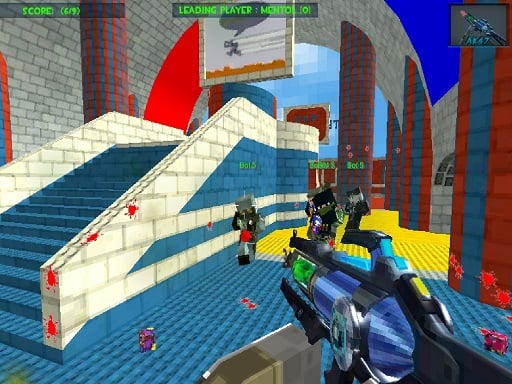
Play Masked Forces 3 for free — a shooting game that runs directly in your browser on desktop, tablet or phone. Shooting games are really about attention: Masked Forces 3 rewards the player who tracks several moving things at once and picks the right one to deal with first. From the tags you can already tell that fast reactions and constant movement are the point; other players are involved, either online or on the same device.
About Masked Forces 3
Masked Forces 3 continues the exhilarating legacy of the acclaimed first-person shooter series, providing gamers with an immersive battlefield experience. In this latest installment, players can dive into both singleplayer and multiplayer modes, making it a versatile choice for any shooter enthusiast. The singleplayer mode presents a series of intense missions where you will face a range of AI-controlled adversaries.
Judged as a shooting game, Masked Forces 3 hits the notes you would hope for: waves or levels that build up, ammunition or cooldown management and precise aiming. Playing it works your aim and aim, which is a large part of why the "one more round" feeling is so strong.
How to play Masked Forces 3
- Start by clicking the big play button. Masked Forces 3 loads inside the frame; give it a moment, especially on a slow connection.
- Follow the on-screen prompts. The developer describes the controls like this: WASD or arrow keys to move Left click to shoot Right click to aim R to reload Mouse wheel to cycle through weapons F pick weapon Tab to open menu
- Take a few practice shots at the first targets to learn the aim speed, then move on to prioritising the dangerous enemies.
- Switch to full screen if precision matters, and remember that the game keeps its own progress — finish a level before you close the tab.
Controls
Controls for Masked Forces 3 at a glance:
| Input | What it does |
|---|---|
| WASD keys | WASD or arrow keys to move Left click to shoot Right click to aim R to reload Mouse wheel to cycle through weapons F pick weapon Tab to open menu. |
| Arrow keys | WASD or arrow keys to move Left click to shoot Right click to aim R to reload Mouse wheel to cycle through weapons F pick weapon Tab to open menu. |
| Left mouse click | WASD or arrow keys to move Left click to shoot Right click to aim R to reload Mouse wheel to cycle through weapons F pick weapon Tab to open menu. |
| Right mouse click | WASD or arrow keys to move Left click to shoot Right click to aim R to reload Mouse wheel to cycle through weapons F pick weapon Tab to open menu. |
| Mouse | WASD or arrow keys to move Left click to shoot Right click to aim R to reload Mouse wheel to cycle through weapons F pick weapon Tab to open menu. |
| Tab | WASD or arrow keys to move Left click to shoot Right click to aim R to reload Mouse wheel to cycle through weapons F pick weapon Tab to open menu. |
It is designed for desktop play with a keyboard and mouse.
Tips and tricks
- If there is a reload, reload during quiet moments — never in the middle of a wave.
- Keep your cursor or crosshair roughly where enemies appear, not on the spot where the last one died.
- Headshots, weak points and combo multipliers are where high scores live; once survival is comfortable, start hunting for them.
- Learn the spawn points. Most levels reuse the same few entry points, and knowing them turns panic into routine.
- Because this is a Shooting game, aim before you fire, and fire in short bursts.
Who will enjoy it
We would recommend Masked Forces 3 to players who like precision, quick targeting and progressively tougher waves. A typical session is levels of a few minutes each, with longer runs in survival modes. Difficulty-wise it is approachable at first, with a steep climb in the later waves. It is designed for desktop play with a keyboard and mouse.
Game details
| Category | Shooting Games |
|---|---|
| Tags | 3d Games, Action, First Person Shooter, Shooting, H5, Multiplayer |
| Platform | Browser (desktop) |
| Controls | Keyboard and mouse |
| Technology | HTML5 — no download or plugin required |
| Frame | Landscape (800×600) |
| Added | 26 September 2024 |
| Plays | 1 |
| Price | Free to play |
Frequently asked questions
Is Masked Forces 3 free to play?
It is free. Open the page, press play and the game loads in the browser. You do not need to install anything or register.
Can I play Masked Forces 3 on my phone?
Masked Forces 3 is best played on a desktop or laptop. It relies on keyboard and mouse input, and while it may load on a phone, the controls will not be comfortable.
What are the controls for Masked Forces 3?
In short: WASD keys — WASD or arrow keys to move Left click to shoot Right click to aim R to reload Mouse wheel to cycle through weapons F pick weapon Tab to open menu; Arrow keys — WASD or arrow keys to move Left click to shoot Right click to aim R to reload Mouse wheel to cycle through weapons F pick weapon Tab to open menu; Left mouse click — WASD or arrow keys to move Left click to shoot Right click to aim R to reload Mouse wheel to cycle through weapons F pick weapon Tab to open menu. The full list is in the controls section above.
Does Masked Forces 3 save my progress?
Progress in Masked Forces 3 is kept by the game itself inside your browser storage. It will normally be there when you come back on the same device and browser.
How do I play Masked Forces 3 in full screen?
Click the expand icon under the game to switch Masked Forces 3 to full screen. Esc returns you to the normal view.
What kind of game is Masked Forces 3?
It is a shooting game with the tags 3d Games, Action, First Person Shooter, Shooting. Approachable at first, with a steep climb in the later waves, and levels of a few minutes each, with longer runs in survival modes.
Games similar to Masked Forces 3
You will find more games like Masked Forces 3 further down this page, chosen by matching tags and category.