Looking for a arcade game that starts instantly? MathPup Math Adventure runs in your browser and is completely free to play. MathPup Math Adventure follows the oldest recipe in gaming: one clear rule, one clear score, and the urge to try just one more time. A few things the tags reveal: the core mechanic involves numbers and arithmetic.
About MathPup Math Adventure
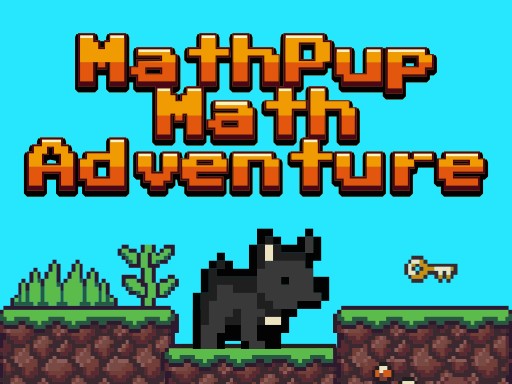
Embark on an exciting journey with MathPup in the captivating world of Math Adventure! Your mission is to guide the adorable MathPup through various levels, overcoming challenges that test your mathematical skills. Each level requires you to collect numbers in the correct sequence to solve problems and unlock the exit. This delightful adventure combines learning with fun, making it perfect
Judged as a arcade game, MathPup Math Adventure hits the notes you would hope for: bright, readable visuals, the "one more go" effect and difficulty that ramps steadily. The skills it leans on are rhythm and focus; both improve noticeably after a few sessions.
How to play MathPup Math Adventure
- Start by clicking the big play button. MathPup Math Adventure loads inside the frame; give it a moment, especially on a slow connection.
- Follow the on-screen prompts. The developer describes the controls like this: Use the arrow keys to move MathPup around the levels Double jump by pressing the arrow key again while MathPup is in the air Press the R on-screen button to replay the level and the forward sign button when finishing a…
- Play the first run purely to learn. Notice the rhythm of the obstacles, then start a fresh run and aim for a clean start.
- Use the full-screen button under the frame for the best view, and keep an eye on the score, timer or health display so you know what the game is asking of you.
Controls
The controls in MathPup Math Adventure are straightforward once you have seen them written down:
| Input | What it does |
|---|---|
| Arrow keys | Use the arrow keys to move MathPup around the levels Double jump by pressing the arrow key again while MathPup is in the air Press the R on-screen button to replay the level and the forward sign button when finishing a level to move on to the nex. |
It is designed for desktop play with a keyboard and mouse.
Tips and tricks
- Restart early. If a run starts badly, do not grind it out; a fresh attempt costs nothing and saves your focus.
- Find the rhythm. Most arcade games have an underlying beat — taps, jumps or moves that fall on a regular interval — and once you feel it, your accuracy jumps.
- Look one step ahead of your character. Reacting to what is under you is too late; reacting to what is coming is exactly on time.
- Aim for consistency before you aim for records. A steady run that avoids mistakes usually scores higher than a flashy one that ends early.
- Because this is a Math game, estimate first, then calculate — most maths games reward speed as much as accuracy.
Who will enjoy it
We would recommend MathPup Math Adventure to anyone with a few minutes to spare and a competitive streak. Expect runs of thirty seconds to a few minutes, endlessly repeatable. The learning curve is simple rules, high skill ceiling. It is designed for desktop play with a keyboard and mouse.
Game details
| Category | Arcade Games |
|---|---|
| Tags | Funny, Math |
| Platform | Browser (desktop) |
| Controls | Keyboard |
| Technology | HTML5 — no download or plugin required |
| Frame | Landscape (480×270) |
| Added | 26 September 2024 |
| Plays | 4 |
| Price | Free to play |
Frequently asked questions
Is MathPup Math Adventure free to play?
Yes. MathPup Math Adventure is completely free to play on Diemakora. There is no download, no account and no payment — the game runs in your browser.
Can I play MathPup Math Adventure on my phone?
This one is a desktop game. It expects a keyboard and mouse, so we recommend playing MathPup Math Adventure on a computer for the intended experience.
What are the controls for MathPup Math Adventure?
In short: Arrow keys — Use the arrow keys to move MathPup around the levels Double jump by pressing the arrow key again while MathPup is in the air Press the R on-screen button to replay the level and the forward sign button when finishing a level to move on to the nex. The full list is in the controls section above.
Does MathPup Math Adventure save my progress?
Progress in MathPup Math Adventure is kept by the game itself inside your browser storage. It will normally be there when you come back on the same device and browser.
How do I play MathPup Math Adventure in full screen?
Click the expand icon under the game to switch MathPup Math Adventure to full screen. Esc returns you to the normal view.
What kind of game is MathPup Math Adventure?
It is a arcade game with the tags Funny, Math. Simple rules, high skill ceiling, and runs of thirty seconds to a few minutes, endlessly repeatable.
Games similar to MathPup Math Adventure
When you are done, scroll down for more arcade games and titles that share tags with MathPup Math Adventure.