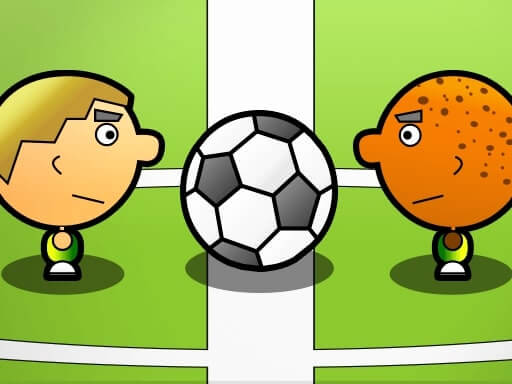
Play Mini Soccer for free — a sports game that runs directly in your browser on desktop, tablet or phone. There is a moment in Mini Soccer — the ball leaving your hand, the sprint down the lane — where everything hangs on one input. Nail it and the game sings. A few things the tags reveal: it is a football game — passing, shooting and positioning.
About Mini Soccer
Mini Soccer is an exhilarating football experience that keeps the excitement alive through its fast-paced gameplay. Whether you want to test your skills against the computer or engage in intense matches with friends, this game provides an immersive challenge that s hard to resist. Players can select from a variety of teams, featuring some of the best football stars globally,
The genre lives on skill-based timing, tournaments, leagues or challenges and a strong sense of momentum. Mini Soccer understands that, and it shows in the first minute of play. Under the surface it is a test of aim and timing, dressed up in triumphant presentation.
How to play Mini Soccer
- Start by clicking the big play button. Mini Soccer loads inside the frame; give it a moment, especially on a slow connection.
- Follow the on-screen prompts. The developer describes the controls like this: - When playing against the computer Right and left arrow keys right left move Up arrow key jump Z and X keys hit - When playing in the with a friend mode Player 1 Arrows move Z X hit the ball Player 2 WSAD move 1 2 hit…
- Use the practice or the first easy match to find the timing sweet spot for shots, swings or jumps.
- Use the full-screen button under the frame for the best view, and keep an eye on the score, timer or health display so you know what the game is asking of you.
Controls
You will not need a manual for Mini Soccer, but knowing the inputs before you start saves the first minute of fumbling:
| Input | What it does |
|---|---|
| Arrow keys | - When playing against the computer Right and left arrow keys right left move Up arrow key jump Z and X keys hit - When playing in the with a friend mode Player 1 Arrows move Z X hit the ball Player 2 WSAD move 1 2 hit the ball - O. |
It is designed for desktop play with a keyboard and mouse.
Tips and tricks
- If there is a power meter, release slightly earlier than feels natural; most meters are tuned so that "full" is too much.
- Timing beats power. Almost every sports game has a "sweet spot" input; find it in practice mode before you play for real.
- Watch the opponent, not your player. Their movement tells you where the ball or the gap is going to be.
- Small, steady inputs. Over-steering, over-swinging and over-jumping are the most common mistakes in every sports game.
Who will enjoy it
We would recommend Mini Soccer to sports fans, casual competitors and anyone who likes a clear scoreboard. Expect a match in three to five minutes. The learning curve is easy to start, satisfying to master. It is designed for desktop play with a keyboard and mouse.
Game details
| Category | Sports Games |
|---|---|
| Tags | 2d, 2 Player Games, Soccer |
| Platform | Browser (desktop) |
| Controls | Keyboard |
| Technology | HTML5 — no download or plugin required |
| Frame | Landscape (1280×720) |
| Added | 26 September 2024 |
| Plays | 2 |
| Price | Free to play |
Frequently asked questions
Is Mini Soccer free to play?
Yes. Mini Soccer is completely free to play on Diemakora. There is no download, no account and no payment — the game runs in your browser.
Can I play Mini Soccer on my phone?
This one is a desktop game. It expects a keyboard and mouse, so we recommend playing Mini Soccer on a computer for the intended experience.
What are the controls for Mini Soccer?
In short: Arrow keys — - When playing against the computer Right and left arrow keys right left move Up arrow key jump Z and X keys hit - When playing in the with a friend mode Player 1 Arrows move Z X hit the ball Player 2 WSAD move 1 2 hit the ball - O. The full list is in the controls section above.
Does Mini Soccer save my progress?
Most browser games, including Mini Soccer, store progress locally in your browser. If you clear your cookies or switch devices, that progress may be lost, so finish sessions before clearing browser data.
What if Mini Soccer does not load?
If Mini Soccer does not load, refresh the page, make sure your browser is up to date and check that hardware acceleration is enabled. Ad blockers occasionally interfere with the game frame as well.
What kind of game is Mini Soccer?
It is a sports game with the tags 2d, 2 Player Games, Soccer. Easy to start, satisfying to master, and a match in three to five minutes.
Games similar to Mini Soccer
Finished a session? The games listed below were picked because they share tags or a category with Mini Soccer.