Looking for a arcade game that starts instantly? Neon Rocket Game runs in your browser and is completely free to play. Arcade games are designed around the loop, and Neon Rocket Game has a good one — short attempts, instant restarts and a score that begs to be beaten.
About Neon Rocket Game
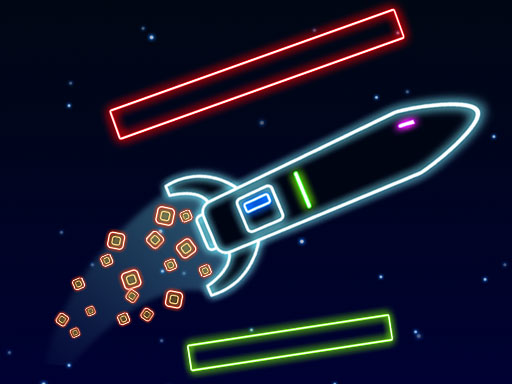
Neon Rocket is an exhilarating and casual gaming experience designed to test your coordination and reflexes. As you guide your rocket through a vibrant neon landscape, you'll need to maintain perfect balance while skillfully avoiding various obstacles that threaten your path. Each successful maneuver not only brings you closer to your goal but also earns you collectible stars that significantly
What makes a good arcade game? Usually a single, easy-to-read score, difficulty that ramps steadily and the "one more go" effect — and Neon Rocket Game has each of them in some measure. Playing it works your focus and consistency, which is a large part of why the "one more round" feeling is so strong.
How to play Neon Rocket Game
- Press the play button above and wait for Neon Rocket Game to finish loading. On first load this can take a few seconds while the game files are fetched.
- Follow the on-screen prompts. The developer describes the controls like this: Desktop A or D to Move the Rocket Mobile Touch Buttons on Screen
- Play the first run purely to learn. Notice the rhythm of the obstacles, then start a fresh run and aim for a clean start.
- When you are comfortable, set a target: a score to beat, a level to clear or a time to shave. Small goals are what make Neon Rocket Game stick.
Controls
You will not need a manual for Neon Rocket Game, but knowing the inputs before you start saves the first minute of fumbling:
| Input | What it does |
|---|---|
| Tap (touch) | Desktop A or D to Move the Rocket Mobile Touch Buttons on Screen. |
The controls are tap and drag based, which makes it comfortable on touch screens as well as with a mouse.
Tips and tricks
- Look one step ahead of your character. Reacting to what is under you is too late; reacting to what is coming is exactly on time.
- Learn the first thirty seconds perfectly. The opening is the same every time, so it should never be where you lose.
- Take a short break after three or four failed runs. Arcade games punish tired eyes more than any other genre.
- Aim for consistency before you aim for records. A steady run that avoids mistakes usually scores higher than a flashy one that ends early.
- Because this is a Arcade game, restart early when a run goes wrong instead of grinding out a poor score.
Who will enjoy it
We would recommend Neon Rocket Game to anyone with a few minutes to spare and a competitive streak. Expect runs of thirty seconds to a few minutes, endlessly repeatable. The learning curve is simple rules, high skill ceiling. The controls are tap and drag based, which makes it comfortable on touch screens as well as with a mouse.
Game details
| Category | Arcade Games |
|---|---|
| Tags | Html5 Games For Your Site, Arcade, 1 Player, Bmx Games, Spaceship, Planet, Rocket |
| Platform | Browser (desktop, tablet and mobile) |
| Controls | Touch and mouse |
| Technology | HTML5 — no download or plugin required |
| Frame | Landscape (1280×720) |
| Added | 25 October 2024 |
| Plays | 2 |
| Price | Free to play |
Frequently asked questions
Is Neon Rocket Game free to play?
Yes. Neon Rocket Game is completely free to play on Diemakora. There is no download, no account and no payment — the game runs in your browser.
Can I play Neon Rocket Game on my phone?
Yes — the game supports touch input and adapts to smaller screens, so you can play Neon Rocket Game on a phone or tablet as well as on a computer.
What are the controls for Neon Rocket Game?
In short: Tap (touch) — Desktop A or D to Move the Rocket Mobile Touch Buttons on Screen. The full list is in the controls section above.
Does Neon Rocket Game save my progress?
Progress in Neon Rocket Game is kept by the game itself inside your browser storage. It will normally be there when you come back on the same device and browser.
How do I play Neon Rocket Game in full screen?
Use the full-screen button just below the game frame. Press Esc on your keyboard to leave full-screen mode again.
What kind of game is Neon Rocket Game?
It is a arcade game with the tags Html5 Games For Your Site, Arcade, 1 Player, Bmx Games. Simple rules, high skill ceiling, and runs of thirty seconds to a few minutes, endlessly repeatable.
Games similar to Neon Rocket Game
When you are done, scroll down for more arcade games and titles that share tags with Neon Rocket Game.