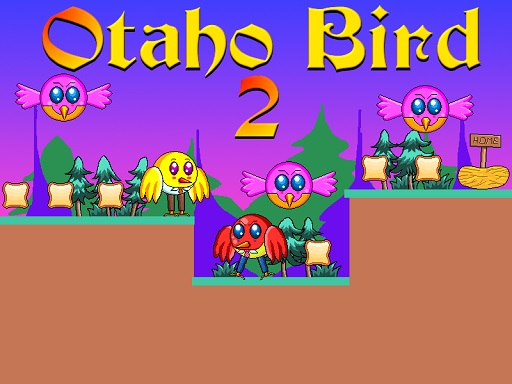
Otaho Bird 2 is a free online arcade game you can play right here in your browser, with no download and no sign-up. You will understand Otaho Bird 2 in about ten seconds and still be improving at it a week later. That is the arcade formula done right. From the tags you can already tell that you run and jump across platforms, and precise movement is the core skill.
About Otaho Bird 2
Otaho Bird 2 is an engaging 2D platformer that invites players into a vibrant world where they control a spirited bird on a quest to collect delicious slices of bread. As you flutter through carefully designed levels, you'll need to navigate a challenging environment filled with adversarial birds, menacing blades, and scorching flames. Your objective in each stage is to
What makes a good arcade game? Usually a single, easy-to-read score, bright, readable visuals and the "one more go" effect — and Otaho Bird 2 has each of them in some measure. Under the surface it is a test of focus and rhythm, dressed up in playful presentation.
How to play Otaho Bird 2
- Press the play button above and wait for Otaho Bird 2 to finish loading. On first load this can take a few seconds while the game files are fetched.
- Follow the on-screen prompts. The developer describes the controls like this: Use WASD or Arrow keys for the player s movement Use W or Up arrow key twice for double jump
- Play the first run purely to learn. Notice the rhythm of the obstacles, then start a fresh run and aim for a clean start.
- Switch to full screen if precision matters, and remember that the game keeps its own progress — finish a level before you close the tab.
Controls
Here is how Otaho Bird 2 is controlled, based on the developer's instructions and our own testing:
| Input | What it does |
|---|---|
| WASD keys | Use WASD or Arrow keys for the player s movement Use W or Up arrow key twice for double jump. |
| Arrow keys | Use WASD or Arrow keys for the player s movement Use W or Up arrow key twice for double jump. |
It is designed for desktop play with a keyboard and mouse.
Tips and tricks
- Restart early. If a run starts badly, do not grind it out; a fresh attempt costs nothing and saves your focus.
- Look one step ahead of your character. Reacting to what is under you is too late; reacting to what is coming is exactly on time.
- Take a short break after three or four failed runs. Arcade games punish tired eyes more than any other genre.
- Learn the first thirty seconds perfectly. The opening is the same every time, so it should never be where you lose.
- Because this is a Platform game, jump from the very edge of a platform for maximum distance.
Who will enjoy it
Who is Otaho Bird 2 for? In a word, anyone with a few minutes to spare and a competitive streak. A typical session is runs of thirty seconds to a few minutes, endlessly repeatable. Difficulty-wise it is simple rules, high skill ceiling. It is designed for desktop play with a keyboard and mouse.
Game details
| Category | Arcade Games |
|---|---|
| Tags | Arcade, 1 Player, Adventure, 2d, Jumping, Cartoon Network, Cute, Platform, Collecting, Pixel, Retro, Angrybirds |
| Platform | Browser (desktop) |
| Controls | Keyboard |
| Technology | HTML5 — no download or plugin required |
| Frame | Landscape (800×640) |
| Added | 26 September 2024 |
| Plays | 1 |
| Price | Free to play |
Frequently asked questions
Is Otaho Bird 2 free to play?
Yes. Otaho Bird 2 is completely free to play on Diemakora. There is no download, no account and no payment — the game runs in your browser.
Can I play Otaho Bird 2 on my phone?
This one is a desktop game. It expects a keyboard and mouse, so we recommend playing Otaho Bird 2 on a computer for the intended experience.
What are the controls for Otaho Bird 2?
In short: WASD keys — Use WASD or Arrow keys for the player s movement Use W or Up arrow key twice for double jump; Arrow keys — Use WASD or Arrow keys for the player s movement Use W or Up arrow key twice for double jump. The full list is in the controls section above.
Does Otaho Bird 2 save my progress?
Progress in Otaho Bird 2 is kept by the game itself inside your browser storage. It will normally be there when you come back on the same device and browser.
How do I play Otaho Bird 2 in full screen?
Use the full-screen button just below the game frame. Press Esc on your keyboard to leave full-screen mode again.
What kind of game is Otaho Bird 2?
It is a arcade game with the tags Arcade, 1 Player, Adventure, 2d. Simple rules, high skill ceiling, and runs of thirty seconds to a few minutes, endlessly repeatable.
Games similar to Otaho Bird 2
When you are done, scroll down for more arcade games and titles that share tags with Otaho Bird 2.