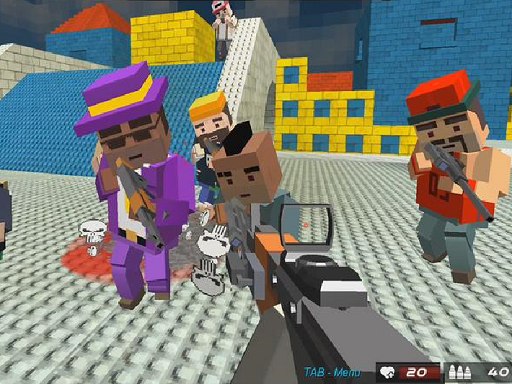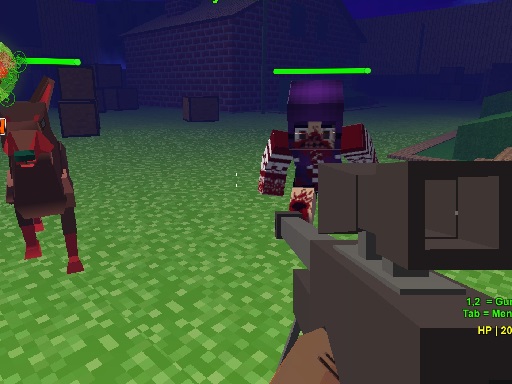
Looking for a shooting game that starts instantly? Pixel Zombie Suvival Toonfare runs in your browser and is completely free to play. Shooting games are really about attention: Pixel Zombie Suvival Toonfare rewards the player who tracks several moving things at once and picks the right one to deal with first. Its tags tell you what to expect: other players are involved, either online or on the same device; the enemies are zombies, which usually means slow but relentless crowds; aiming and firing at targets is the primary action.
About Pixel Zombie Suvival Toonfare
Pixel Zombie Survival Toonfare offers an exciting mix of offline campaigns and multiplayer modes that promise hours of fun. Players can enjoy these undead-themed adventures solo or team up with friends to tackle the perils of a zombie-infested world. With a diverse selection of weapons at your disposal, whether you're battling AI-controlled zombie foes or engaging in intense competition against
Judged as a shooting game, Pixel Zombie Suvival Toonfare hits the notes you would hope for: ammunition or cooldown management, waves or levels that build up and satisfying hit feedback. The skills it leans on are situational awareness and situational awareness; both improve noticeably after a few sessions.
How to play Pixel Zombie Suvival Toonfare
- Press the play button above and wait for Pixel Zombie Suvival Toonfare to finish loading. On first load this can take a few seconds while the game files are fetched.
- Follow the on-screen prompts. The developer describes the controls like this: To walk using WASD and to shoot use the mouse show the menu push TAB
- Take a few practice shots at the first targets to learn the aim speed, then move on to prioritising the dangerous enemies.
- When you are comfortable, set a target: a score to beat, a level to clear or a time to shave. Small goals are what make Pixel Zombie Suvival Toonfare stick.
Controls
Here is how Pixel Zombie Suvival Toonfare is controlled, based on the developer's instructions and our own testing:
| Input | What it does |
|---|---|
| WASD keys | To walk using WASD and to shoot use the mouse show the menu push TAB. |
| Mouse | To walk using WASD and to shoot use the mouse show the menu push TAB. |
| Tab | To walk using WASD and to shoot use the mouse show the menu push TAB. |
It is designed for desktop play with a keyboard and mouse.
Tips and tricks
- Prioritise the threat that will hurt you soonest, not the one that is closest or biggest. Fast enemies before slow ones, shooters before melee.
- Aim first, then shoot. Spraying costs time or ammo and rarely helps; a single well-placed shot almost always beats three rushed ones.
- Learn the spawn points. Most levels reuse the same few entry points, and knowing them turns panic into routine.
- Keep your cursor or crosshair roughly where enemies appear, not on the spot where the last one died.
- Because this is a Shooting game, aim before you fire, and fire in short bursts.
Who will enjoy it
Pixel Zombie Suvival Toonfare is a good fit for players who like precision, quick targeting and progressively tougher waves. Expect levels of a few minutes each, with longer runs in survival modes. The learning curve is approachable at first, with a steep climb in the later waves. It is designed for desktop play with a keyboard and mouse.
Game details
| Category | Shooting Games |
|---|---|
| Tags | Shooting, Zombie, Multiplayer, Warrior |
| Platform | Browser (desktop) |
| Controls | Keyboard and mouse |
| Technology | HTML5 — no download or plugin required |
| Frame | Landscape (800×600) |
| Added | 26 September 2024 |
| Plays | 2 |
| Price | Free to play |
Frequently asked questions
Is Pixel Zombie Suvival Toonfare free to play?
It is free. Open the page, press play and the game loads in the browser. You do not need to install anything or register.
Can I play Pixel Zombie Suvival Toonfare on my phone?
This one is a desktop game. It expects a keyboard and mouse, so we recommend playing Pixel Zombie Suvival Toonfare on a computer for the intended experience.
What are the controls for Pixel Zombie Suvival Toonfare?
In short: WASD keys — To walk using WASD and to shoot use the mouse show the menu push TAB; Mouse — To walk using WASD and to shoot use the mouse show the menu push TAB; Tab — To walk using WASD and to shoot use the mouse show the menu push TAB. The full list is in the controls section above.
Does Pixel Zombie Suvival Toonfare save my progress?
Most browser games, including Pixel Zombie Suvival Toonfare, store progress locally in your browser. If you clear your cookies or switch devices, that progress may be lost, so finish sessions before clearing browser data.
What if Pixel Zombie Suvival Toonfare does not load?
If Pixel Zombie Suvival Toonfare does not load, refresh the page, make sure your browser is up to date and check that hardware acceleration is enabled. Ad blockers occasionally interfere with the game frame as well.
What kind of game is Pixel Zombie Suvival Toonfare?
It is a shooting game with the tags Shooting, Zombie, Multiplayer, Warrior. Approachable at first, with a steep climb in the later waves, and levels of a few minutes each, with longer runs in survival modes.
Games similar to Pixel Zombie Suvival Toonfare
You will find more games like Pixel Zombie Suvival Toonfare further down this page, chosen by matching tags and category.