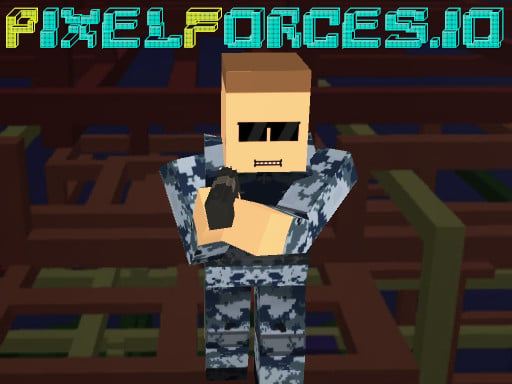
Looking for a multiplayer game that starts instantly? PixelForces.io runs in your browser and is completely free to play. PixelForces.io works because it is social. Winning feels better and losing is funnier when there is a real person on the other side. From the tags you can already tell that it features firearms and shooting mechanics; it uses hardware-accelerated graphics in the browser.
About PixelForces.io
PixelForces.io is an exhilarating 3D shooting game designed for those who crave a challenge in a vibrant online environment. With the option to select from five unique multiplayer modes, players can engage in thrilling combat and tactical gameplay. Whether you prefer the intensity of Deathmatch or the collaborative approach of Team Deathmatch, there's something for everyone. In the RPG mode,
Judged as a multiplayer game, PixelForces.io hits the notes you would hope for: bragging rights, simple rules everyone can grasp fast and moments of comeback and reversal. The skills it leans on are reading opponents and composure; both improve noticeably after a few sessions.
How to play PixelForces.io
- Press the play button above and wait for PixelForces.io to finish loading. On first load this can take a few seconds while the game files are fetched.
- Follow the on-screen prompts. The developer describes the controls like this: WASD or arrow keys to move Space bar to jump Right mouse button to aim Left mouse button to shoot L for toggle flashlight in night mode Esc or tab to toggle pause
- Try a round against the computer or alone first so the controls are familiar before you bring in another player.
- Use the full-screen button under the frame for the best view, and keep an eye on the score, timer or health display so you know what the game is asking of you.
Controls
Here is how PixelForces.io is controlled, based on the developer's instructions and our own testing:
| Input | What it does |
|---|---|
| WASD keys | WASD or arrow keys to move Space bar to jump Right mouse button to aim Left mouse button to shoot L for toggle flashlight in night mode Esc or tab to toggle pause. |
| Arrow keys | WASD or arrow keys to move Space bar to jump Right mouse button to aim Left mouse button to shoot L for toggle flashlight in night mode Esc or tab to toggle pause. |
| Space bar | WASD or arrow keys to move Space bar to jump Right mouse button to aim Left mouse button to shoot L for toggle flashlight in night mode Esc or tab to toggle pause. |
| Mouse | WASD or arrow keys to move Space bar to jump Right mouse button to aim Left mouse button to shoot L for toggle flashlight in night mode Esc or tab to toggle pause. |
| Esc | WASD or arrow keys to move Space bar to jump Right mouse button to aim Left mouse button to shoot L for toggle flashlight in night mode Esc or tab to toggle pause. |
| Tab | WASD or arrow keys to move Space bar to jump Right mouse button to aim Left mouse button to shoot L for toggle flashlight in night mode Esc or tab to toggle pause. |
It is designed for desktop play with a keyboard and mouse.
Tips and tricks
- Short, frequent matches build skill faster than marathon sessions.
- Cooperative modes reward splitting roles: one player handles offence while the other covers, rather than both rushing.
- In shared-keyboard games, agree on who uses which keys before you start — hand collisions cause more losses than skill does.
- Be a good winner. Rematches are how multiplayer games stay fun, and nobody replays a gloater.
Who will enjoy it
We would recommend PixelForces.io to friends on one screen, online competitors and anyone who finds bots boring. Expect matches of two to ten minutes, best played in a series. Difficulty-wise it is entirely dependent on who you are playing against. It is designed for desktop play with a keyboard and mouse.
Game details
| Category | Multiplayer Games |
|---|---|
| Tags | 3d Games, Webgl, Unity3d, Gun, Weapons |
| Platform | Browser (desktop) |
| Controls | Keyboard and mouse |
| Technology | HTML5 — no download or plugin required |
| Frame | Landscape (960×540) |
| Added | 25 October 2024 |
| Plays | 2 |
| Price | Free to play |
Frequently asked questions
Is PixelForces.io free to play?
It is free. Open the page, press play and the game loads in the browser. You do not need to install anything or register.
Can I play PixelForces.io on my phone?
PixelForces.io is best played on a desktop or laptop. It relies on keyboard and mouse input, and while it may load on a phone, the controls will not be comfortable.
What are the controls for PixelForces.io?
In short: WASD keys — WASD or arrow keys to move Space bar to jump Right mouse button to aim Left mouse button to shoot L for toggle flashlight in night mode Esc or tab to toggle pause; Arrow keys — WASD or arrow keys to move Space bar to jump Right mouse button to aim Left mouse button to shoot L for toggle flashlight in night mode Esc or tab to toggle pause; Space bar — WASD or arrow keys to move Space bar to jump Right mouse button to aim Left mouse button to shoot L for toggle flashlight in night mode Esc or tab to toggle pause. The full list is in the controls section above.
Does PixelForces.io save my progress?
Progress in PixelForces.io is kept by the game itself inside your browser storage. It will normally be there when you come back on the same device and browser.
How do I play PixelForces.io in full screen?
Click the expand icon under the game to switch PixelForces.io to full screen. Esc returns you to the normal view.
What kind of game is PixelForces.io?
It is a multiplayer game with the tags 3d Games, Webgl, Unity3d, Gun. Entirely dependent on who you are playing against, and matches of two to ten minutes, best played in a series.
Games similar to PixelForces.io
If you enjoy PixelForces.io, the related games below share its category or tags and are a natural next step.