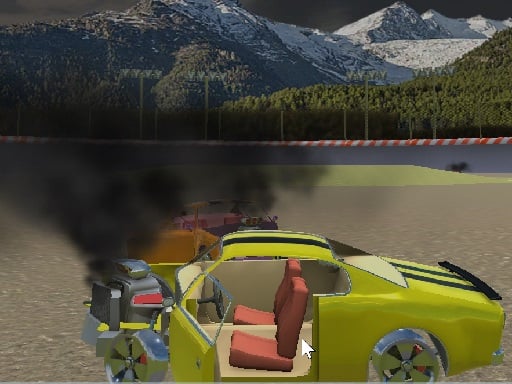
Randomation Demolition Speed Car Crash is one of the racing games in the Diemakora collection. It loads in seconds and needs nothing installed. In Randomation Demolition Speed Car Crash every corner is a small decision — brake early and lose time, brake late and risk the wall. That tension is what keeps people replaying the same track. Its tags tell you what to expect: it uses hardware-accelerated graphics in the browser.
About Randomation Demolition Speed Car Crash
Experience the thrill of chaos in Randomation Demolition Speed Car Crash! Test your reflexes and agility as you navigate a destructive environment filled with oncoming vehicles while racing against the clock. Your primary objective is to collect as many coins as possible within the allotted time, all while avoiding a collision with other drivers. As you speed through the chaotic streets,
What makes a good racing game? Usually upgrades or unlocks between races, responsive steering and tracks or roads that reward memorisation — and Randomation Demolition Speed Car Crash has each of them in some measure. The skills it leans on are risk management and timing; both improve noticeably after a few sessions.
How to play Randomation Demolition Speed Car Crash
- Press the play button above and wait for Randomation Demolition Speed Car Crash to finish loading. On first load this can take a few seconds while the game files are fetched.
- Follow the on-screen prompts. The developer describes the controls like this: Tab - Menu ARROWS keys to drive C key to change view camera F Boost R Restart WASD keys to Look around
- Do a warm-up lap without worrying about position. Feel how the vehicle brakes and turns, then race for real.
- Use the full-screen button under the frame for the best view, and keep an eye on the score, timer or health display so you know what the game is asking of you.
Controls
Controls for Randomation Demolition Speed Car Crash at a glance:
| Input | What it does |
|---|---|
| WASD keys | Tab - Menu ARROWS keys to drive C key to change view camera F Boost R Restart WASD keys to Look around. |
| Arrow keys | Tab - Menu ARROWS keys to drive C key to change view camera F Boost R Restart WASD keys to Look around. |
| Tab | Tab - Menu ARROWS keys to drive C key to change view camera F Boost R Restart WASD keys to Look around. |
It is designed for desktop play with a keyboard and mouse.
Tips and tricks
- Learn one track completely before moving on. Knowing where every bend is worth several seconds a lap and the skill carries over.
- Traffic and rivals are predictable: they hold their line. Plan your overtake two cars ahead rather than reacting to the one in front.
- If the game has upgrades, put the first ones into handling or brakes rather than top speed — control wins more races than raw power at the beginning.
- Look where you want to go, not at the wall you want to avoid. Your steering follows your attention.
- Because this is a Webgl game, enable hardware acceleration in your browser settings if it stutters.
Who will enjoy it
Who is Randomation Demolition Speed Car Crash for? In a word, anyone who enjoys speed, vehicles and shaving seconds off a personal best. A typical session is a single race of one to three minutes, or a longer career if unlocks are involved. How hard is it? Forgiving on early tracks, demanding on later ones. It is designed for desktop play with a keyboard and mouse.
Game details
| Category | Racing Games |
|---|---|
| Tags | 3d Games, 1 Player, Webgl, Unity3d, Supercars, Driving |
| Platform | Browser (desktop) |
| Controls | Keyboard |
| Technology | HTML5 — no download or plugin required |
| Frame | Landscape (800×600) |
| Added | 25 October 2024 |
| Plays | 2 |
| Price | Free to play |
Frequently asked questions
Is Randomation Demolition Speed Car Crash free to play?
It is free. Open the page, press play and the game loads in the browser. You do not need to install anything or register.
Can I play Randomation Demolition Speed Car Crash on my phone?
Randomation Demolition Speed Car Crash is best played on a desktop or laptop. It relies on keyboard and mouse input, and while it may load on a phone, the controls will not be comfortable.
What are the controls for Randomation Demolition Speed Car Crash?
In short: WASD keys — Tab - Menu ARROWS keys to drive C key to change view camera F Boost R Restart WASD keys to Look around; Arrow keys — Tab - Menu ARROWS keys to drive C key to change view camera F Boost R Restart WASD keys to Look around; Tab — Tab - Menu ARROWS keys to drive C key to change view camera F Boost R Restart WASD keys to Look around. The full list is in the controls section above.
Does Randomation Demolition Speed Car Crash save my progress?
Most browser games, including Randomation Demolition Speed Car Crash, store progress locally in your browser. If you clear your cookies or switch devices, that progress may be lost, so finish sessions before clearing browser data.
How do I play Randomation Demolition Speed Car Crash in full screen?
Use the full-screen button just below the game frame. Press Esc on your keyboard to leave full-screen mode again.
What kind of game is Randomation Demolition Speed Car Crash?
It is a racing game with the tags 3d Games, 1 Player, Webgl, Unity3d. Forgiving on early tracks, demanding on later ones, and a single race of one to three minutes, or a longer career if unlocks are involved.
Games similar to Randomation Demolition Speed Car Crash
If you enjoy Randomation Demolition Speed Car Crash, the related games below share its category or tags and are a natural next step.