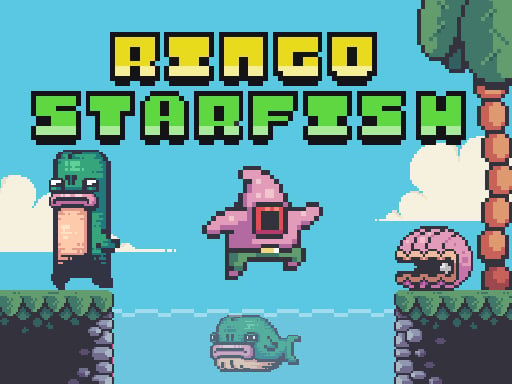
Looking for a arcade game that starts instantly? Ringo Starfish runs in your browser and is completely free to play. Ringo Starfish follows the oldest recipe in gaming: one clear rule, one clear score, and the urge to try just one more time. A few things the tags reveal: it deliberately echoes classic arcade design; there is a journey with a beginning and an end rather than an endless score chase.
About Ringo Starfish
Join Ringo Starfish on an exhilarating adventure as he navigates the vast depths of the ocean and stumbles upon an enigmatic island teeming with secrets and hidden treasures. This colorful platform game invites players to help Ringo embark on a thrilling quest, where danger lurks at every corner and treasures await to be uncovered. As Ringo delves deeper into the island,
Judged as a arcade game, Ringo Starfish hits the notes you would hope for: instant restarts, the "one more go" effect and difficulty that ramps steadily. The skills it leans on are consistency and timing; both improve noticeably after a few sessions.
How to play Ringo Starfish
- Press the play button above and wait for Ringo Starfish to finish loading. On first load this can take a few seconds while the game files are fetched.
- Follow the on-screen prompts. The developer describes the controls like this: Arrow keys or A D to move W or Up Arrow to jump X or J to fire Mouse or Touch to Start Mobile - Touch to Play
- Play the first run purely to learn. Notice the rhythm of the obstacles, then start a fresh run and aim for a clean start.
- Switch to full screen if precision matters, and remember that the game keeps its own progress — finish a level before you close the tab.
Controls
You will not need a manual for Ringo Starfish, but knowing the inputs before you start saves the first minute of fumbling:
| Input | What it does |
|---|---|
| Arrow keys | Arrow keys or A D to move W or Up Arrow to jump X or J to fire Mouse or Touch to Start Mobile - Touch to Play. |
| Mouse | Arrow keys or A D to move W or Up Arrow to jump X or J to fire Mouse or Touch to Start Mobile - Touch to Play. |
| Tap (touch) | Arrow keys or A D to move W or Up Arrow to jump X or J to fire Mouse or Touch to Start Mobile - Touch to Play. |
The controls are tap and drag based, which makes it comfortable on touch screens as well as with a mouse.
Tips and tricks
- Learn the first thirty seconds perfectly. The opening is the same every time, so it should never be where you lose.
- Restart early. If a run starts badly, do not grind it out; a fresh attempt costs nothing and saves your focus.
- Find the rhythm. Most arcade games have an underlying beat — taps, jumps or moves that fall on a regular interval — and once you feel it, your accuracy jumps.
- Aim for consistency before you aim for records. A steady run that avoids mistakes usually scores higher than a flashy one that ends early.
- Because this is a Pixel game, pixel games often have very precise hitboxes — trust the sprite edges.
Who will enjoy it
Who is Ringo Starfish for? In a word, anyone with a few minutes to spare and a competitive streak. A typical session is runs of thirty seconds to a few minutes, endlessly repeatable. The learning curve is simple rules, high skill ceiling. The controls are tap and drag based, which makes it comfortable on touch screens as well as with a mouse.
Game details
| Category | Arcade Games |
|---|---|
| Tags | Html5 Games For Your Site, Arcade, Mobile, Adventure, 2d, Supercars, Platform, Pixel, Classic, Retro, Mario |
| Platform | Browser (desktop, tablet and mobile) |
| Controls | Keyboard and mouse |
| Technology | HTML5 — no download or plugin required |
| Frame | Landscape (1280×720) |
| Added | 25 October 2024 |
| Plays | 1 |
| Price | Free to play |
Frequently asked questions
Is Ringo Starfish free to play?
Yes. Ringo Starfish is completely free to play on Diemakora. There is no download, no account and no payment — the game runs in your browser.
Can I play Ringo Starfish on my phone?
Yes — the game supports touch input and adapts to smaller screens, so you can play Ringo Starfish on a phone or tablet as well as on a computer.
What are the controls for Ringo Starfish?
In short: Arrow keys — Arrow keys or A D to move W or Up Arrow to jump X or J to fire Mouse or Touch to Start Mobile - Touch to Play; Mouse — Arrow keys or A D to move W or Up Arrow to jump X or J to fire Mouse or Touch to Start Mobile - Touch to Play; Tap (touch) — Arrow keys or A D to move W or Up Arrow to jump X or J to fire Mouse or Touch to Start Mobile - Touch to Play. The full list is in the controls section above.
Does Ringo Starfish save my progress?
Progress in Ringo Starfish is kept by the game itself inside your browser storage. It will normally be there when you come back on the same device and browser.
How do I play Ringo Starfish in full screen?
Use the full-screen button just below the game frame. Press Esc on your keyboard to leave full-screen mode again.
What kind of game is Ringo Starfish?
It is a arcade game with the tags Html5 Games For Your Site, Arcade, Mobile, Adventure. Simple rules, high skill ceiling, and runs of thirty seconds to a few minutes, endlessly repeatable.
Games similar to Ringo Starfish
You will find more games like Ringo Starfish further down this page, chosen by matching tags and category.