Play Spiderman Memory Card Match for free — a puzzle game that runs directly in your browser on desktop, tablet or phone. Spiderman Memory Card Match asks you to think before you act. There is no clock chasing you in most levels — only a board, a set of rules, and the pleasure of the solution clicking into place. Its tags tell you what to expect: it exercises logic and quick thinking; it is played with cards, so probability and memory matter.
About Spiderman Memory Card Match
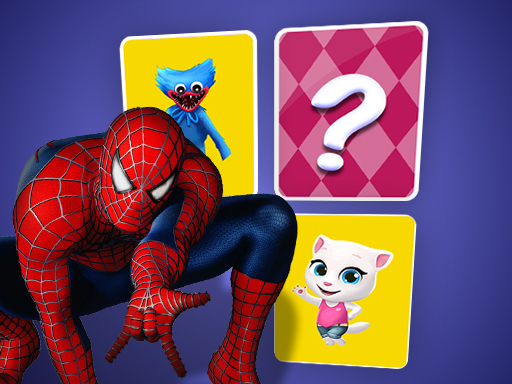
Challenge your memory with the thrilling Spiderman Memory Card Match game! In this engaging memory challenge, you'll test your recall abilities across various difficulty levels. As you begin, choose a level that suits you; the higher the difficulty, the more cards will be present on the board. Prepare to encounter multiple pairs of identical images featuring our beloved superhero, Spiderman.
The genre lives on a gentle but real difficulty curve, a calm pace and hints or undo options. Spiderman Memory Card Match understands that, and it shows in the first minute of play. Under the surface it is a test of planning and pattern recognition, dressed up in relaxing presentation.
How to play Spiderman Memory Card Match
- Start by clicking the big play button. Spiderman Memory Card Match loads inside the frame; give it a moment, especially on a slow connection.
- Follow the on-screen prompts. The developer describes the controls like this: Children should periodically return to this memory until they are easily capable of solving at least the most basic levels It is common that the child will make significant progress by developing memory strategies In…
- Read the whole level before your first move. Identify the goal, then look for the forced moves that must happen regardless.
- Switch to full screen if precision matters, and remember that the game keeps its own progress — finish a level before you close the tab.
Controls
Here is how Spiderman Memory Card Match is controlled, based on the developer's instructions and our own testing:
| Input | What it does |
|---|---|
| Mouse | Point and click to play; the game shows its own prompts on screen. |
| Keyboard | Some actions may use the arrow keys or space bar — check the in-game hints. |
It is designed for desktop play with a keyboard and mouse.
Tips and tricks
- If you are stuck for more than a couple of minutes, step away and come back. Puzzle solutions often arrive when you stop forcing them.
- Read the whole board before your first move. In most puzzle games the first move is the most important one, and it deserves ten seconds of looking.
- Use undo or restart freely. Experimenting is how you learn the mechanics; there is no penalty for trying an idea.
- Look for forced moves — places where only one option is legal. Solving those first shrinks the problem.
- Because this is a Card game, track which cards have already been played.
- Because this is a Brain game, the obvious answer is often a trap in brain-teasers — pause before you click.
Who will enjoy it
Spiderman Memory Card Match is a good fit for players who prefer thinking to twitching, from casual brain-teaser fans to dedicated solvers. In terms of time, think of a level or two in five minutes, or a long relaxed session. How hard is it? Gentle at the start and genuinely tricky later. It is designed for desktop play with a keyboard and mouse.
Game details
| Category | Puzzle Games |
|---|---|
| Tags | Brain, Matching, Card |
| Platform | Browser (desktop) |
| Controls | Mouse |
| Technology | HTML5 — no download or plugin required |
| Frame | Landscape (800×600) |
| Added | 26 September 2024 |
| Plays | 1 |
| Price | Free to play |
Frequently asked questions
Is Spiderman Memory Card Match free to play?
Yes. Spiderman Memory Card Match is completely free to play on Diemakora. There is no download, no account and no payment — the game runs in your browser.
Can I play Spiderman Memory Card Match on my phone?
This one is a desktop game. It expects a keyboard and mouse, so we recommend playing Spiderman Memory Card Match on a computer for the intended experience.
What are the controls for Spiderman Memory Card Match?
The developer did not publish detailed controls, but the game follows genre conventions: Mouse — Point and click to play; the game shows its own prompts on screen; Keyboard — Some actions may use the arrow keys or space bar — check the in-game hints. The full list is in the controls section above.
Does Spiderman Memory Card Match save my progress?
Progress in Spiderman Memory Card Match is kept by the game itself inside your browser storage. It will normally be there when you come back on the same device and browser.
What if Spiderman Memory Card Match does not load?
If Spiderman Memory Card Match does not load, refresh the page, make sure your browser is up to date and check that hardware acceleration is enabled. Ad blockers occasionally interfere with the game frame as well.
What kind of game is Spiderman Memory Card Match?
It is a puzzle game with the tags Brain, Matching, Card. Gentle at the start and genuinely tricky later, and a level or two in five minutes, or a long relaxed session.
Games similar to Spiderman Memory Card Match
When you are done, scroll down for more puzzle games and titles that share tags with Spiderman Memory Card Match.