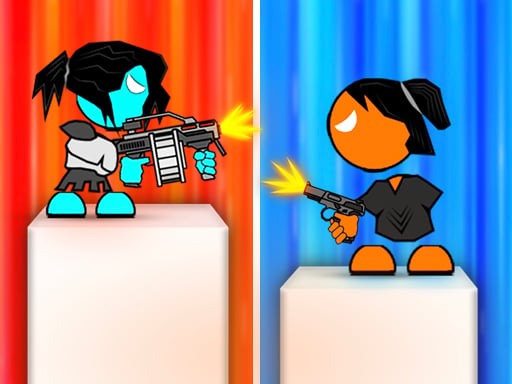
Stick Arena 3D is one of the action games in the Diemakora collection. It loads in seconds and needs nothing installed. Stick Arena 3D belongs to the action family, which means the fun comes from momentum — moving, dodging, striking and recovering before the next wave arrives. From the tags you can already tell that fast reactions and constant movement are the point; aiming and firing at targets is the primary action.
About Stick Arena 3D
Get ready to dive into the thrilling realm of Stick Arena 3D, an exhilarating platform game that invites you on an unforgettable journey across 40 meticulously designed levels. Each stage bursts with unique challenges, enemies, and mysteries waiting to be uncovered. As you navigate through vibrant, 3D environments, you'll need to strategically outmaneuver foes and utilize your skills to emerge
What makes a good action game? Usually short, intense rounds, a satisfying rhythm once you learn the patterns and clear feedback on every hit or miss — and Stick Arena 3D has each of them in some measure. Under the surface it is a test of hand-eye coordination and pattern recognition, dressed up in fast-paced presentation.
How to play Stick Arena 3D
- Start by clicking the big play button. Stick Arena 3D loads inside the frame; give it a moment, especially on a slow connection.
- Follow the on-screen prompts. The developer describes the controls like this: You can use the ARROW KEYS or W A D to move You can use the LEFT CLICK button on your mouse to shoot
- Start slowly. Learn the movement and the first enemy pattern before you push for score; speed comes naturally once the inputs are automatic.
- When you are comfortable, set a target: a score to beat, a level to clear or a time to shave. Small goals are what make Stick Arena 3D stick.
Controls
You will not need a manual for Stick Arena 3D, but knowing the inputs before you start saves the first minute of fumbling:
| Input | What it does |
|---|---|
| Arrow keys | You can use the ARROW KEYS or W A D to move You can use the LEFT CLICK button on your mouse to shoot. |
| Left mouse click | You can use the ARROW KEYS or W A D to move You can use the LEFT CLICK button on your mouse to shoot. |
| Mouse | You can use the ARROW KEYS or W A D to move You can use the LEFT CLICK button on your mouse to shoot. |
It is designed for desktop play with a keyboard and mouse.
Tips and tricks
- Learn the enemy or obstacle patterns before you try to go fast — most action games repeat a handful of behaviours, and once you recognise them the game slows down in your head.
- When you die, note exactly what killed you. The answer is usually one specific pattern, and fixing that one thing is worth more than "trying harder".
- Watch the edges of the screen, not just your character. New threats almost always enter from the sides or the top, and spotting them early gives you a full second of extra time.
- Do not chase every bonus. Collectibles placed near danger are a trade-off the designer set for you; take them only when your position is safe.
- Because this is a Shooting game, aim before you fire, and fire in short bursts.
Who will enjoy it
We would recommend Stick Arena 3D to players who enjoy adrenaline, arcade-style progression and beating their own high score. Expect rounds of two to five minutes, which makes it ideal for a quick break. How hard is it? Easy to pick up but genuinely demanding to master. It is designed for desktop play with a keyboard and mouse.
Game details
| Category | Action Games |
|---|---|
| Tags | 3d Games, Adventure, Action, First Person Shooter, Shooting, Stickman |
| Platform | Browser (desktop) |
| Controls | Keyboard and mouse |
| Technology | HTML5 — no download or plugin required |
| Frame | Landscape (800×450) |
| Added | 26 September 2024 |
| Plays | 1 |
| Price | Free to play |
Frequently asked questions
Is Stick Arena 3D free to play?
It is free. Open the page, press play and the game loads in the browser. You do not need to install anything or register.
Can I play Stick Arena 3D on my phone?
Stick Arena 3D is best played on a desktop or laptop. It relies on keyboard and mouse input, and while it may load on a phone, the controls will not be comfortable.
What are the controls for Stick Arena 3D?
In short: Arrow keys — You can use the ARROW KEYS or W A D to move You can use the LEFT CLICK button on your mouse to shoot; Left mouse click — You can use the ARROW KEYS or W A D to move You can use the LEFT CLICK button on your mouse to shoot; Mouse — You can use the ARROW KEYS or W A D to move You can use the LEFT CLICK button on your mouse to shoot. The full list is in the controls section above.
Does Stick Arena 3D save my progress?
Most browser games, including Stick Arena 3D, store progress locally in your browser. If you clear your cookies or switch devices, that progress may be lost, so finish sessions before clearing browser data.
What if Stick Arena 3D does not load?
A blank frame usually means the game is still loading or a browser extension blocked it. Wait a few seconds, then reload; if that fails, try another browser.
What kind of game is Stick Arena 3D?
It is a action game with the tags 3d Games, Adventure, Action, First Person Shooter. Easy to pick up but genuinely demanding to master, and rounds of two to five minutes, which makes it ideal for a quick break.
Games similar to Stick Arena 3D
You will find more games like Stick Arena 3D further down this page, chosen by matching tags and category.