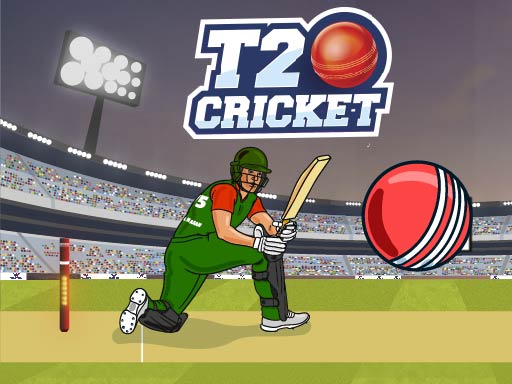
Looking for a sports game that starts instantly? T20 Cricket runs in your browser and is completely free to play. T20 Cricket takes a real sport, strips it to its essential thrill and hands you the controls. Timing the shot, the tackle or the jump is everything. Its tags tell you what to expect: it follows the hyper-casual formula: one mechanic, instant play and very short rounds; it is based on a real sport.
About T20 Cricket
Step into the thrilling world of T20 Cricket! Immerse yourself in the exhilarating atmosphere of a packed stadium, where fervent fans cheer for their teams. The game unfolds on a vibrant green field that sets the stage for an electrifying cricketing experience. Select the Bangladesh cricket team to display your exceptional skills and tactical know-how. In this fast-paced format, the bowlers
Judged as a sports game, T20 Cricket hits the notes you would hope for: skill-based timing, familiar rules and a strong sense of momentum. Under the surface it is a test of anticipation and aim, dressed up in energetic presentation.
How to play T20 Cricket
- Press the play button above and wait for T20 Cricket to finish loading. On first load this can take a few seconds while the game files are fetched.
- Follow the on-screen prompts. The developer describes the controls like this: Mobile Tap on the screen to hit the ball PC Click on the screen to hit the ball
- Use the practice or the first easy match to find the timing sweet spot for shots, swings or jumps.
- Use the full-screen button under the frame for the best view, and keep an eye on the score, timer or health display so you know what the game is asking of you.
Controls
Here is how T20 Cricket is controlled, based on the developer's instructions and our own testing:
| Input | What it does |
|---|---|
| Mouse | Mobile Tap on the screen to hit the ball PC Click on the screen to hit the ball. |
| Tap (touch) | Mobile Tap on the screen to hit the ball PC Click on the screen to hit the ball. |
The controls are tap and drag based, which makes it comfortable on touch screens as well as with a mouse.
Tips and tricks
- Use the whole field, court or track. Players who hug one side become predictable.
- Watch the opponent, not your player. Their movement tells you where the ball or the gap is going to be.
- Defend first when you are ahead, attack first when you are behind. It sounds obvious, and yet.
- Small, steady inputs. Over-steering, over-swinging and over-jumping are the most common mistakes in every sports game.
- Because this is a Sports game, timing beats power.
- Because this is a Arcade game, restart early when a run goes wrong instead of grinding out a poor score.
Who will enjoy it
We would recommend T20 Cricket to sports fans, casual competitors and anyone who likes a clear scoreboard. Expect a match in three to five minutes. The learning curve is easy to start, satisfying to master. The controls are tap and drag based, which makes it comfortable on touch screens as well as with a mouse.
Game details
| Category | Sports Games |
|---|---|
| Tags | Arcade, Hypercasual, Dragon Ball Z, Sports, Naptech Games |
| Platform | Browser (desktop, tablet and mobile) |
| Controls | Touch and mouse |
| Technology | HTML5 — no download or plugin required |
| Frame | Landscape (1280×720) |
| Added | 26 September 2024 |
| Plays | 1 |
| Price | Free to play |
Frequently asked questions
Is T20 Cricket free to play?
It is free. Open the page, press play and the game loads in the browser. You do not need to install anything or register.
Can I play T20 Cricket on my phone?
T20 Cricket works on mobile devices. Open this page on your phone or tablet and use the touch controls; rotating the device to landscape usually gives the best view.
What are the controls for T20 Cricket?
In short: Mouse — Mobile Tap on the screen to hit the ball PC Click on the screen to hit the ball; Tap (touch) — Mobile Tap on the screen to hit the ball PC Click on the screen to hit the ball. The full list is in the controls section above.
Does T20 Cricket save my progress?
Most browser games, including T20 Cricket, store progress locally in your browser. If you clear your cookies or switch devices, that progress may be lost, so finish sessions before clearing browser data.
What if T20 Cricket does not load?
A blank frame usually means the game is still loading or a browser extension blocked it. Wait a few seconds, then reload; if that fails, try another browser.
What kind of game is T20 Cricket?
It is a sports game with the tags Arcade, Hypercasual, Dragon Ball Z, Sports. Easy to start, satisfying to master, and a match in three to five minutes.
Games similar to T20 Cricket
When you are done, scroll down for more sports games and titles that share tags with T20 Cricket.