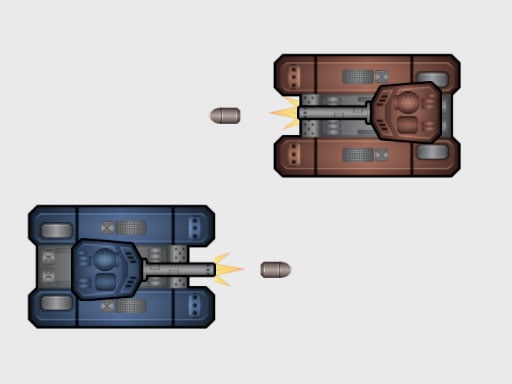
Welcome to TankBattle 2 Player, a browser-based action game. Click play, wait a moment for it to load, and you are in. TankBattle 2 Player belongs to the action family, which means the fun comes from momentum — moving, dodging, striking and recovering before the next wave arrives. A few things the tags reveal: fast reactions and constant movement are the point; the structure is classic arcade — quick rounds, rising difficulty and a score to beat.
About TankBattle 2 Player
Prepare yourself for the ultimate showdown in TankBattle 2 Player, where skill and strategy come together in an exhilarating battle of armored warfare. Engage in fierce duels as you command your tank, ready to take on your opponent in a test of nerve and precision. Choose your tank wisely and lead it into battle, where your reflexes and tactical decisions
The genre lives on a satisfying rhythm once you learn the patterns, clear feedback on every hit or miss and tight controls. TankBattle 2 Player understands that, and it shows in the first minute of play. The skills it leans on are pattern recognition and reaction time; both improve noticeably after a few sessions.
How to play TankBattle 2 Player
- Start by clicking the big play button. TankBattle 2 Player loads inside the frame; give it a moment, especially on a slow connection.
- Follow the on-screen prompts. The developer describes the controls like this: To move the blue tank use the WASD keys Press the Q key to fire a shot To move the brown tank use the Arrow Keys keys Press the P key to fire a shot
- Start slowly. Learn the movement and the first enemy pattern before you push for score; speed comes naturally once the inputs are automatic.
- When you are comfortable, set a target: a score to beat, a level to clear or a time to shave. Small goals are what make TankBattle 2 Player stick.
Controls
Controls for TankBattle 2 Player at a glance:
| Input | What it does |
|---|---|
| WASD keys | To move the blue tank use the WASD keys Press the Q key to fire a shot To move the brown tank use the Arrow Keys keys Press the P key to fire a shot. |
| Arrow keys | To move the blue tank use the WASD keys Press the Q key to fire a shot To move the brown tank use the Arrow Keys keys Press the P key to fire a shot. |
It is designed for desktop play with a keyboard and mouse.
Tips and tricks
- Sound is a cue. Many action games telegraph attacks with an audio effect a moment before the visual one — play with sound on when you are learning.
- When you die, note exactly what killed you. The answer is usually one specific pattern, and fixing that one thing is worth more than "trying harder".
- If there is a dash, jump or dodge move, treat it as a resource: use it to escape, not to attack, until you know the level.
- Keep moving. Standing still is the most common way to lose an action round, because the game is designed to punish hesitation.
- Because this is a Action game, keep moving.
Who will enjoy it
We would recommend TankBattle 2 Player to players who enjoy adrenaline, arcade-style progression and beating their own high score. A typical session is rounds of two to five minutes, which makes it ideal for a quick break. Difficulty-wise it is easy to pick up but genuinely demanding to master. It is designed for desktop play with a keyboard and mouse.
Game details
| Category | Action Games |
|---|---|
| Tags | Arcade, Adventure, Action, 2d, 2 Player Games, Battleship, Tanks |
| Platform | Browser (desktop) |
| Controls | Keyboard |
| Technology | HTML5 — no download or plugin required |
| Frame | Landscape (800×600) |
| Added | 26 September 2024 |
| Plays | 1 |
| Price | Free to play |
Frequently asked questions
Is TankBattle 2 Player free to play?
It is free. Open the page, press play and the game loads in the browser. You do not need to install anything or register.
Can I play TankBattle 2 Player on my phone?
TankBattle 2 Player is best played on a desktop or laptop. It relies on keyboard and mouse input, and while it may load on a phone, the controls will not be comfortable.
What are the controls for TankBattle 2 Player?
In short: WASD keys — To move the blue tank use the WASD keys Press the Q key to fire a shot To move the brown tank use the Arrow Keys keys Press the P key to fire a shot; Arrow keys — To move the blue tank use the WASD keys Press the Q key to fire a shot To move the brown tank use the Arrow Keys keys Press the P key to fire a shot. The full list is in the controls section above.
Does TankBattle 2 Player save my progress?
Most browser games, including TankBattle 2 Player, store progress locally in your browser. If you clear your cookies or switch devices, that progress may be lost, so finish sessions before clearing browser data.
What if TankBattle 2 Player does not load?
A blank frame usually means the game is still loading or a browser extension blocked it. Wait a few seconds, then reload; if that fails, try another browser.
What kind of game is TankBattle 2 Player?
It is a action game with the tags Arcade, Adventure, Action, 2d. Easy to pick up but genuinely demanding to master, and rounds of two to five minutes, which makes it ideal for a quick break.
Games similar to TankBattle 2 Player
When you are done, scroll down for more action games and titles that share tags with TankBattle 2 Player.