Teko vs Doov 2 is one of the arcade games in the Diemakora collection. It loads in seconds and needs nothing installed. You will understand Teko vs Doov 2 in about ten seconds and still be improving at it a week later. That is the arcade formula done right. A few things the tags reveal: it deliberately echoes classic arcade design; gathering items or collectibles is the goal.
About Teko vs Doov 2
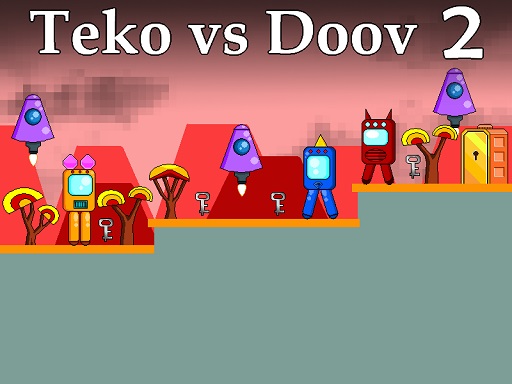
Teko vs Doov 2 is an exciting 2D platformer set in a futuristic Sci-Fi landscape. In this thrilling sequel, you take on the role of Teko, a nimble robot with a mission to gather silver keys while navigating a series of increasingly perilous levels. Your primary objective is to evade a variety of menacing foes, including both red and blue
Judged as a arcade game, Teko vs Doov 2 hits the notes you would hope for: instant restarts, the "one more go" effect and a single, easy-to-read score. Playing it works your rhythm and focus, which is a large part of why the "one more round" feeling is so strong.
How to play Teko vs Doov 2
- Press the play button above and wait for Teko vs Doov 2 to finish loading. On first load this can take a few seconds while the game files are fetched.
- Follow the on-screen prompts. The developer describes the controls like this: Use WASD or Arrow keys for the player s movement Use W or Up arrow key twice for double jump
- Play the first run purely to learn. Notice the rhythm of the obstacles, then start a fresh run and aim for a clean start.
- Use the full-screen button under the frame for the best view, and keep an eye on the score, timer or health display so you know what the game is asking of you.
Controls
The controls in Teko vs Doov 2 are straightforward once you have seen them written down:
| Input | What it does |
|---|---|
| WASD keys | Use WASD or Arrow keys for the player s movement Use W or Up arrow key twice for double jump. |
| Arrow keys | Use WASD or Arrow keys for the player s movement Use W or Up arrow key twice for double jump. |
It is designed for desktop play with a keyboard and mouse.
Tips and tricks
- Learn the first thirty seconds perfectly. The opening is the same every time, so it should never be where you lose.
- Restart early. If a run starts badly, do not grind it out; a fresh attempt costs nothing and saves your focus.
- Combo systems reward patience: keep the chain alive with safe moves rather than reaching for risky bonuses.
- Play in a quiet tab with nothing else running. Small frame drops cause missed timing that feels like bad luck but is not.
- Because this is a Collecting game, plan a route that passes everything once.
Who will enjoy it
Teko vs Doov 2 is a good fit for anyone with a few minutes to spare and a competitive streak. A typical session is runs of thirty seconds to a few minutes, endlessly repeatable. The learning curve is simple rules, high skill ceiling. It is designed for desktop play with a keyboard and mouse.
Game details
| Category | Arcade Games |
|---|---|
| Tags | Arcade, 1 Player, Adventure, 2d, Jumping, Platform, Collecting, Pixel, Retro, Robot, Science |
| Platform | Browser (desktop) |
| Controls | Keyboard |
| Technology | HTML5 — no download or plugin required |
| Frame | Landscape (800×640) |
| Added | 26 September 2024 |
| Plays | 3 |
| Price | Free to play |
Frequently asked questions
Is Teko vs Doov 2 free to play?
It is free. Open the page, press play and the game loads in the browser. You do not need to install anything or register.
Can I play Teko vs Doov 2 on my phone?
This one is a desktop game. It expects a keyboard and mouse, so we recommend playing Teko vs Doov 2 on a computer for the intended experience.
What are the controls for Teko vs Doov 2?
In short: WASD keys — Use WASD or Arrow keys for the player s movement Use W or Up arrow key twice for double jump; Arrow keys — Use WASD or Arrow keys for the player s movement Use W or Up arrow key twice for double jump. The full list is in the controls section above.
Does Teko vs Doov 2 save my progress?
Most browser games, including Teko vs Doov 2, store progress locally in your browser. If you clear your cookies or switch devices, that progress may be lost, so finish sessions before clearing browser data.
How do I play Teko vs Doov 2 in full screen?
Use the full-screen button just below the game frame. Press Esc on your keyboard to leave full-screen mode again.
What kind of game is Teko vs Doov 2?
It is a arcade game with the tags Arcade, 1 Player, Adventure, 2d. Simple rules, high skill ceiling, and runs of thirty seconds to a few minutes, endlessly repeatable.
Games similar to Teko vs Doov 2
When you are done, scroll down for more arcade games and titles that share tags with Teko vs Doov 2.