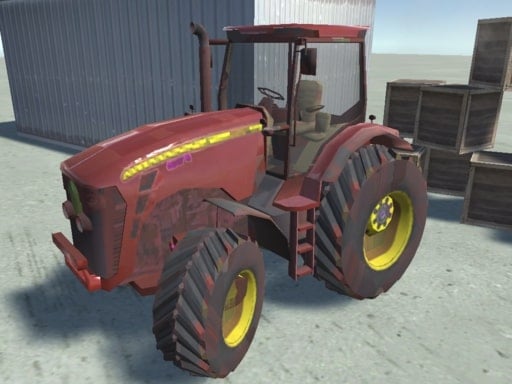
Play Tractor Trail Challenge for free — a arcade game that runs directly in your browser on desktop, tablet or phone. Tractor Trail Challenge follows the oldest recipe in gaming: one clear rule, one clear score, and the urge to try just one more time. From the tags you can already tell that it uses hardware-accelerated graphics in the browser; there is a journey with a beginning and an end rather than an endless score chase.
About Tractor Trail Challenge
Tractor Trail Challenge is an exhilarating off-road adventure that truly tests your driving prowess. Strap yourself into the driver's seat of a mighty tractor and prepare for an action-packed journey through challenging terrains. Encounter rugged mountains, thick forests, and murky swamps as you put your skills to the ultimate test. Face a variety of obstacles along the way, from steep inclines
The genre lives on a single, easy-to-read score, the "one more go" effect and bright, readable visuals. Tractor Trail Challenge understands that, and it shows in the first minute of play. Under the surface it is a test of rhythm and rhythm, dressed up in upbeat presentation.
How to play Tractor Trail Challenge
- Start by clicking the big play button. Tractor Trail Challenge loads inside the frame; give it a moment, especially on a slow connection.
- Follow the on-screen prompts. The developer describes the controls like this: WASD to drive Space to Brake CLICK to navigate through the menu
- Play the first run purely to learn. Notice the rhythm of the obstacles, then start a fresh run and aim for a clean start.
- Switch to full screen if precision matters, and remember that the game keeps its own progress — finish a level before you close the tab.
Controls
The controls in Tractor Trail Challenge are straightforward once you have seen them written down:
| Input | What it does |
|---|---|
| WASD keys | WASD to drive Space to Brake CLICK to navigate through the menu. |
| Space bar | WASD to drive Space to Brake CLICK to navigate through the menu. |
| Mouse | WASD to drive Space to Brake CLICK to navigate through the menu. |
It is designed for desktop play with a keyboard and mouse.
Tips and tricks
- Restart early. If a run starts badly, do not grind it out; a fresh attempt costs nothing and saves your focus.
- Find the rhythm. Most arcade games have an underlying beat — taps, jumps or moves that fall on a regular interval — and once you feel it, your accuracy jumps.
- Look one step ahead of your character. Reacting to what is under you is too late; reacting to what is coming is exactly on time.
- Aim for consistency before you aim for records. A steady run that avoids mistakes usually scores higher than a flashy one that ends early.
- Because this is a Driving game, keep your eyes far down the road — you will react earlier to what is coming.
Who will enjoy it
Who is Tractor Trail Challenge for? In a word, anyone with a few minutes to spare and a competitive streak. A typical session is runs of thirty seconds to a few minutes, endlessly repeatable. Difficulty-wise it is simple rules, high skill ceiling. It is designed for desktop play with a keyboard and mouse.
Game details
| Category | Arcade Games |
|---|---|
| Tags | 3d Games, Adventure, Webgl, Driving, Tractor |
| Platform | Browser (desktop) |
| Controls | Keyboard and mouse |
| Technology | HTML5 — no download or plugin required |
| Frame | Landscape (800×600) |
| Added | 26 September 2024 |
| Plays | 1 |
| Price | Free to play |
Frequently asked questions
Is Tractor Trail Challenge free to play?
Yes. Tractor Trail Challenge is completely free to play on Diemakora. There is no download, no account and no payment — the game runs in your browser.
Can I play Tractor Trail Challenge on my phone?
This one is a desktop game. It expects a keyboard and mouse, so we recommend playing Tractor Trail Challenge on a computer for the intended experience.
What are the controls for Tractor Trail Challenge?
In short: WASD keys — WASD to drive Space to Brake CLICK to navigate through the menu; Space bar — WASD to drive Space to Brake CLICK to navigate through the menu; Mouse — WASD to drive Space to Brake CLICK to navigate through the menu. The full list is in the controls section above.
Does Tractor Trail Challenge save my progress?
Progress in Tractor Trail Challenge is kept by the game itself inside your browser storage. It will normally be there when you come back on the same device and browser.
What if Tractor Trail Challenge does not load?
A blank frame usually means the game is still loading or a browser extension blocked it. Wait a few seconds, then reload; if that fails, try another browser.
What kind of game is Tractor Trail Challenge?
It is a arcade game with the tags 3d Games, Adventure, Webgl, Driving. Simple rules, high skill ceiling, and runs of thirty seconds to a few minutes, endlessly repeatable.
Games similar to Tractor Trail Challenge
If you enjoy Tractor Trail Challenge, the related games below share its category or tags and are a natural next step.