Utoo 2 is a free online arcade game you can play right here in your browser, with no download and no sign-up. Utoo 2 follows the oldest recipe in gaming: one clear rule, one clear score, and the urge to try just one more time. A few things the tags reveal: timing your jumps is the main mechanic; there is a journey with a beginning and an end rather than an endless score chase.
About Utoo 2
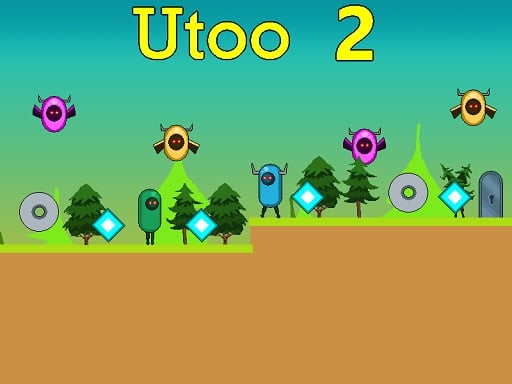
Utoo 2 is an engaging 2D platformer that invites players into a vibrant world packed with challenges and excitement. Your primary objective is to collect blue cubes scattered throughout various levels, all while skillfully avoiding a myriad of dangerous foes. These include hostile creatures, menacing flying enemies, lethal saws, and treacherous spikes that can hinder your progress. The game consists of
The genre lives on bright, readable visuals, the "one more go" effect and instant restarts. Utoo 2 understands that, and it shows in the first minute of play. The skills it leans on are rhythm and timing; both improve noticeably after a few sessions.
How to play Utoo 2
- Press the play button above and wait for Utoo 2 to finish loading. On first load this can take a few seconds while the game files are fetched.
- Follow the on-screen prompts. The developer describes the controls like this: Use WASD or Arrow keys for the player s movement Use W or Up arrow key twice for double jump
- Play the first run purely to learn. Notice the rhythm of the obstacles, then start a fresh run and aim for a clean start.
- When you are comfortable, set a target: a score to beat, a level to clear or a time to shave. Small goals are what make Utoo 2 stick.
Controls
Here is how Utoo 2 is controlled, based on the developer's instructions and our own testing:
| Input | What it does |
|---|---|
| WASD keys | Use WASD or Arrow keys for the player s movement Use W or Up arrow key twice for double jump. |
| Arrow keys | Use WASD or Arrow keys for the player s movement Use W or Up arrow key twice for double jump. |
It is designed for desktop play with a keyboard and mouse.
Tips and tricks
- Learn the first thirty seconds perfectly. The opening is the same every time, so it should never be where you lose.
- Combo systems reward patience: keep the chain alive with safe moves rather than reaching for risky bonuses.
- Restart early. If a run starts badly, do not grind it out; a fresh attempt costs nothing and saves your focus.
- Look one step ahead of your character. Reacting to what is under you is too late; reacting to what is coming is exactly on time.
- Because this is a Arcade game, restart early when a run goes wrong instead of grinding out a poor score.
- Because this is a Collecting game, plan a route that passes everything once.
Who will enjoy it
Utoo 2 is a good fit for anyone with a few minutes to spare and a competitive streak. Expect runs of thirty seconds to a few minutes, endlessly repeatable. How hard is it? Simple rules, high skill ceiling. It is designed for desktop play with a keyboard and mouse.
Game details
| Category | Arcade Games |
|---|---|
| Tags | Arcade, 1 Player, Adventure, 2d, Jumping, Cute, Platform, Collecting, Pixel, Retro |
| Platform | Browser (desktop) |
| Controls | Keyboard |
| Technology | HTML5 — no download or plugin required |
| Frame | Landscape (800×640) |
| Added | 26 September 2024 |
| Plays | 1 |
| Price | Free to play |
Frequently asked questions
Is Utoo 2 free to play?
Yes. Utoo 2 is completely free to play on Diemakora. There is no download, no account and no payment — the game runs in your browser.
Can I play Utoo 2 on my phone?
This one is a desktop game. It expects a keyboard and mouse, so we recommend playing Utoo 2 on a computer for the intended experience.
What are the controls for Utoo 2?
In short: WASD keys — Use WASD or Arrow keys for the player s movement Use W or Up arrow key twice for double jump; Arrow keys — Use WASD or Arrow keys for the player s movement Use W or Up arrow key twice for double jump. The full list is in the controls section above.
Does Utoo 2 save my progress?
Most browser games, including Utoo 2, store progress locally in your browser. If you clear your cookies or switch devices, that progress may be lost, so finish sessions before clearing browser data.
How do I play Utoo 2 in full screen?
Use the full-screen button just below the game frame. Press Esc on your keyboard to leave full-screen mode again.
What kind of game is Utoo 2?
It is a arcade game with the tags Arcade, 1 Player, Adventure, 2d. Simple rules, high skill ceiling, and runs of thirty seconds to a few minutes, endlessly repeatable.
Games similar to Utoo 2
Finished a session? The games listed below were picked because they share tags or a category with Utoo 2.