Winter Clash 3D is one of the shooting games in the Diemakora collection. It loads in seconds and needs nothing installed. Shooting games are really about attention: Winter Clash 3D rewards the player who tracks several moving things at once and picks the right one to deal with first. A few things the tags reveal: other players are involved, either online or on the same device.
About Winter Clash 3D
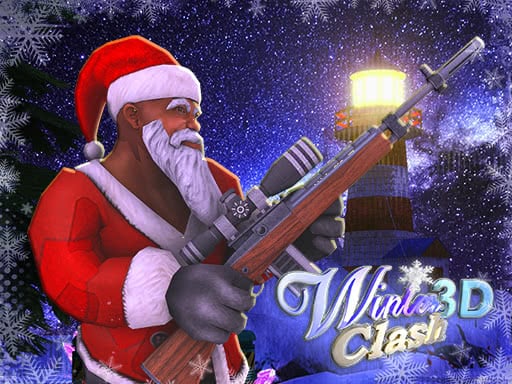
This Christmas season, an evil conspiracy brews as dastardly elves scheme to invade Santa Claus's hidden fortress. Their malevolent aim is to summon the wicked sorceress Baba Yaga, a force of chaos and darkness known as the Pagan Idol. However, the fate of Christmas rests in your hands! Equip yourself with powerful weaponry and join the relentless action of Winter
What makes a good shooting game? Usually satisfying hit feedback, enemies with distinct behaviours and ammunition or cooldown management — and Winter Clash 3D has each of them in some measure. Under the surface it is a test of aim and resource management, dressed up in intense presentation.
How to play Winter Clash 3D
- Press the play button above and wait for Winter Clash 3D to finish loading. On first load this can take a few seconds while the game files are fetched.
- Follow the on-screen prompts. The developer describes the controls like this: WASD - movement SPACE - jump C - crouch RMB - aim TAB - score table
- Take a few practice shots at the first targets to learn the aim speed, then move on to prioritising the dangerous enemies.
- Use the full-screen button under the frame for the best view, and keep an eye on the score, timer or health display so you know what the game is asking of you.
Controls
The controls in Winter Clash 3D are straightforward once you have seen them written down:
| Input | What it does |
|---|---|
| WASD keys | WASD - movement SPACE - jump C - crouch RMB - aim TAB - score table. |
| Space bar | WASD - movement SPACE - jump C - crouch RMB - aim TAB - score table. |
| Tab | WASD - movement SPACE - jump C - crouch RMB - aim TAB - score table. |
It is designed for desktop play with a keyboard and mouse.
Tips and tricks
- Keep your cursor or crosshair roughly where enemies appear, not on the spot where the last one died.
- Aim first, then shoot. Spraying costs time or ammo and rarely helps; a single well-placed shot almost always beats three rushed ones.
- Sound tells you where an enemy is before you can see it. Headphones help more than you would expect.
- Learn the spawn points. Most levels reuse the same few entry points, and knowing them turns panic into routine.
Who will enjoy it
We would recommend Winter Clash 3D to players who like precision, quick targeting and progressively tougher waves. In terms of time, think of levels of a few minutes each, with longer runs in survival modes. How hard is it? Approachable at first, with a steep climb in the later waves. It is designed for desktop play with a keyboard and mouse.
Game details
| Category | Shooting Games |
|---|---|
| Tags | Fall Boys, First Person Shooter, .io Games, Christmas, Multiplayer |
| Platform | Browser (desktop) |
| Controls | Keyboard |
| Technology | HTML5 — no download or plugin required |
| Frame | Landscape (1000×562) |
| Added | 25 October 2024 |
| Plays | 1 |
| Price | Free to play |
Frequently asked questions
Is Winter Clash 3D free to play?
It is free. Open the page, press play and the game loads in the browser. You do not need to install anything or register.
Can I play Winter Clash 3D on my phone?
Winter Clash 3D is best played on a desktop or laptop. It relies on keyboard and mouse input, and while it may load on a phone, the controls will not be comfortable.
What are the controls for Winter Clash 3D?
In short: WASD keys — WASD - movement SPACE - jump C - crouch RMB - aim TAB - score table; Space bar — WASD - movement SPACE - jump C - crouch RMB - aim TAB - score table; Tab — WASD - movement SPACE - jump C - crouch RMB - aim TAB - score table. The full list is in the controls section above.
Does Winter Clash 3D save my progress?
Progress in Winter Clash 3D is kept by the game itself inside your browser storage. It will normally be there when you come back on the same device and browser.
What if Winter Clash 3D does not load?
If Winter Clash 3D does not load, refresh the page, make sure your browser is up to date and check that hardware acceleration is enabled. Ad blockers occasionally interfere with the game frame as well.
What kind of game is Winter Clash 3D?
It is a shooting game with the tags Fall Boys, First Person Shooter, .io Games, Christmas. Approachable at first, with a steep climb in the later waves, and levels of a few minutes each, with longer runs in survival modes.
Games similar to Winter Clash 3D
You will find more games like Winter Clash 3D further down this page, chosen by matching tags and category.