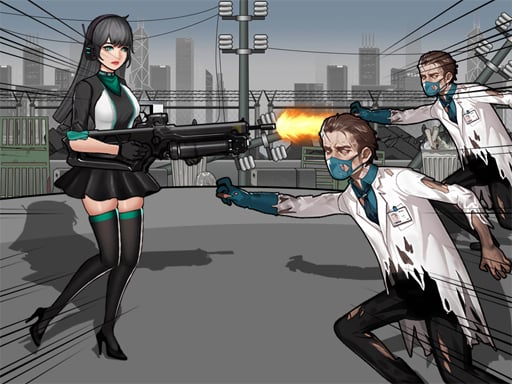
Welcome to Zombie Mission 12, a browser-based multiplayer game. Click play, wait a moment for it to load, and you are in. Solo games are predictable; other people are not. Zombie Mission 12 uses that unpredictability as its engine, and every match ends up telling a slightly different story. A few things the tags reveal: the enemies are zombies, which usually means slow but relentless crowds.
About Zombie Mission 12
Embark on a thrilling journey in the latest installment of the Zombie Mission series, titled Zombie Mission 12. Set in a captivating parallel universe inspired by the wild west, this game takes players through an immersive adventure filled with excitement and challenges. Encounter brand new weapons, innovative mechanics, and a selection of vehicles that enhance your gameplay experience. In this episode,
What makes a good multiplayer game? Usually moments of comeback and reversal, simple rules everyone can grasp fast and quick matchmaking or shared-screen setup — and Zombie Mission 12 has each of them in some measure. The skills it leans on are adaptability and composure; both improve noticeably after a few sessions.
How to play Zombie Mission 12
- Start by clicking the big play button. Zombie Mission 12 loads inside the frame; give it a moment, especially on a slow connection.
- Follow the on-screen prompts. The developer describes the controls like this: PLAYER 1 Move W A S D Hit C Mega Hit Hold C Key and Release Grenade V Reload X Jump W Walk on the wall Swimming Up Switch weapon Q-E Special Attack Q E When the bar is full PLAYER 2 Move ARROW KEYS
- Try a round against the computer or alone first so the controls are familiar before you bring in another player.
- When you are comfortable, set a target: a score to beat, a level to clear or a time to shave. Small goals are what make Zombie Mission 12 stick.
Controls
Here is how Zombie Mission 12 is controlled, based on the developer's instructions and our own testing:
| Input | What it does |
|---|---|
| Arrow keys | PLAYER 1 Move W A S D Hit C Mega Hit Hold C Key and Release Grenade V Reload X Jump W Walk on the wall Swimming Up Switch weapon Q-E Special Attack Q E When the bar is full PLAYER 2 Move ARROW KEYS. |
It is designed for desktop play with a keyboard and mouse.
Tips and tricks
- Be a good winner. Rematches are how multiplayer games stay fun, and nobody replays a gloater.
- Cooperative modes reward splitting roles: one player handles offence while the other covers, rather than both rushing.
- Play the opponent, not the game. Notice what your rival keeps doing and punish that habit.
- Short, frequent matches build skill faster than marathon sessions.
Who will enjoy it
Zombie Mission 12 is a good fit for friends on one screen, online competitors and anyone who finds bots boring. In terms of time, think of matches of two to ten minutes, best played in a series. How hard is it? Entirely dependent on who you are playing against. It is designed for desktop play with a keyboard and mouse.
Game details
| Category | Multiplayer Games |
|---|---|
| Tags | 2 Player Games, Escape, Zombie, Shoot Em Up, Undead |
| Platform | Browser (desktop) |
| Controls | Keyboard |
| Technology | HTML5 — no download or plugin required |
| Frame | Landscape (800×600) |
| Added | 26 September 2024 |
| Plays | 1 |
| Price | Free to play |
Frequently asked questions
Is Zombie Mission 12 free to play?
Yes. Zombie Mission 12 is completely free to play on Diemakora. There is no download, no account and no payment — the game runs in your browser.
Can I play Zombie Mission 12 on my phone?
Zombie Mission 12 is best played on a desktop or laptop. It relies on keyboard and mouse input, and while it may load on a phone, the controls will not be comfortable.
What are the controls for Zombie Mission 12?
In short: Arrow keys — PLAYER 1 Move W A S D Hit C Mega Hit Hold C Key and Release Grenade V Reload X Jump W Walk on the wall Swimming Up Switch weapon Q-E Special Attack Q E When the bar is full PLAYER 2 Move ARROW KEYS. The full list is in the controls section above.
Does Zombie Mission 12 save my progress?
Most browser games, including Zombie Mission 12, store progress locally in your browser. If you clear your cookies or switch devices, that progress may be lost, so finish sessions before clearing browser data.
How do I play Zombie Mission 12 in full screen?
Click the expand icon under the game to switch Zombie Mission 12 to full screen. Esc returns you to the normal view.
What kind of game is Zombie Mission 12?
It is a multiplayer game with the tags 2 Player Games, Escape, Zombie, Shoot Em Up. Entirely dependent on who you are playing against, and matches of two to ten minutes, best played in a series.
Games similar to Zombie Mission 12
If you enjoy Zombie Mission 12, the related games below share its category or tags and are a natural next step.