Zombie Mission 8 is a free online arcade game you can play right here in your browser, with no download and no sign-up. You will understand Zombie Mission 8 in about ten seconds and still be improving at it a week later. That is the arcade formula done right. Its tags tell you what to expect: aiming and firing at targets is the primary action.
About Zombie Mission 8
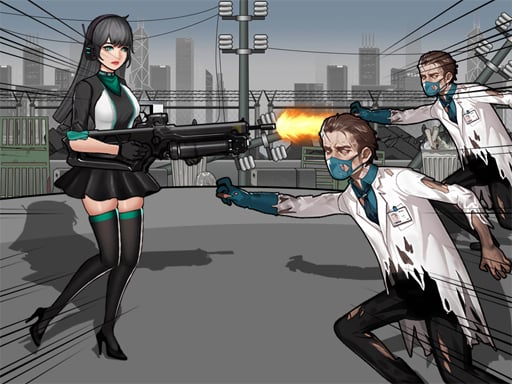
In Zombie Mission 8, the thrilling saga continues as players delve deeper into a new landscape, this time exploring the depths of the Mars Colony. Having previously engaged in battle at the space station, players now face an even greater challenge as a horde of Zombies overruns this extraterrestrial settlement. Scientists and workers have been taken hostage, and it s
Judged as a arcade game, Zombie Mission 8 hits the notes you would hope for: instant restarts, bright, readable visuals and difficulty that ramps steadily. Playing it works your rhythm and timing, which is a large part of why the "one more round" feeling is so strong.
How to play Zombie Mission 8
- Press the play button above and wait for Zombie Mission 8 to finish loading. On first load this can take a few seconds while the game files are fetched.
- Follow the on-screen prompts. The developer describes the controls like this: Player 1 Move W A S D Hit F Grenade G Jump W Walk on the wall Switch weapon Q-E Player 2 Move ARROW KEYS Hit L Grenade K Jump UP ARROW KEY Walk on the wall Switch weapon O-P
- Play the first run purely to learn. Notice the rhythm of the obstacles, then start a fresh run and aim for a clean start.
- When you are comfortable, set a target: a score to beat, a level to clear or a time to shave. Small goals are what make Zombie Mission 8 stick.
Controls
Controls for Zombie Mission 8 at a glance:
| Input | What it does |
|---|---|
| Arrow keys | Player 1 Move W A S D Hit F Grenade G Jump W Walk on the wall Switch weapon Q-E Player 2 Move ARROW KEYS Hit L Grenade K Jump UP ARROW KEY Walk on the wall Switch weapon O-P. |
It is designed for desktop play with a keyboard and mouse.
Tips and tricks
- Find the rhythm. Most arcade games have an underlying beat — taps, jumps or moves that fall on a regular interval — and once you feel it, your accuracy jumps.
- Take a short break after three or four failed runs. Arcade games punish tired eyes more than any other genre.
- Learn the first thirty seconds perfectly. The opening is the same every time, so it should never be where you lose.
- Aim for consistency before you aim for records. A steady run that avoids mistakes usually scores higher than a flashy one that ends early.
- Because this is a Zombie game, never let yourself get surrounded — always keep an exit behind you.
Who will enjoy it
Zombie Mission 8 is a good fit for anyone with a few minutes to spare and a competitive streak. In terms of time, think of runs of thirty seconds to a few minutes, endlessly repeatable. The learning curve is simple rules, high skill ceiling. It is designed for desktop play with a keyboard and mouse.
Game details
| Category | Arcade Games |
|---|---|
| Tags | Action, Shooting, 2 Player Games, Platform, Battleship, Zombie, Warrior, Shoot Em Up, Spaceship, Undead |
| Platform | Browser (desktop) |
| Controls | Keyboard |
| Technology | HTML5 — no download or plugin required |
| Frame | Landscape (800×600) |
| Added | 25 October 2024 |
| Plays | 2 |
| Price | Free to play |
Frequently asked questions
Is Zombie Mission 8 free to play?
Yes. Zombie Mission 8 is completely free to play on Diemakora. There is no download, no account and no payment — the game runs in your browser.
Can I play Zombie Mission 8 on my phone?
Zombie Mission 8 is best played on a desktop or laptop. It relies on keyboard and mouse input, and while it may load on a phone, the controls will not be comfortable.
What are the controls for Zombie Mission 8?
In short: Arrow keys — Player 1 Move W A S D Hit F Grenade G Jump W Walk on the wall Switch weapon Q-E Player 2 Move ARROW KEYS Hit L Grenade K Jump UP ARROW KEY Walk on the wall Switch weapon O-P. The full list is in the controls section above.
Does Zombie Mission 8 save my progress?
Most browser games, including Zombie Mission 8, store progress locally in your browser. If you clear your cookies or switch devices, that progress may be lost, so finish sessions before clearing browser data.
How do I play Zombie Mission 8 in full screen?
Click the expand icon under the game to switch Zombie Mission 8 to full screen. Esc returns you to the normal view.
What kind of game is Zombie Mission 8?
It is a arcade game with the tags Action, Shooting, 2 Player Games, Platform. Simple rules, high skill ceiling, and runs of thirty seconds to a few minutes, endlessly repeatable.
Games similar to Zombie Mission 8
When you are done, scroll down for more arcade games and titles that share tags with Zombie Mission 8.