Play Zombie Road for free — a shooting game that runs directly in your browser on desktop, tablet or phone. Shooting games are really about attention: Zombie Road rewards the player who tracks several moving things at once and picks the right one to deal with first. Its tags tell you what to expect: the enemies are zombies, which usually means slow but relentless crowds.
About Zombie Road
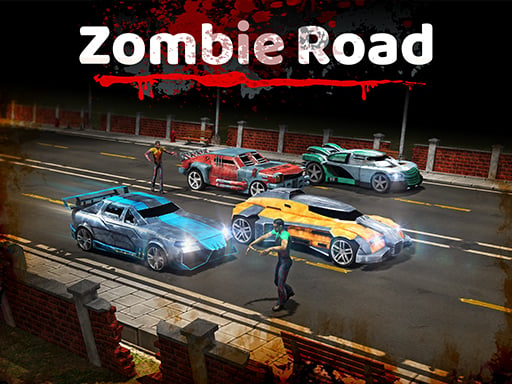
Welcome to Zombie Road, a heart-pounding racing game set in a treacherous post-apocalyptic landscape teeming with zombies. Only the most courageous drivers and toughest survivors have managed to endure this chaotic world, battling through relentless hordes of undead. With every twist and turn, players will face the ultimate test of skill, speed, and survival. Are you ready to outdrive and
The genre lives on enemies with distinct behaviours, satisfying hit feedback and waves or levels that build up. Zombie Road understands that, and it shows in the first minute of play. The skills it leans on are target prioritisation and resource management; both improve noticeably after a few sessions.
How to play Zombie Road
- Press the play button above and wait for Zombie Road to finish loading. On first load this can take a few seconds while the game files are fetched.
- Follow the on-screen prompts. The developer describes the controls like this: Drive your car through a zombie apocalypse as long and as fast as you can without crashing Overtake cars closely at high speeds to gain extra points and cash Driving in the opposite direction also gives more points and…
- Take a few practice shots at the first targets to learn the aim speed, then move on to prioritising the dangerous enemies.
- When you are comfortable, set a target: a score to beat, a level to clear or a time to shave. Small goals are what make Zombie Road stick.
Controls
Here is how Zombie Road is controlled, based on the developer's instructions and our own testing:
| Input | What it does |
|---|---|
| Mouse | Point and click to play; the game shows its own prompts on screen. |
| Keyboard | Some actions may use the arrow keys or space bar — check the in-game hints. |
It is designed for desktop play with a keyboard and mouse.
Tips and tricks
- Headshots, weak points and combo multipliers are where high scores live; once survival is comfortable, start hunting for them.
- Prioritise the threat that will hurt you soonest, not the one that is closest or biggest. Fast enemies before slow ones, shooters before melee.
- If there is a reload, reload during quiet moments — never in the middle of a wave.
- Aim first, then shoot. Spraying costs time or ammo and rarely helps; a single well-placed shot almost always beats three rushed ones.
Who will enjoy it
Who is Zombie Road for? In a word, players who like precision, quick targeting and progressively tougher waves. A typical session is levels of a few minutes each, with longer runs in survival modes. How hard is it? Approachable at first, with a steep climb in the later waves. It is designed for desktop play with a keyboard and mouse.
Game details
| Category | Shooting Games |
|---|---|
| Tags | Html5 Games For Your Site, Action, Trial Car, Racing, Html Games For Your Website, Zombie, Traffic |
| Platform | Browser (desktop) |
| Controls | Mouse |
| Technology | HTML5 — no download or plugin required |
| Frame | Portrait (600×800) |
| Added | 25 October 2024 |
| Plays | 1 |
| Price | Free to play |
Frequently asked questions
Is Zombie Road free to play?
It is free. Open the page, press play and the game loads in the browser. You do not need to install anything or register.
Can I play Zombie Road on my phone?
Zombie Road is best played on a desktop or laptop. It relies on keyboard and mouse input, and while it may load on a phone, the controls will not be comfortable.
What are the controls for Zombie Road?
The developer did not publish detailed controls, but the game follows genre conventions: Mouse — Point and click to play; the game shows its own prompts on screen; Keyboard — Some actions may use the arrow keys or space bar — check the in-game hints. The full list is in the controls section above.
Does Zombie Road save my progress?
Most browser games, including Zombie Road, store progress locally in your browser. If you clear your cookies or switch devices, that progress may be lost, so finish sessions before clearing browser data.
How do I play Zombie Road in full screen?
Use the full-screen button just below the game frame. Press Esc on your keyboard to leave full-screen mode again.
What kind of game is Zombie Road?
It is a shooting game with the tags Html5 Games For Your Site, Action, Trial Car, Racing. Approachable at first, with a steep climb in the later waves, and levels of a few minutes each, with longer runs in survival modes.
Games similar to Zombie Road
When you are done, scroll down for more shooting games and titles that share tags with Zombie Road.