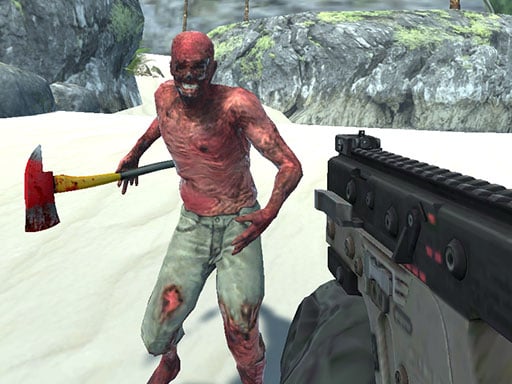
Looking for a shooting game that starts instantly? Zombie Vacation runs in your browser and is completely free to play. Shooting games are really about attention: Zombie Vacation rewards the player who tracks several moving things at once and picks the right one to deal with first. From the tags you can already tell that aiming and firing at targets is the primary action.
About Zombie Vacation
Welcome to Zombie Vacation, where your dream getaway turns into a nightmare! You are no ordinary tourist; you are a special forces soldier whose plane has crash-landed on a remote tropical island. Instead of sandy beaches and coconut drinks, you find yourself besieged by hordes of relentless zombies. This unexpected vacation rapidly transforms into a fight for survival as you
What makes a good shooting game? Usually ammunition or cooldown management, satisfying hit feedback and enemies with distinct behaviours — and Zombie Vacation has each of them in some measure. The skills it leans on are target prioritisation and resource management; both improve noticeably after a few sessions.
How to play Zombie Vacation
- Start by clicking the big play button. Zombie Vacation loads inside the frame; give it a moment, especially on a slow connection.
- Follow the on-screen prompts. The developer describes the controls like this: WASD - Move LMB - Shoot R - Reload P - Pause Space - Jump
- Take a few practice shots at the first targets to learn the aim speed, then move on to prioritising the dangerous enemies.
- Switch to full screen if precision matters, and remember that the game keeps its own progress — finish a level before you close the tab.
Controls
Controls for Zombie Vacation at a glance:
| Input | What it does |
|---|---|
| WASD keys | WASD - Move LMB - Shoot R - Reload P - Pause Space - Jump. |
| Space bar | WASD - Move LMB - Shoot R - Reload P - Pause Space - Jump. |
It is designed for desktop play with a keyboard and mouse.
Tips and tricks
- Sound tells you where an enemy is before you can see it. Headphones help more than you would expect.
- If there is a reload, reload during quiet moments — never in the middle of a wave.
- Prioritise the threat that will hurt you soonest, not the one that is closest or biggest. Fast enemies before slow ones, shooters before melee.
- Move between shots. Many shooters make you an easy target only when you stand in one place.
Who will enjoy it
Zombie Vacation is a good fit for players who like precision, quick targeting and progressively tougher waves. In terms of time, think of levels of a few minutes each, with longer runs in survival modes. Difficulty-wise it is approachable at first, with a steep climb in the later waves. It is designed for desktop play with a keyboard and mouse.
Game details
| Category | Shooting Games |
|---|---|
| Tags | 3d Games, 1 Player, Action, Webgl, Unity3d, First Person Shooter, Shooting, Zombie, Gun, Warrior, Shoot Em Up, Killing, Undead |
| Platform | Browser (desktop) |
| Controls | Keyboard |
| Technology | HTML5 — no download or plugin required |
| Frame | Landscape (960×600) |
| Added | 25 October 2024 |
| Plays | 1 |
| Price | Free to play |
Frequently asked questions
Is Zombie Vacation free to play?
It is free. Open the page, press play and the game loads in the browser. You do not need to install anything or register.
Can I play Zombie Vacation on my phone?
This one is a desktop game. It expects a keyboard and mouse, so we recommend playing Zombie Vacation on a computer for the intended experience.
What are the controls for Zombie Vacation?
In short: WASD keys — WASD - Move LMB - Shoot R - Reload P - Pause Space - Jump; Space bar — WASD - Move LMB - Shoot R - Reload P - Pause Space - Jump. The full list is in the controls section above.
Does Zombie Vacation save my progress?
Progress in Zombie Vacation is kept by the game itself inside your browser storage. It will normally be there when you come back on the same device and browser.
What if Zombie Vacation does not load?
If Zombie Vacation does not load, refresh the page, make sure your browser is up to date and check that hardware acceleration is enabled. Ad blockers occasionally interfere with the game frame as well.
What kind of game is Zombie Vacation?
It is a shooting game with the tags 3d Games, 1 Player, Action, Webgl. Approachable at first, with a steep climb in the later waves, and levels of a few minutes each, with longer runs in survival modes.
Games similar to Zombie Vacation
If you enjoy Zombie Vacation, the related games below share its category or tags and are a natural next step.