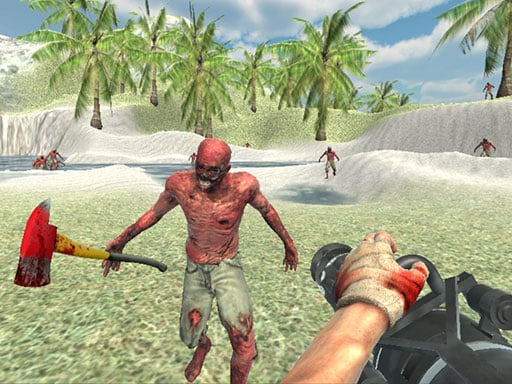
Play Zombie Vacation 2 for free — a shooting game that runs directly in your browser on desktop, tablet or phone. Shooting games are really about attention: Zombie Vacation 2 rewards the player who tracks several moving things at once and picks the right one to deal with first. From the tags you can already tell that the enemies are zombies, which usually means slow but relentless crowds; it features firearms and shooting mechanics; it uses hardware-accelerated graphics in the browser.
About Zombie Vacation 2
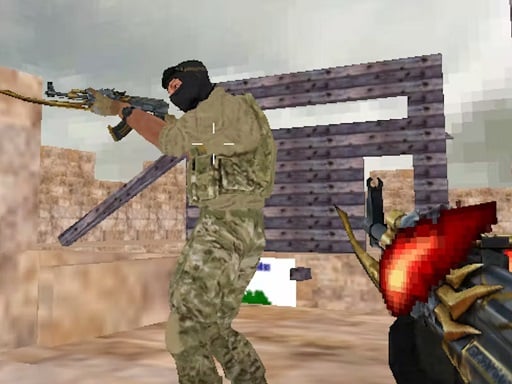
Zombie Vacation 2 is an exhilarating zombie survival shooter that immerses players in a breathtaking tropical setting, where danger lurks at every corner. Step into the boots of a special forces soldier who finds himself stranded on an island overrun with relentless, bloodthirsty zombies. With stunning graphics that draw you into the intense atmosphere, this game challenges your reflexes and
What makes a good shooting game? Usually precise aiming, waves or levels that build up and enemies with distinct behaviours — and Zombie Vacation 2 has each of them in some measure. Under the surface it is a test of aim and resource management, dressed up in tactical presentation.
How to play Zombie Vacation 2
- Press the play button above and wait for Zombie Vacation 2 to finish loading. On first load this can take a few seconds while the game files are fetched.
- Follow the on-screen prompts. The developer describes the controls like this: WASD - Move LMB - Shoot RMB - Aim Mouse Wheel - Change weapon R - Reload Space - Jump T - Bullet time
- Take a few practice shots at the first targets to learn the aim speed, then move on to prioritising the dangerous enemies.
- When you are comfortable, set a target: a score to beat, a level to clear or a time to shave. Small goals are what make Zombie Vacation 2 stick.
Controls
Controls for Zombie Vacation 2 at a glance:
| Input | What it does |
|---|---|
| WASD keys | WASD - Move LMB - Shoot RMB - Aim Mouse Wheel - Change weapon R - Reload Space - Jump T - Bullet time. |
| Space bar | WASD - Move LMB - Shoot RMB - Aim Mouse Wheel - Change weapon R - Reload Space - Jump T - Bullet time. |
| Mouse | WASD - Move LMB - Shoot RMB - Aim Mouse Wheel - Change weapon R - Reload Space - Jump T - Bullet time. |
It is designed for desktop play with a keyboard and mouse.
Tips and tricks
- Prioritise the threat that will hurt you soonest, not the one that is closest or biggest. Fast enemies before slow ones, shooters before melee.
- Sound tells you where an enemy is before you can see it. Headphones help more than you would expect.
- Aim first, then shoot. Spraying costs time or ammo and rarely helps; a single well-placed shot almost always beats three rushed ones.
- Headshots, weak points and combo multipliers are where high scores live; once survival is comfortable, start hunting for them.
- Because this is a Zombie game, never let yourself get surrounded — always keep an exit behind you.
- Because this is a Shooting game, aim before you fire, and fire in short bursts.
Who will enjoy it
Zombie Vacation 2 is a good fit for players who like precision, quick targeting and progressively tougher waves. Expect levels of a few minutes each, with longer runs in survival modes. The learning curve is approachable at first, with a steep climb in the later waves. It is designed for desktop play with a keyboard and mouse.
Game details
| Category | Shooting Games |
|---|---|
| Tags | 3d Games, 1 Player, Action, Webgl, Unity3d, First Person Shooter, Shooting, Zombie, Gun, Warrior, Shoot Em Up, Undead |
| Platform | Browser (desktop) |
| Controls | Keyboard and mouse |
| Technology | HTML5 — no download or plugin required |
| Frame | Landscape (960×600) |
| Added | 26 September 2024 |
| Plays | 1 |
| Price | Free to play |
Frequently asked questions
Is Zombie Vacation 2 free to play?
Yes. Zombie Vacation 2 is completely free to play on Diemakora. There is no download, no account and no payment — the game runs in your browser.
Can I play Zombie Vacation 2 on my phone?
Zombie Vacation 2 is best played on a desktop or laptop. It relies on keyboard and mouse input, and while it may load on a phone, the controls will not be comfortable.
What are the controls for Zombie Vacation 2?
In short: WASD keys — WASD - Move LMB - Shoot RMB - Aim Mouse Wheel - Change weapon R - Reload Space - Jump T - Bullet time; Space bar — WASD - Move LMB - Shoot RMB - Aim Mouse Wheel - Change weapon R - Reload Space - Jump T - Bullet time; Mouse — WASD - Move LMB - Shoot RMB - Aim Mouse Wheel - Change weapon R - Reload Space - Jump T - Bullet time. The full list is in the controls section above.
Does Zombie Vacation 2 save my progress?
Progress in Zombie Vacation 2 is kept by the game itself inside your browser storage. It will normally be there when you come back on the same device and browser.
What if Zombie Vacation 2 does not load?
A blank frame usually means the game is still loading or a browser extension blocked it. Wait a few seconds, then reload; if that fails, try another browser.
What kind of game is Zombie Vacation 2?
It is a shooting game with the tags 3d Games, 1 Player, Action, Webgl. Approachable at first, with a steep climb in the later waves, and levels of a few minutes each, with longer runs in survival modes.
Games similar to Zombie Vacation 2
Finished a session? The games listed below were picked because they share tags or a category with Zombie Vacation 2.