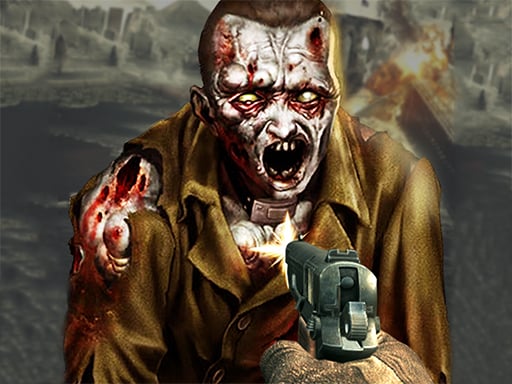
Play Zombie X City Apocalypse for free — a arcade game that runs directly in your browser on desktop, tablet or phone. You will understand Zombie X City Apocalypse in about ten seconds and still be improving at it a week later. That is the arcade formula done right. Its tags tell you what to expect: the enemies are zombies, which usually means slow but relentless crowds; it models a real activity or system with some fidelity; it models a real activity or system with some fidelity.
About Zombie X City Apocalypse
Zombie X City Apocalypse brings an exhilarating twist to the classic shooter genre, immersing players in a tense, high-stakes environment. Set in a city that has been overrun by flesh-eating zombies due to a catastrophic secret experiment, players must navigate through chaotic streets teeming with relentless undead. Tasked with survival, you ll engage in heart-pounding action as you blast, dodge,
Judged as a arcade game, Zombie X City Apocalypse hits the notes you would hope for: instant restarts, difficulty that ramps steadily and bright, readable visuals. Under the surface it is a test of timing and consistency, dressed up in playful presentation.
How to play Zombie X City Apocalypse
- Press the play button above and wait for Zombie X City Apocalypse to finish loading. On first load this can take a few seconds while the game files are fetched.
- Follow the on-screen prompts. The developer describes the controls like this: L - lock unlock cursor WASD or Arrows - walk Space - jump LMB RMB - shoot aim R - reload T - time slow F - flash light G - throw granate C - activate armor
- Play the first run purely to learn. Notice the rhythm of the obstacles, then start a fresh run and aim for a clean start.
- Use the full-screen button under the frame for the best view, and keep an eye on the score, timer or health display so you know what the game is asking of you.
Controls
Controls for Zombie X City Apocalypse at a glance:
| Input | What it does |
|---|---|
| WASD keys | L - lock unlock cursor WASD or Arrows - walk Space - jump LMB RMB - shoot aim R - reload T - time slow F - flash light G - throw granate C - activate armor. |
| Arrow keys | L - lock unlock cursor WASD or Arrows - walk Space - jump LMB RMB - shoot aim R - reload T - time slow F - flash light G - throw granate C - activate armor. |
| Space bar | L - lock unlock cursor WASD or Arrows - walk Space - jump LMB RMB - shoot aim R - reload T - time slow F - flash light G - throw granate C - activate armor. |
| L key | L - lock unlock cursor WASD or Arrows - walk Space - jump LMB RMB - shoot aim R - reload T - time slow F - flash light G - throw granate C - activate armor. |
It is designed for desktop play with a keyboard and mouse.
Tips and tricks
- Play in a quiet tab with nothing else running. Small frame drops cause missed timing that feels like bad luck but is not.
- Combo systems reward patience: keep the chain alive with safe moves rather than reaching for risky bonuses.
- Find the rhythm. Most arcade games have an underlying beat — taps, jumps or moves that fall on a regular interval — and once you feel it, your accuracy jumps.
- Take a short break after three or four failed runs. Arcade games punish tired eyes more than any other genre.
Who will enjoy it
Zombie X City Apocalypse is a good fit for anyone with a few minutes to spare and a competitive streak. In terms of time, think of runs of thirty seconds to a few minutes, endlessly repeatable. Difficulty-wise it is simple rules, high skill ceiling. It is designed for desktop play with a keyboard and mouse.
Game details
| Category | Arcade Games |
|---|---|
| Tags | 3d Games, Simulation, First Person Shooter, Shooting, Simulator, Zombie, Shoot Em Up, City |
| Platform | Browser (desktop) |
| Controls | Keyboard and mouse |
| Technology | HTML5 — no download or plugin required |
| Frame | Landscape (900×600) |
| Added | 25 October 2024 |
| Plays | 1 |
| Price | Free to play |
Frequently asked questions
Is Zombie X City Apocalypse free to play?
Yes. Zombie X City Apocalypse is completely free to play on Diemakora. There is no download, no account and no payment — the game runs in your browser.
Can I play Zombie X City Apocalypse on my phone?
This one is a desktop game. It expects a keyboard and mouse, so we recommend playing Zombie X City Apocalypse on a computer for the intended experience.
What are the controls for Zombie X City Apocalypse?
In short: WASD keys — L - lock unlock cursor WASD or Arrows - walk Space - jump LMB RMB - shoot aim R - reload T - time slow F - flash light G - throw granate C - activate armor; Arrow keys — L - lock unlock cursor WASD or Arrows - walk Space - jump LMB RMB - shoot aim R - reload T - time slow F - flash light G - throw granate C - activate armor; Space bar — L - lock unlock cursor WASD or Arrows - walk Space - jump LMB RMB - shoot aim R - reload T - time slow F - flash light G - throw granate C - activate armor. The full list is in the controls section above.
Does Zombie X City Apocalypse save my progress?
Most browser games, including Zombie X City Apocalypse, store progress locally in your browser. If you clear your cookies or switch devices, that progress may be lost, so finish sessions before clearing browser data.
What if Zombie X City Apocalypse does not load?
If Zombie X City Apocalypse does not load, refresh the page, make sure your browser is up to date and check that hardware acceleration is enabled. Ad blockers occasionally interfere with the game frame as well.
What kind of game is Zombie X City Apocalypse?
It is a arcade game with the tags 3d Games, Simulation, First Person Shooter, Shooting. Simple rules, high skill ceiling, and runs of thirty seconds to a few minutes, endlessly repeatable.
Games similar to Zombie X City Apocalypse
When you are done, scroll down for more arcade games and titles that share tags with Zombie X City Apocalypse.