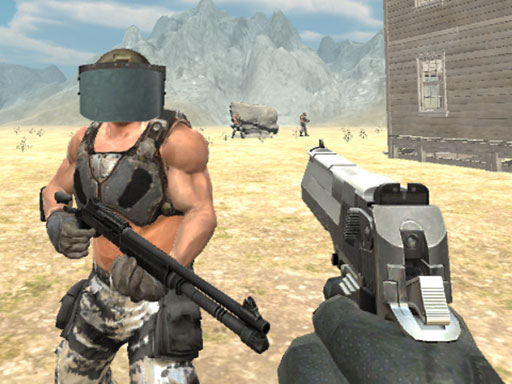
Zombies Golf Grenades is a free online shooting game you can play right here in your browser, with no download and no sign-up. Zombies Golf Grenades puts a target in front of you and a weapon in your hands. Aim, timing and knowing when not to fire are the whole game. A few things the tags reveal: aiming and firing at targets is the primary action; the enemies are zombies, which usually means slow but relentless crowds.
About Zombies Golf Grenades
Introducing "Zombies Golf Grenades," an engaging mini-golf style game set against the backdrop of a post-apocalyptic city overrun by the undead. A catastrophic virus has turned the population into relentless, silly zombies, and as you indulge in your favorite pastime of mini-golf, a sudden zombie attack ensues. What was once a bustling metropolis is now a desolate wasteland filled with
What makes a good shooting game? Usually ammunition or cooldown management, enemies with distinct behaviours and satisfying hit feedback — and Zombies Golf Grenades has each of them in some measure. The skills it leans on are resource management and aim; both improve noticeably after a few sessions.
How to play Zombies Golf Grenades
- Press the play button above and wait for Zombies Golf Grenades to finish loading. On first load this can take a few seconds while the game files are fetched.
- Follow the on-screen prompts. The developer describes the controls like this: Turn yourself into a zombie shooter using golf balls as Grenades make the streets your golf shot stadium and make your way through numerous challenging levels in this zombie shooting games Kill the dead target in this…
- Take a few practice shots at the first targets to learn the aim speed, then move on to prioritising the dangerous enemies.
- Switch to full screen if precision matters, and remember that the game keeps its own progress — finish a level before you close the tab.
Controls
Here is how Zombies Golf Grenades is controlled, based on the developer's instructions and our own testing:
| Input | What it does |
|---|---|
| Mouse / Tap | Click or tap to interact with the game. |
| Drag | Hold and move to aim, steer or drag objects where the game asks for it. |
The controls are tap and drag based, which makes it comfortable on touch screens as well as with a mouse.
Tips and tricks
- Aim first, then shoot. Spraying costs time or ammo and rarely helps; a single well-placed shot almost always beats three rushed ones.
- Sound tells you where an enemy is before you can see it. Headphones help more than you would expect.
- Move between shots. Many shooters make you an easy target only when you stand in one place.
- Keep your cursor or crosshair roughly where enemies appear, not on the spot where the last one died.
- Because this is a Action game, keep moving.
Who will enjoy it
Zombies Golf Grenades is a good fit for players who like precision, quick targeting and progressively tougher waves. Expect levels of a few minutes each, with longer runs in survival modes. The learning curve is approachable at first, with a steep climb in the later waves. The controls are tap and drag based, which makes it comfortable on touch screens as well as with a mouse.
Game details
| Category | Shooting Games |
|---|---|
| Tags | Html5 Games For Your Site, Kids, Funny, 3d Games, Mobile, Adventure, Action, Fall Boys, Webgl, Unity3d, First Person Shooter, Shooting, Zombie |
| Platform | Browser (desktop, tablet and mobile) |
| Controls | Touch and mouse |
| Technology | HTML5 — no download or plugin required |
| Frame | Landscape (800×600) |
| Added | 26 September 2024 |
| Plays | 2 |
| Price | Free to play |
Frequently asked questions
Is Zombies Golf Grenades free to play?
Yes. Zombies Golf Grenades is completely free to play on Diemakora. There is no download, no account and no payment — the game runs in your browser.
Can I play Zombies Golf Grenades on my phone?
Zombies Golf Grenades works on mobile devices. Open this page on your phone or tablet and use the touch controls; rotating the device to landscape usually gives the best view.
What are the controls for Zombies Golf Grenades?
The developer did not publish detailed controls, but the game follows genre conventions: Mouse / Tap — Click or tap to interact with the game; Drag — Hold and move to aim, steer or drag objects where the game asks for it. The full list is in the controls section above.
Does Zombies Golf Grenades save my progress?
Progress in Zombies Golf Grenades is kept by the game itself inside your browser storage. It will normally be there when you come back on the same device and browser.
What if Zombies Golf Grenades does not load?
A blank frame usually means the game is still loading or a browser extension blocked it. Wait a few seconds, then reload; if that fails, try another browser.
Is Zombies Golf Grenades suitable for children?
It is tagged Kids, which usually indicates content aimed at younger players. As with any online game, we suggest a parent takes a quick look first.
Games similar to Zombies Golf Grenades
Finished a session? The games listed below were picked because they share tags or a category with Zombies Golf Grenades.