Welcome to GunShoot Gang blocky combat, a browser-based shooting game. Click play, wait a moment for it to load, and you are in. The appeal of GunShoot Gang blocky combat is simple and old: line up the shot, take it, and watch the result. What makes it stick is the escalation that follows. A few things the tags reveal: it uses hardware-accelerated graphics in the browser; other players are involved, either online or on the same device.
About GunShoot Gang blocky combat
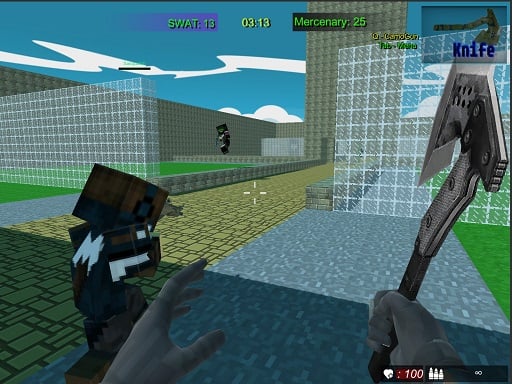
Experience the thrilling adventures of GunShoot Gang Blocky Combat! Dive into an exhilarating pixelated world where you can engage in intense combat across a lush jungle map. This game offers a variety of missions within its campaign mode, each with unique challenges and varying levels of difficulty. The dynamic maps and engaging gameplay elements ensure that no two missions feel
The genre lives on waves or levels that build up, ammunition or cooldown management and satisfying hit feedback. GunShoot Gang blocky combat understands that, and it shows in the first minute of play. The skills it leans on are aim and situational awareness; both improve noticeably after a few sessions.
How to play GunShoot Gang blocky combat
- Start by clicking the big play button. GunShoot Gang blocky combat loads inside the frame; give it a moment, especially on a slow connection.
- Follow the on-screen prompts. The developer describes the controls like this: WASD - move Mouse - shooting aim look around change gun SPACE - jump TAB - menu SHIFT - run
- Take a few practice shots at the first targets to learn the aim speed, then move on to prioritising the dangerous enemies.
- Use the full-screen button under the frame for the best view, and keep an eye on the score, timer or health display so you know what the game is asking of you.
Controls
The controls in GunShoot Gang blocky combat are straightforward once you have seen them written down:
| Input | What it does |
|---|---|
| WASD keys | WASD - move Mouse - shooting aim look around change gun SPACE - jump TAB - menu SHIFT - run. |
| Space bar | WASD - move Mouse - shooting aim look around change gun SPACE - jump TAB - menu SHIFT - run. |
| Mouse | WASD - move Mouse - shooting aim look around change gun SPACE - jump TAB - menu SHIFT - run. |
| Shift | WASD - move Mouse - shooting aim look around change gun SPACE - jump TAB - menu SHIFT - run. |
| Tab | WASD - move Mouse - shooting aim look around change gun SPACE - jump TAB - menu SHIFT - run. |
It is designed for desktop play with a keyboard and mouse.
Tips and tricks
- Keep your cursor or crosshair roughly where enemies appear, not on the spot where the last one died.
- If there is a reload, reload during quiet moments — never in the middle of a wave.
- Sound tells you where an enemy is before you can see it. Headphones help more than you would expect.
- Move between shots. Many shooters make you an easy target only when you stand in one place.
- Because this is a Shooting game, aim before you fire, and fire in short bursts.
Who will enjoy it
We would recommend GunShoot Gang blocky combat to players who like precision, quick targeting and progressively tougher waves. In terms of time, think of levels of a few minutes each, with longer runs in survival modes. Difficulty-wise it is approachable at first, with a steep climb in the later waves. It is designed for desktop play with a keyboard and mouse.
Game details
| Category | Shooting Games |
|---|---|
| Tags | Webgl, Unity3d, First Person Shooter, Shooting, Onlinegames Io, Multiplayer, Shoot Em Up |
| Platform | Browser (desktop) |
| Controls | Keyboard and mouse |
| Technology | HTML5 — no download or plugin required |
| Frame | Landscape (800×600) |
| Added | 25 October 2024 |
| Plays | 2 |
| Price | Free to play |
Frequently asked questions
Is GunShoot Gang blocky combat free to play?
Yes. GunShoot Gang blocky combat is completely free to play on Diemakora. There is no download, no account and no payment — the game runs in your browser.
Can I play GunShoot Gang blocky combat on my phone?
This one is a desktop game. It expects a keyboard and mouse, so we recommend playing GunShoot Gang blocky combat on a computer for the intended experience.
What are the controls for GunShoot Gang blocky combat?
In short: WASD keys — WASD - move Mouse - shooting aim look around change gun SPACE - jump TAB - menu SHIFT - run; Space bar — WASD - move Mouse - shooting aim look around change gun SPACE - jump TAB - menu SHIFT - run; Mouse — WASD - move Mouse - shooting aim look around change gun SPACE - jump TAB - menu SHIFT - run. The full list is in the controls section above.
Does GunShoot Gang blocky combat save my progress?
Most browser games, including GunShoot Gang blocky combat, store progress locally in your browser. If you clear your cookies or switch devices, that progress may be lost, so finish sessions before clearing browser data.
How do I play GunShoot Gang blocky combat in full screen?
Click the expand icon under the game to switch GunShoot Gang blocky combat to full screen. Esc returns you to the normal view.
What kind of game is GunShoot Gang blocky combat?
It is a shooting game with the tags Webgl, Unity3d, First Person Shooter, Shooting. Approachable at first, with a steep climb in the later waves, and levels of a few minutes each, with longer runs in survival modes.
Games similar to GunShoot Gang blocky combat
When you are done, scroll down for more shooting games and titles that share tags with GunShoot Gang blocky combat.