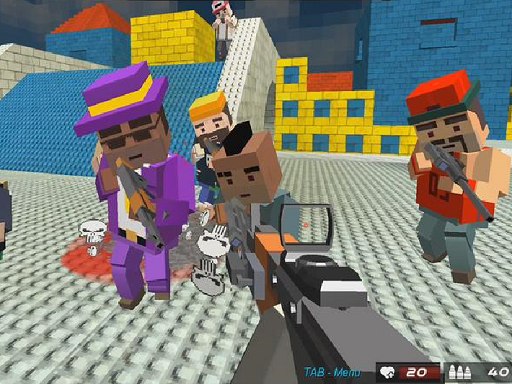
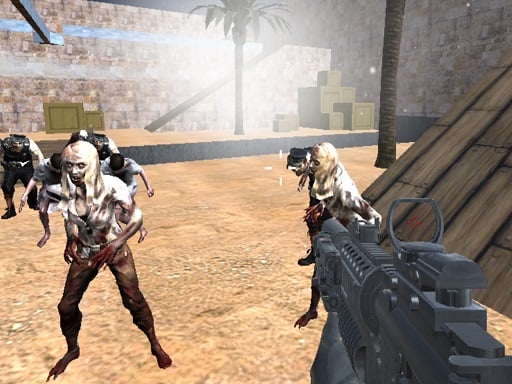
MineWarFire Land Defense is a free online arcade game you can play right here in your browser, with no download and no sign-up. Arcade games are designed around the loop, and MineWarFire Land Defense has a good one — short attempts, instant restarts and a score that begs to be beaten. Its tags tell you what to expect: it uses a block-world style of building and exploring; the enemies are zombies, which usually means slow but relentless crowds.
About MineWarFire Land Defense
Experience intense action and strategic defense in MineWarFire Land Defense, a thrilling free-to-play game where your skills are put to the test against relentless minezombies. These creepy invaders are hell-bent on conquering your territory, and it's up to you to stop them! As you navigate through chaotic battlefields, your mission is clear: eliminate the approaching foes and protect your land
What makes a good arcade game? Usually bright, readable visuals, instant restarts and difficulty that ramps steadily — and MineWarFire Land Defense has each of them in some measure. Under the surface it is a test of timing and focus, dressed up in upbeat presentation.
How to play MineWarFire Land Defense
- Press the play button above and wait for MineWarFire Land Defense to finish loading. On first load this can take a few seconds while the game files are fetched.
- Follow the on-screen prompts. The developer describes the controls like this: Instructions Use mouse right click to play Touch the screen on mobile devices
- Play the first run purely to learn. Notice the rhythm of the obstacles, then start a fresh run and aim for a clean start.
- Use the full-screen button under the frame for the best view, and keep an eye on the score, timer or health display so you know what the game is asking of you.
Controls
The controls in MineWarFire Land Defense are straightforward once you have seen them written down:
| Input | What it does |
|---|---|
| Right mouse click | Instructions Use mouse right click to play Touch the screen on mobile devices. |
| Mouse | Instructions Use mouse right click to play Touch the screen on mobile devices. |
| Tap (touch) | Instructions Use mouse right click to play Touch the screen on mobile devices. |
The controls are tap and drag based, which makes it comfortable on touch screens as well as with a mouse.
Tips and tricks
- Combo systems reward patience: keep the chain alive with safe moves rather than reaching for risky bonuses.
- Play in a quiet tab with nothing else running. Small frame drops cause missed timing that feels like bad luck but is not.
- Take a short break after three or four failed runs. Arcade games punish tired eyes more than any other genre.
- Learn the first thirty seconds perfectly. The opening is the same every time, so it should never be where you lose.
- Because this is a Minecraft game, gather before you build; running out mid-project is the classic mistake.
- Because this is a Zombie game, never let yourself get surrounded — always keep an exit behind you.
Who will enjoy it
We would recommend MineWarFire Land Defense to anyone with a few minutes to spare and a competitive streak. Expect runs of thirty seconds to a few minutes, endlessly repeatable. The learning curve is simple rules, high skill ceiling. The controls are tap and drag based, which makes it comfortable on touch screens as well as with a mouse.
Game details
| Category | Arcade Games |
|---|---|
| Tags | Zombie, Warrior, Minecraft, Kiz 10 |
| Platform | Browser (desktop, tablet and mobile) |
| Controls | Touch and mouse |
| Technology | HTML5 — no download or plugin required |
| Frame | Landscape (800×600) |
| Added | 26 September 2024 |
| Plays | 1 |
| Price | Free to play |
Frequently asked questions
Is MineWarFire Land Defense free to play?
It is free. Open the page, press play and the game loads in the browser. You do not need to install anything or register.
Can I play MineWarFire Land Defense on my phone?
MineWarFire Land Defense works on mobile devices. Open this page on your phone or tablet and use the touch controls; rotating the device to landscape usually gives the best view.
What are the controls for MineWarFire Land Defense?
In short: Right mouse click — Instructions Use mouse right click to play Touch the screen on mobile devices; Mouse — Instructions Use mouse right click to play Touch the screen on mobile devices; Tap (touch) — Instructions Use mouse right click to play Touch the screen on mobile devices. The full list is in the controls section above.
Does MineWarFire Land Defense save my progress?
Most browser games, including MineWarFire Land Defense, store progress locally in your browser. If you clear your cookies or switch devices, that progress may be lost, so finish sessions before clearing browser data.
What if MineWarFire Land Defense does not load?
If MineWarFire Land Defense does not load, refresh the page, make sure your browser is up to date and check that hardware acceleration is enabled. Ad blockers occasionally interfere with the game frame as well.
What kind of game is MineWarFire Land Defense?
It is a arcade game with the tags Zombie, Warrior, Minecraft, Kiz 10. Simple rules, high skill ceiling, and runs of thirty seconds to a few minutes, endlessly repeatable.
Games similar to MineWarFire Land Defense
When you are done, scroll down for more arcade games and titles that share tags with MineWarFire Land Defense.