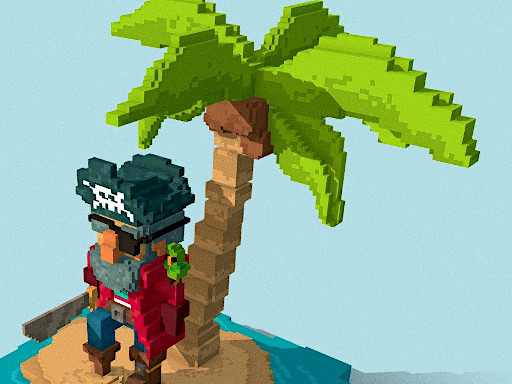
Welcome to Pirates of Voxel, a browser-based shooting game. Click play, wait a moment for it to load, and you are in. Pirates of Voxel puts a target in front of you and a weapon in your hands. Aim, timing and knowing when not to fire are the whole game. From the tags you can already tell that there is a journey with a beginning and an end rather than an endless score chase; it uses a block-world style of building and exploring.
About Pirates of Voxel
Welcome to the treacherous world of Pirates of Voxel, where the mantra is simple: eat or be devoured. In this thrilling adventure, survival is paramount, and every decision can mean the difference between life and death. You ll face a relentless onslaught of fierce hunters and savage beasts eager to feast on hapless souls like yours. Arm yourself with a
The genre lives on precise aiming, enemies with distinct behaviours and waves or levels that build up. Pirates of Voxel understands that, and it shows in the first minute of play. The skills it leans on are target prioritisation and resource management; both improve noticeably after a few sessions.
How to play Pirates of Voxel
- Press the play button above and wait for Pirates of Voxel to finish loading. On first load this can take a few seconds while the game files are fetched.
- Follow the on-screen prompts. The developer describes the controls like this: Move WASD and MOUSE Weapons 1 2 3 4 5 6 7 8 9 and 0 Hit block LEFT-CLICK Run LSHIFT Fly mode F
- Take a few practice shots at the first targets to learn the aim speed, then move on to prioritising the dangerous enemies.
- Switch to full screen if precision matters, and remember that the game keeps its own progress — finish a level before you close the tab.
Controls
Controls for Pirates of Voxel at a glance:
| Input | What it does |
|---|---|
| WASD keys | Move WASD. |
| Left mouse click | MOUSE Weapons 1 2 3 4 5 6 7 8 9 and 0 Hit block LEFT-CLICK Run LSHIFT Fly mode F. |
| Mouse | MOUSE Weapons 1 2 3 4 5 6 7 8 9 and 0 Hit block LEFT-CLICK Run LSHIFT Fly mode F. |
It is designed for desktop play with a keyboard and mouse.
Tips and tricks
- Keep your cursor or crosshair roughly where enemies appear, not on the spot where the last one died.
- Move between shots. Many shooters make you an easy target only when you stand in one place.
- Sound tells you where an enemy is before you can see it. Headphones help more than you would expect.
- Aim first, then shoot. Spraying costs time or ammo and rarely helps; a single well-placed shot almost always beats three rushed ones.
- Because this is a Kids game, younger children do better with a mouse or touch screen than with keyboard combinations.
Who will enjoy it
Pirates of Voxel is a good fit for players who like precision, quick targeting and progressively tougher waves. Expect levels of a few minutes each, with longer runs in survival modes. The learning curve is approachable at first, with a steep climb in the later waves. It is designed for desktop play with a keyboard and mouse.
Game details
| Category | Shooting Games |
|---|---|
| Tags | Kids, Funny, Adventure, Pixel, Minecraft, Miner, Pirate |
| Platform | Browser (desktop) |
| Controls | Keyboard and mouse |
| Technology | HTML5 — no download or plugin required |
| Frame | Landscape (800×600) |
| Added | 25 October 2024 |
| Plays | 5 |
| Price | Free to play |
Frequently asked questions
Is Pirates of Voxel free to play?
Yes. Pirates of Voxel is completely free to play on Diemakora. There is no download, no account and no payment — the game runs in your browser.
Can I play Pirates of Voxel on my phone?
This one is a desktop game. It expects a keyboard and mouse, so we recommend playing Pirates of Voxel on a computer for the intended experience.
What are the controls for Pirates of Voxel?
In short: WASD keys — Move WASD; Left mouse click — MOUSE Weapons 1 2 3 4 5 6 7 8 9 and 0 Hit block LEFT-CLICK Run LSHIFT Fly mode F; Mouse — MOUSE Weapons 1 2 3 4 5 6 7 8 9 and 0 Hit block LEFT-CLICK Run LSHIFT Fly mode F. The full list is in the controls section above.
Does Pirates of Voxel save my progress?
Most browser games, including Pirates of Voxel, store progress locally in your browser. If you clear your cookies or switch devices, that progress may be lost, so finish sessions before clearing browser data.
What if Pirates of Voxel does not load?
If Pirates of Voxel does not load, refresh the page, make sure your browser is up to date and check that hardware acceleration is enabled. Ad blockers occasionally interfere with the game frame as well.
Is Pirates of Voxel suitable for children?
It is tagged Kids, which usually indicates content aimed at younger players. As with any online game, we suggest a parent takes a quick look first.
Games similar to Pirates of Voxel
Finished a session? The games listed below were picked because they share tags or a category with Pirates of Voxel.