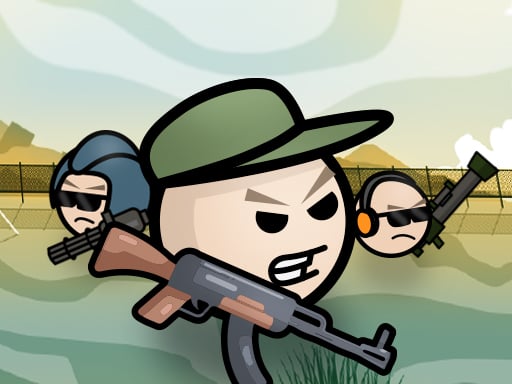
Play Mini Shooters for free — a shooting game that runs directly in your browser on desktop, tablet or phone. Mini Shooters puts a target in front of you and a weapon in your hands. Aim, timing and knowing when not to fire are the whole game. A few things the tags reveal: other players are involved, either online or on the same device.
About Mini Shooters
Mini Shooters is an exciting and engaging 2D shooting game that brings action-packed battles to life. In this vibrant world, players can equip themselves with a variety of weapons, each providing unique gameplay dynamics that keep the experience fresh and entertaining. Whether you prefer a quick-firing pistol or a powerful rifle, there's a weapon type to match your playstyle and
What makes a good shooting game? Usually satisfying hit feedback, precise aiming and enemies with distinct behaviours — and Mini Shooters has each of them in some measure. The skills it leans on are resource management and situational awareness; both improve noticeably after a few sessions.
How to play Mini Shooters
- Start by clicking the big play button. Mini Shooters loads inside the frame; give it a moment, especially on a slow connection.
- Follow the on-screen prompts. The developer describes the controls like this: WASD or arrow keys to move Use mouse to aim Left mouse click to shoot Space to pick up weapon
- Take a few practice shots at the first targets to learn the aim speed, then move on to prioritising the dangerous enemies.
- Use the full-screen button under the frame for the best view, and keep an eye on the score, timer or health display so you know what the game is asking of you.
Controls
You will not need a manual for Mini Shooters, but knowing the inputs before you start saves the first minute of fumbling:
| Input | What it does |
|---|---|
| WASD keys | WASD or arrow keys to move Use mouse to aim Left mouse click to shoot Space to pick up weapon. |
| Arrow keys | WASD or arrow keys to move Use mouse to aim Left mouse click to shoot Space to pick up weapon. |
| Space bar | WASD or arrow keys to move Use mouse to aim Left mouse click to shoot Space to pick up weapon. |
| Mouse | WASD or arrow keys to move Use mouse to aim Left mouse click to shoot Space to pick up weapon. |
It is designed for desktop play with a keyboard and mouse.
Tips and tricks
- Headshots, weak points and combo multipliers are where high scores live; once survival is comfortable, start hunting for them.
- Keep your cursor or crosshair roughly where enemies appear, not on the spot where the last one died.
- Learn the spawn points. Most levels reuse the same few entry points, and knowing them turns panic into routine.
- If there is a reload, reload during quiet moments — never in the middle of a wave.
- Because this is a Multiplayer game, expect surprises — real opponents do not follow the patterns bots do.
Who will enjoy it
We would recommend Mini Shooters to players who like precision, quick targeting and progressively tougher waves. A typical session is levels of a few minutes each, with longer runs in survival modes. Difficulty-wise it is approachable at first, with a steep climb in the later waves. It is designed for desktop play with a keyboard and mouse.
Game details
| Category | Shooting Games |
|---|---|
| Tags | Funny, 2d, First Person Shooter, .io Games, Violence, Multiplayer |
| Platform | Browser (desktop) |
| Controls | Keyboard and mouse |
| Technology | HTML5 — no download or plugin required |
| Frame | Landscape (960×600) |
| Added | 25 October 2024 |
| Plays | 1 |
| Price | Free to play |
Frequently asked questions
Is Mini Shooters free to play?
Yes. Mini Shooters is completely free to play on Diemakora. There is no download, no account and no payment — the game runs in your browser.
Can I play Mini Shooters on my phone?
This one is a desktop game. It expects a keyboard and mouse, so we recommend playing Mini Shooters on a computer for the intended experience.
What are the controls for Mini Shooters?
In short: WASD keys — WASD or arrow keys to move Use mouse to aim Left mouse click to shoot Space to pick up weapon; Arrow keys — WASD or arrow keys to move Use mouse to aim Left mouse click to shoot Space to pick up weapon; Space bar — WASD or arrow keys to move Use mouse to aim Left mouse click to shoot Space to pick up weapon. The full list is in the controls section above.
Does Mini Shooters save my progress?
Most browser games, including Mini Shooters, store progress locally in your browser. If you clear your cookies or switch devices, that progress may be lost, so finish sessions before clearing browser data.
What if Mini Shooters does not load?
A blank frame usually means the game is still loading or a browser extension blocked it. Wait a few seconds, then reload; if that fails, try another browser.
What kind of game is Mini Shooters?
It is a shooting game with the tags Funny, 2d, First Person Shooter, .io Games. Approachable at first, with a steep climb in the later waves, and levels of a few minutes each, with longer runs in survival modes.
Games similar to Mini Shooters
Finished a session? The games listed below were picked because they share tags or a category with Mini Shooters.